
Увод
This manual provides detailed instructions for the installation, configuration, and operation of your ZyXEL NWA3160-N IEEE 802.11n 300 Mbps Wireless Access Point. Please read this manual thoroughly before using the device to ensure proper setup and optimal performance. Keep this manual for future reference.
Производ је завршенview
The ZyXEL NWA3160-N is a high-performance wireless access point designed to provide reliable 802.11n wireless connectivity. It supports Power over Ethernet (PoE) for flexible deployment and offers a wireless transmission speed of up to 300 Mbps across dual-band frequencies (2.4 GHz and 5 GHz).
Садржај пакета
- ZyXEL NWA3160-N Wireless Access Point
- Адаптер за напајање (ако не користите PoE)
- Етхернет Цабле
- Водич за брзи почетак
- Wall Mount Kit (if applicable)
Изглед уређаја
Familiarize yourself with the ports and indicators on your NWA3160-N device.
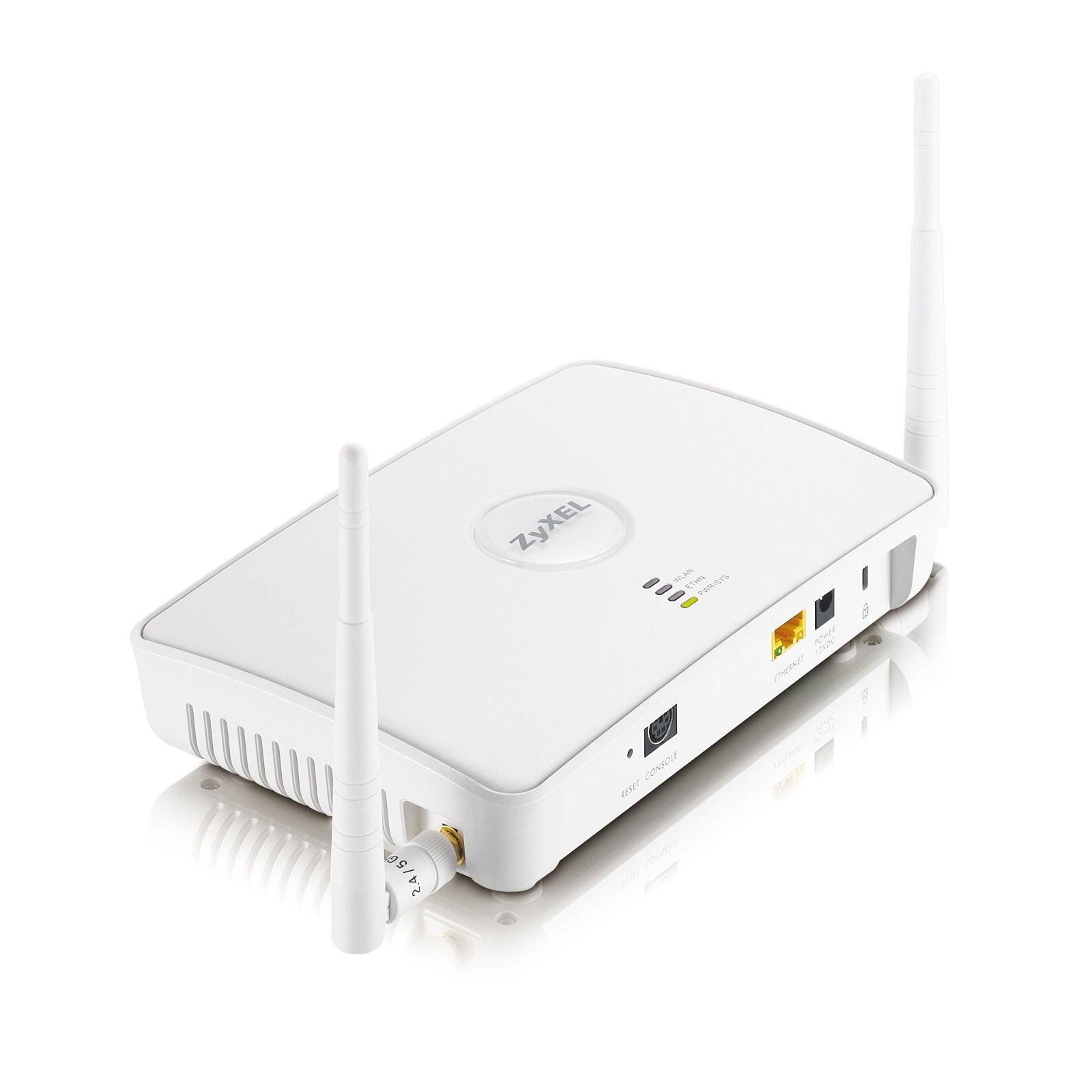
Слика 1: Фронт view of the ZyXEL NWA3160-N Wireless Access Point, showing LED indicators for power, WLAN, and LAN status. The device features a compact design suitable for desktop or wall mounting.
Key components typically include:
- ЛЕД за напајање: Означава статус напајања.
- ВЛАН ЛЕД: Означава бежичну активност.
- ЛАН ЛЕД: Indicates Ethernet port activity.
- Етернет порт (RJ-45): For network connection and PoE input.
- Дугме за ресетовање: За ресетовање на фабричка подешавања.
- Антене: Two dipole antennas for wireless signal transmission.
Сетуп
1. Физичка инсталација
The NWA3160-N can be placed on a desktop or mounted on a wall. Choose a central location for optimal wireless coverage, away from obstructions and sources of interference.
- Положај на радној површини: Поставите уређај на равну, стабилну површину.
- Монтажа на зид: Use the provided wall mount kit. Mark the desired positions for screws, drill pilot holes, insert anchors, and secure the device.
2. Прикључак за напајање
The NWA3160-N supports Power over Ethernet (PoE).
- Коришћење ПоЕ: Connect an Ethernet cable from a PoE-enabled switch or injector to the Ethernet port on the NWA3160-N. The device will power on automatically.
- Using Power Adapter (Optional): If PoE is not available, connect the included power adapter to the device's power input and then to a power outlet.
3. Мрежна веза
Connect an Ethernet cable from your network router or switch to the Ethernet port on the NWA3160-N. This provides network access to the access point.
4. Почетна конфигурација
To configure the NWA3160-N, you will typically access its web-басед интерфејс за управљање.
- Connect a computer to the same network as the NWA3160-N.
- Отвори а web browser and enter the default IP address of the access point (refer to the Quick Start Guide or manufacturer's website for the default IP and login credentials).
- Пријавите се користећи подразумевано корисничко име и лозинку.
- Follow the on-screen wizard or navigate to the wireless settings to configure your Wi-Fi network.
Упутство за употребу
Конфигурација бежичне мреже
Једном када сте пријављени у web interface, navigate to the wireless settings section to configure your Wi-Fi network.
- ССИД (име мреже): Set a unique name for your wireless network.
- Безбедносни режим: Select a strong security protocol, such as WPA2-PSK or WPA3-PSK, and set a strong password.
- Фреквенцијски опсег: Configure settings for both 2.4 GHz and 5 GHz bands if desired.
- канал: For optimal performance, select a less congested wireless channel.
Режим приступне тачке
The NWA3160-N primarily functions as an Access Point, extending your existing wired network wirelessly. Ensure it is connected to your main router or switch.
ВПС (Ви-Фи заштићено подешавање)
WPS allows for easy connection of WPS-compatible devices to your wireless network without manually entering the password. Refer to the device's web interface for WPS activation and instructions.
- Press the WPS button on the NWA3160-N (if available, or activate via software).
- Within two minutes, press the WPS button on your client device.
- Уређаји ће аутоматски успоставити безбедну везу.
Одржавање
Ажурирања фирмвера
Regularly check the ZyXEL support website for firmware updates. Firmware updates can improve performance, add new features, and address security vulnerabilities. Follow the instructions provided with the firmware update package carefully.
Чишћење
Clean the device with a soft, dry cloth. Do not use liquid or aerosol cleaners, as they may damage the device.
Решавање проблема
If you encounter issues with your NWA3160-N, refer to the following common troubleshooting steps:
- Нема напајања: Ensure the power adapter is securely connected or that the PoE source is active and providing power. Check the Power LED.
- Нема мрежне везе: Verify that the Ethernet cable is properly connected to both the NWA3160-N and your network device (router/switch). Check the LAN LED.
- Нема Wi-Fi сигнала: Ensure the WLAN LED is active. Check wireless settings in the web interface (SSID broadcast, security).
- Не могу приступити Web Интерфејс: Confirm your computer is on the same network segment as the NWA3160-N. Verify the IP address. Try clearing your browser's cache.
- Мала брзина бежичне мреже: Check for interference from other devices (cordless phones, microwaves). Try changing the wireless channel. Ensure client devices support 802.11n.
- Фацтори Ресет: If all else fails, use a paperclip to press and hold the Reset button for 5-10 seconds while the device is powered on. This will restore default settings.
Спецификације
| Модел | NWA3160-N |
| Ви-фи стандард | ИЕЕЕ КСНУМКСн |
| Брзина бежичног преноса | 300 Mbps (Maximum Upstream Data Transfer Rate) |
| Фрекуенци Бандс | 2.4 GHz (2.41 GHz - 2.46 GHz), 5 GHz (5.15 GHz - 5.85 GHz) |
| Број антена | 2 |
| Антенна Типе | Dipole Antenna (2 dBi Gain) |
| Етхернет портови | 1 x Network (RJ-45) Port (Fast Ethernet, PoE capable) |
| Форм Фацтор | Desktop, Wall Mountable |
| Димензије (В к Ш к Д) | 1.8" x 7.8" x 5.4" (приближно) |
| Тежина | 15.49 oz (Approximate) / 0.3 kg |
| Green Compliant | Yes (RoHS, WEEE) |
| Сигурносни протокол | ВПС |
Информације о гаранцији
The ZyXEL NWA3160-N Wireless Access Point comes with a Ограничена 2-годишња гаранција. Please retain your proof of purchase for warranty claims. For full warranty terms and conditions, refer to the official ZyXEL webсајт или документацију која је приложена уз ваш производ.
Подршка
For technical support, additional documentation, or frequently asked questions, please visit the official ZyXEL support webсајт:
When contacting support, please have your product model (NWA3160-N) and serial number ready.