
Увод
This manual provides comprehensive instructions for the setup, operation, and maintenance of your AT&T 1040 Corded Four-Line Expandable Telephone. This device is designed for small business environments, offering multi-line capabilities, conferencing, and intercom features to enhance communication efficiency.
Кључне карактеристике укључују:
- Four-line operation for managing multiple calls simultaneously.
- Integrated speakerphone for hands-free communication.
- 3-party conferencing capability.
- 32-number speed dial for quick access to frequently called numbers.
- Intercom functionality for internal communication.
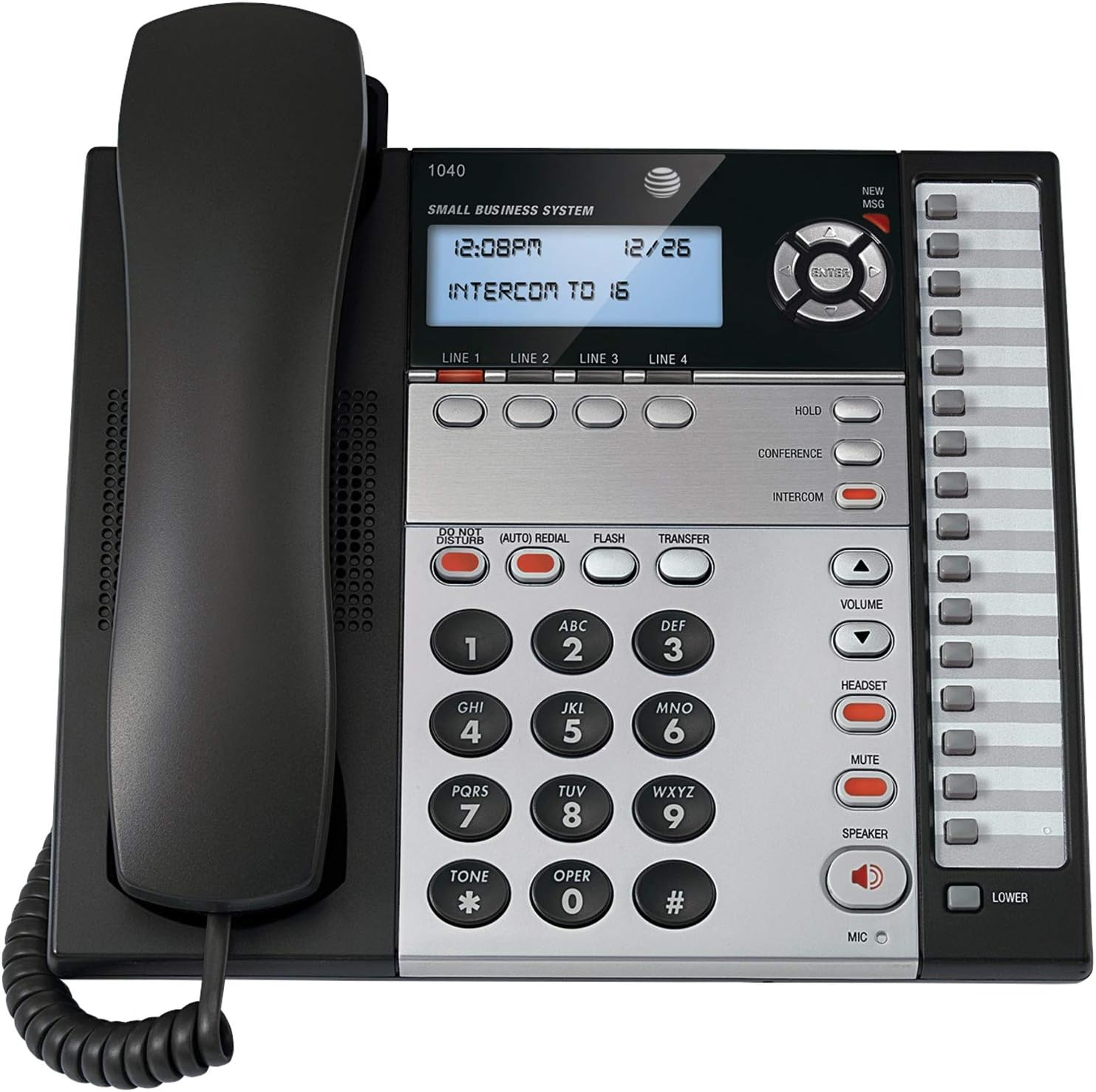
Слика 1: The AT&T 1040 Corded Four-Line Expandable Telephone. This image displays the main unit with its handset resting on the cradle, the digital display showing time and intercom status, the four line buttons, and the full keypad with function buttons like HOLD, CONFERENCE, INTERCOM, VOLUME, HEADSET, MUTE, and SPEAKER.
Сетуп
1. Распакивање и провера компоненти
Пре почетка инсталације, уверите се да су све компоненте присутне:
- AT&T 1040 Base Unit
- Слушалица
- Намотани кабл за слушалицу
- Line Cords (up to 4, depending on configuration)
- АЦ адаптер
- 9V Battery (for backup, typically included or purchased separately)
2. Connecting the Telephone
- Повежите слушалицу: Plug one end of the coiled handset cord into the handset and the other end into the jack labeled ХАНДСЕТ са стране телефонске базе.
- Connect the Line Cords: For each telephone line you wish to use, plug one end of a line cord into the jack labeled ЛИНИЈА 1, ЛИНИЈА 2, ЛИНИЈА 3, или ЛИНИЈА 4 on the back of the telephone base. Plug the other end of each line cord into a modular wall jack.
- Инсталирајте батерију од 9V: Open the battery compartment on the bottom of the telephone base. Insert a 9V battery, observing the correct polarity (+/-). This battery provides backup power for settings during power outages. Затворите преграду.
- Connect the AC Power Adapter: Plug the small end of the AC power adapter into the ПОВЕР jack on the back of the telephone base. Plug the larger end into a standard electrical outlet.
3. Initial Configuration (Date and Time)
При првом укључивању или након нестанка струјеtage (if battery backup is not present or depleted), you may need to set the date and time. Refer to the display and use the navigation buttons (up/down arrows and ENTER) to adjust the settings. Press ЕНТЕР да бисте потврдили свако подешавање.
Упутство за употребу
1. Основне функције позива
- Позивање:
- Подигните слушалицу или притисните СПЕАКЕР дугме.
- Select an available line by pressing one of the ЛИНИЈА 1-4 дугмад.
- Позовите жељени телефонски број.
- Одговарање на позив:
- Када телефон зазвони, подигните слушалицу или притисните СПЕАКЕР button. The corresponding line button will flash.
- Завршавање позива:
- Вратите слушалицу у лежиште или притисните СПЕАКЕР поново притисните дугме ако користите звучник.
2. Multi-Line Operation
- Selecting a Line: Притисните жељено ЛИНИЈА 1-4 button to select an available line for making or receiving calls.
- Switching Between Lines: During an active call on one line, press another ЛИНЕ button to switch to that line or answer an incoming call on it. The first call will automatically be placed on hold.
3. Спеакерпхоне
Да бисте користили звучник, притисните СПЕАКЕР button. The indicator light will illuminate. You can then dial or speak hands-free. Press the СПЕАКЕР button again to end the call or switch to the handset by lifting it.
4. Интерфон
The intercom feature allows internal communication between connected AT&T 1040 units. To initiate an intercom call:
- Притисните тастер ИНТЕРЦОМ дугме.
- Dial the extension number of the desired internal unit (e.g., "16" as shown on the display).
- The other unit will ring, and you can speak when answered.
5. Функција задржавања
Да ставите активни позив на чекање, притисните ХОЛД button. The line indicator light will flash slowly. To retrieve the call, press the flashing ЛИНЕ дугме.
6. Конференцијски позив
To establish a 3-party conference call:
- Establish a call on ЛИНИЈА 1.
- Притисните тастер ХОЛД button to place the first call on hold.
- Select an available line (e.g., ЛИНИЈА 2) and dial the second party.
- Када друга страна одговори, притисните КОНФЕРЕНЦИЈА button. All three parties will now be connected.
7. Брзо бирање
The AT&T 1040 supports 32-number speed dial entries.
- Programming Speed Dial: Consult the full manual for detailed programming steps, typically involving a ПРОГРАМ or СТОРЕ button followed by a memory location and the number.
- Коришћење брзог бирања: Подигните слушалицу или притисните СПЕАКЕР, select a line, then press the speed dial memory location button.
8. Контрола јачине звука
Користите ВОЛУМЕ горе (▲) и доле (▼) buttons to adjust the listening volume during a call (handset or speakerphone). Ringer volume can typically be adjusted via a switch or menu setting on the base unit.
9. Муте
Током позива притисните МУТЕ button to temporarily disable your microphone. The other party will not hear you, but you can still hear them. Press МУТЕ again to resume speaking.
10. Не узнемиравај
Притисните тастер НЕ ОМЕТАЈ button to silence incoming calls. The indicator light will illuminate. Press it again to deactivate.
11. Поновно бирање
Притисните тастер (AUTO) REDIAL button to automatically redial the last number called.
12. Flash / Transfer
Тхе ФЛАСХ button is used for accessing network features such as call waiting or transferring calls, depending on your telephone service provider. The ТРАНСФЕР button is typically used in conjunction with intercom or other system features to transfer an external call to another internal extension.
13. Headset Operation
To use a headset (not included), plug it into the СЛУШАЛИЦЕ jack on the side of the telephone base. Press the СЛУШАЛИЦЕ button to activate headset mode. The indicator light will illuminate. Press it again to deactivate or switch to handset/speakerphone.
Одржавање
1. Чишћење
Wipe the telephone's exterior with a soft, slightly damp cloth. Do not use cleaning sprays or abrasive cleaners, as these can damage the finish or internal components. Ensure the phone is unplugged from power before cleaning.
2. Замена батерије
The 9V battery provides backup for settings. If the display shows incorrect time/date after a power outage, the battery may need replacement. Open the battery compartment on the bottom of the unit, remove the old battery, and insert a new 9V alkaline battery, observing polarity. Dispose of old batteries responsibly.
3. Општа нега
Avoid exposing the telephone to extreme temperatures, direct sunlight, or moisture. Do not drop the unit or subject it to strong impacts. Keep it away from sources of electrical noise, such as motors or fluorescent lighting fixtures.
Решавање проблема
| Проблем | Решење |
|---|---|
| Нема тона за бирање. |
|
| Не могу да упућујем или примам позиве. |
|
| Екран је празан или нечитљив. |
|
| Интерфон не ради. |
|
Спецификације
- Димензије производа: 10.2 к 11.5 к 4.5 инча
- Тежина артикла: 0.16 унци (4.54 г)
- Тип телефона: Цордед
- Извор напајања: Цордед Елецтриц
- Тип бирача: Једна тастатура
- Тип система за одговор: Дигитал
- Могућност конференцијског позива: 3-ваи
- Вишелинијска операција: Multi-Line Operation (Four-Line)
- Speed Dial Capacity: 32 броја
- интерфон: Да
Гаранција и подршка
За информације о гаранцији и техничку подршку, обратите се званичном AT&T производу website or contact AT&T customer service. Keep your purchase receipt as proof of purchase for warranty claims.
Online resources may include FAQs, additional troubleshooting guides, and contact information for support.