Увод
This manual provides instructions for the proper use and care of your Dynex Micro USB Cable, model DX-C114201. This cable is designed for connecting devices with a Micro USB port to a standard USB port for both charging and data transfer purposes.
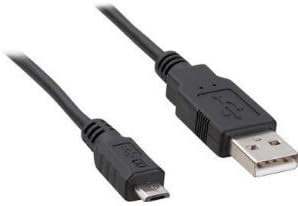
Image: Dynex Micro USB Cable. This image displays the cable with its two distinct connectors: a smaller Micro USB connector on one end, typically used for mobile devices, and a larger standard USB-A connector on the other end, commonly found on computers or wall chargers. The cable itself is black.
Сетуп
- Идентификујте портове: Locate the Micro USB port on your device (e.g., smartphone, tablet, camera) and a standard USB-A port on your power source (e.g., wall adapter, computer, power bank).
- Connect Micro USB: Gently insert the Micro USB connector end of the cable into the Micro USB port on your device. Ensure the connector is oriented correctly to avoid damage. Do not force the connection.
- Connect Standard USB: Insert the standard USB-A connector end of the cable into the USB-A port on your power source or computer.
- Потврдите везу: For charging, your device should indicate that it is receiving power. For data transfer, your computer should recognize the connected device.
Упутство за употребу
Уређаји за пуњење
- Connect the cable as described in the "Setup" section.
- Ensure the power source (wall adapter, computer USB port) is active.
- Monitor your device's screen for charging indicators. Charging times may vary depending on the device and power source.
Пренос података
- Connect your device to a computer using the cable.
- On your device, you may need to select a "File Transfer" or "MTP" (Media Transfer Protocol) mode from the notification panel.
- Your computer should display the connected device as a removable drive or media device. You can then drag and drop files between your computer and the device.
- Always safely eject or disconnect your device from the computer before physically removing the cable to prevent data corruption.
Одржавање
- Складиштење: Чувајте кабл на хладном и сувом месту, даље од директне сунчеве светлости и екстремних температура. Избегавајте чврсто увијање или оштро савијање кабла, што може оштетити унутрашње жице.
- Чишћење: If necessary, gently wipe the cable and connectors with a soft, dry, lint-free cloth. Do not use liquid cleaners or solvents.
- Руковање: Always grasp the connector head when plugging or unplugging the cable, rather than pulling on the cable itself. This prevents strain on the cable-connector junction.
- инспекција: Periodically inspect the cable for any signs of wear, fraying, or damage to the insulation or connectors. Discontinue use if damage is observed.
Решавање проблема
- Уређај се не пуни:
- Уверите се да су оба краја кабла добро повезана.
- Покушајте са другим УСБ портом или адаптером за напајање.
- Проверите да ли је порт за пуњење вашег уређаја чист и без прљавштине.
- Test the cable with another compatible device if possible to determine if the issue is with the cable or the device/power source.
- Computer not recognizing device for data transfer:
- Ensure the cable is firmly connected to both the device and the computer.
- On your device, check the notification panel for USB connection options and select "File Transfer" or "MTP".
- Покушајте са другим УСБ портом на рачунару.
- Поново покрените и уређај и рачунар.
- Ensure necessary drivers are installed on your computer for the connected device.
- Слаба веза:
- If the cable feels loose in the port, gently check for debris in the device's port.
- Avoid excessive wiggling or bending of the cable while connected, as this can damage the port or cable.
Спецификације
| Бранд | Динек |
| Број модела | DX-C114201 (Item Model Number: 4326668128) |
| Тип конектора | USB-A (Male) to Micro USB (Male) |
| Цабле Типе | Мицро УСБ |
| Препоручена употреба | Charging and data transfer for devices with Micro USB ports |
| Компатибилни уређаји | Smartphone, Tablet, Power Bank, Camera, Laptop, Personal Computer, Router, Mouse, GPS Navigation System, Docking Station, Television, Scanner, etc. |
| Број пинова | 5 |
| Димензије производа | 7 x 4 x 4 инча (димензије паковања) |
| Тежина артикла | 1.6 унци |
| УПЦ | 600603141058 |
| ASIN | B005EYMQ2C |
Гаранција и подршка
For warranty information or technical support regarding your Dynex Micro USB Cable DX-C114201, please refer to the documentation included with your purchase or visit the official Dynex website. Contact information for customer service is typically available on the manufacturer's product packaging or webсајту.