
ИнФоцус ИН126
Упутство за употребу за ИнФоцус ИН126 ДЛП пројектор
Model: IN126 | Brand: InFocus
1. Производ је готовview
The InFocus IN126 is a DLP projector designed for various projection needs, offering high brightness and a clear image. This manual provides essential information for the proper setup, operation, and maintenance of your projector.
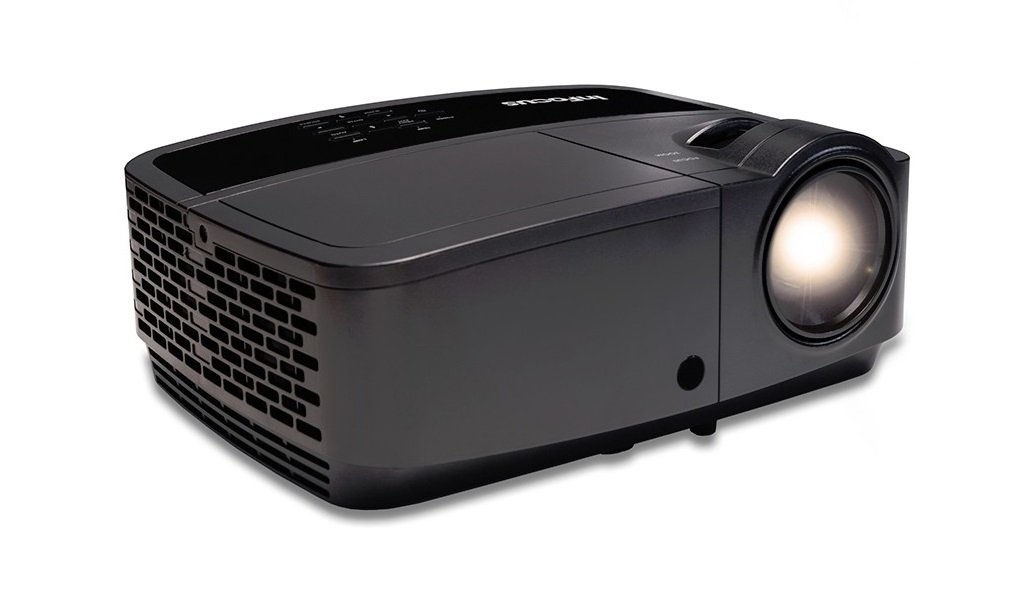
Слика 1.1: Предња страна view of the InFocus IN126 DLP Projector.
Кључне карактеристике:
- High brightness of up to 3200 lumens for clear images in various lighting conditions.
- High 3000:1 contrast ratio for sharp detail.
- Compact and portable design, weighing approximately 4.8 lbs. (2.17 kg).
- 3D-Ready capability for immersive viewинг искуства.
- HDMI connectivity for versatile input options.
2. Подешавање и инсталација
2.1 Распакивање
Carefully remove the projector and all accessories from the packaging. Verify that all components are present according to the packing list.
2.2 Постављање пројектора
Place the projector on a stable, flat surface or mount it securely. Ensure adequate ventilation around the projector to prevent overheating. Position the projector at an appropriate distance from the screen to achieve the desired image size.
2.3 Повезивање уређаја
Connect your video source (e.g., laptop, gaming console) to the projector using an HDMI cable. Ensure the cable is securely plugged into both the source device and the projector's HDMI input port.

Image 2.1: An InFocus projector set up for a business presentation, demonstrating typical usage.
2.4 Укључивање/искључивање
- За укључивање: Connect the power cord to the projector and a power outlet. Press the power button on the projector or remote control. The power indicator light will illuminate.
- За искључивање: Press the power button twice. The projector will enter a cooling cycle before completely shutting down. Do not unplug the projector during the cooling cycle.
2.5 Подешавање слике
- Фокус: Окрећите прстен за фокусирање на објективу док слика не постане оштра и јасна.
- Кеистоне Цоррецтион: Use the keystone adjustment feature (usually found in the projector's menu or via dedicated buttons) to correct trapezoidal image distortion if the projector is not perfectly perpendicular to the screen.
3. Руковање пројектором
3.1 Избор улазног извора
Press the 'Source' or 'Input' button on the remote control or projector control panel to cycle through available input sources (e.g., HDMI, VGA). Select the input corresponding to your connected device.
3.2 Навигација кроз мени
Use the arrow buttons on the remote or control panel to navigate the on-screen display (OSD) menu. Press 'Enter' or 'OK' to confirm selections and 'Menu' or 'Exit' to go back or close the menu.
3.3 Подешавања слике
Within the OSD menu, you can adjust various picture settings:
- Осветљеност: Подешава укупну осветљеност или замраченост слике.
- Контраст: Controls the difference between the lightest and darkest parts of the image.
- Боја: Подешава интензитет боја.
- Размера: Бира формат приказа (нпр. 4:3, 16:9).
3.4 Аудио подешавања
If your projector has built-in speakers or is connected to an external audio system, you can adjust the volume and other audio settings through the OSD menu.
3.5 3Д операције
The IN126 projector is 3D-Ready. To view 3D content, you will need compatible 3D glasses, a 3D-enabled source device, and 3D content. Refer to your 3D glasses and source device manuals for specific instructions on enabling 3D mode.
4. Одржавање
4.1 Чишћење сочива
Use a soft, lint-free cloth specifically designed for optical lenses to gently wipe the projector lens. Avoid using abrasive cleaners or excessive force, which can scratch the lens.
4.2 Чишћење пројектора Casing
Wipe the projector's exterior casinг са меким, дamp тканина. Не користите јаке хемикалије или раствараче.
4.3 Одржавање ваздушног филтера
Regularly check and clean the air filter to ensure proper airflow and prevent overheating. Refer to the full product manual for instructions on locating and cleaning or replacing the air filter.
4.4 Лamp Замена
Пројектор лamp has an estimated operating life of up to 20,000 hours. When the lamp reaches the end of its life, a warning message may appear, or the image brightness may significantly decrease. Refer to the full product manual for detailed instructions on safe lamp replacement. Always use genuine InFocus replacement lamps.
КСНУМКС. Решавање проблема
This section addresses common issues you might encounter with your InFocus IN126 projector.
5.1 Нема слике на екрану
- Уверите се да је пројектор укључен и да индикатор напајања стално светли.
- Check all cable connections (HDMI, power) are secure.
- Verify the correct input source is selected on the projector.
- Confirm the source device (laptop, etc.) is powered on and outputting a signal.
5.2 Image is Distorted or Blurry
- Подесите прстен за фокусирање на објективу.
- Use keystone correction to fix trapezoidal distortion.
- Ensure the projector is placed on a stable surface and is not vibrating.
- Check the resolution settings of your source device; ensure it is compatible with the projector's native resolution (1280 x 720).
5.3 Нема звука
- Increase the volume on both the projector and the source device.
- Ако користите спољне звучнике, уверите се да су правилно повезани и укључени.
- Check audio settings in the projector's OSD menu.
5.4 Projector Overheating
- Ensure there is sufficient space around the projector for ventilation.
- Clean the air filter to remove any dust buildup.
- Не блокирајте отворе за вентилацију.
6. Спецификације
The following table outlines the key technical specifications for the InFocus IN126 DLP Projector:
| Феатуре | Спецификација |
|---|---|
| Бранд | ИнФоцус |
| Назив модела | IN126 DLP |
| Дисплаи Типе | ДЛП |
| Нативе Ресолутион | 1280 к 720 |
| Максимална резолуција екрана | 1920 к 1080 |
| Осветљеност | 3200 lumens (ANSI) |
| Однос контраста | 3000:1 |
| Радни век извора светлости | 20000 сата |
| Lamp Ватtage | 230 Ваттс |
| Технологија повезивања | ХДМИ |
| Посебна карактеристика | 3Д-Реади |
| Форм Фацтор | Портабле |
| Тип монтаже | Таблетоп Моунт |
| Тежина артикла | 4.85 фунти (2.2 кг) |
| Сертификација за екстерно тестирање | UL, c-UL, FCC, CE |
7. Информације о гаранцији
The InFocus IN126 DLP Projector comes with a limited manufacturer's warranty. For specific details regarding warranty coverage, duration, and terms, please refer to the warranty card included with your product or visit the official InFocus webсајт. Сачувајте доказ о куповини за потребе гаранције.
8. Корисничка подршка
For further assistance, technical support, or to inquire about replacement parts, please visit the official InFocus support website or contact their customer service department. Contact information can typically be found on the InFocus website or in the documentation included with your projector.
Ask a question about this manual
Ask about setup, troubleshooting, compatibility, parts, safety, or missing instructions. Manuals+ will review the question and use this page’s manual context to help answer it.