
Увод
This manual provides essential information for the safe and effective operation of your Laserliner SoundTest-Master 082.070A Noise Level Meter. Please read these instructions carefully before using the device and keep them for future reference. The SoundTest-Master 082.070A is designed for precise measurement of noise levels, featuring integrated long-term memory and PC connectivity for comprehensive documentation.
Безбедносна упутства
- Always operate the device within its specified environmental conditions.
- Не излажите уређај екстремним температурама, влажности или директној сунчевој светлости.
- Избегавајте испуштање уређаја или излагање јаким ударима.
- Do not attempt to open or modify the device. Repairs should only be performed by authorized personnel.
- Држите уређај даље од јаких магнетних поља.
- Ensure the microphone is clean and free from obstructions for accurate measurements.
Производ је завршенview
The Laserliner SoundTest-Master 082.070A is a handheld noise level meter equipped with a sensitive electret condenser microphone and a clear, illuminated display. It features various controls for measurement settings and data management.

Слика 1: Фронт view of the SoundTest-Master 082.070A, showing the display, microphone with windshield, and control buttons.
Кључне компоненте:
- Електретни кондензаторски микрофон: For capturing sound. Includes a removable windshield.
- Осветљени дисплеј: Shows measurement values, settings, and status.
- Контролна дугмад: Power, Setup, Max, Record, A/C weighting, Fast/Slow time weighting, Level adjustment, Data send.
- Аналогни излази: DC and AC outputs for external connections.
- РС232 интерфејс: Optoisolated port for PC connection and data transfer.
Сетуп
1. Инсталација батерије
The device requires batteries for operation. Ensure correct polarity when inserting batteries into the compartment, typically located on the rear of the unit.
2. Прво укључивање
Притисните тастер Повер button to turn on the device. The display will illuminate and show initial readings.
3. Windshield Attachment
Attach the removable windshield to the microphone to minimize wind noise interference during outdoor measurements.
Упутство за употребу
1. Основна мерења
- Turn on the device using the Повер дугме.
- Point the microphone towards the sound source.
- The current noise level will be displayed in decibels (dB).
2. Frequency Weighting (dB(A), dB(C))
Користите А/Ц button to switch between frequency weighting curves:
- дБ (А): Simulates the human ear's response to sound, commonly used for environmental noise measurements.
- dB(C): Provides a flatter response, suitable for measuring peak sound pressure levels or low-frequency noise.
3. Time Weighting (Fast/Slow)
Притисните тастер БРЗО СПОРО дугме за избор жељеног временског пондерисања:
- FAST (125 ms): For measuring rapidly changing noise levels.
- СПОРО (1 секунда): For measuring average noise levels over a longer period, suitable for stable noise sources.
4. Data Logging and PC Connection
The device features a long-term recording function with 16,000 memory points and real-time logging capabilities when connected to a PC.
- Internal Data Logging: Притисните тастер РЕЦОРД button to start/stop internal data recording. The device can store up to 16,000 measurement points.
- Веза са рачунаром: Connect the device to a computer using the provided RS232 cable.
- софтвер: Install the provided software on your PC. This software allows for real-time data display, analysis, and download of recorded data.
- Слање података: Користите СЕНД ДАТА button to initiate data transfer to the connected PC.
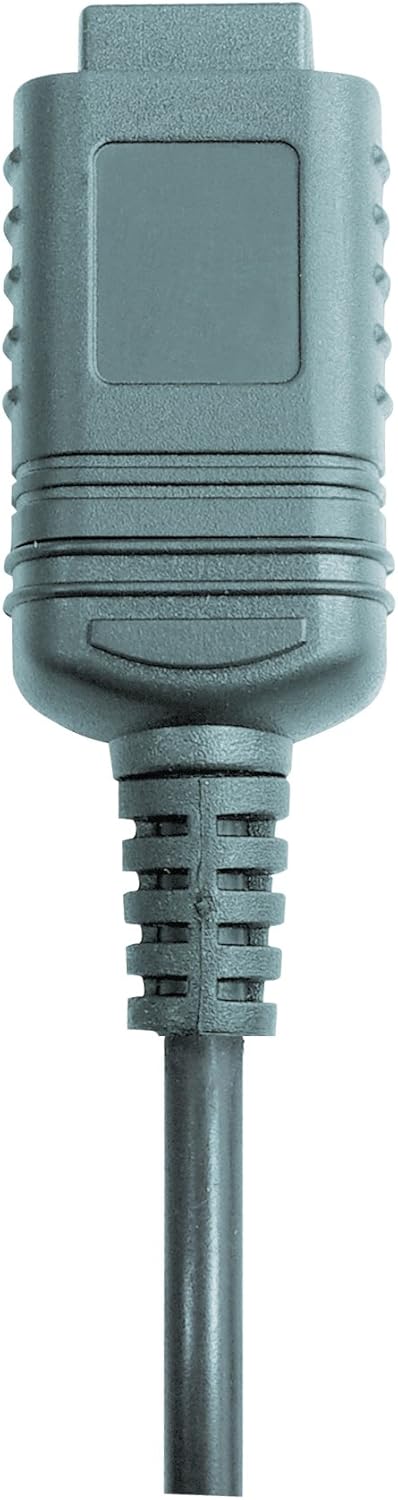

Слика 2: RS232 cable connectors used for connecting the SoundTest-Master to a PC.
5. Калибрација
The device can be calibrated and adjusted using a standard noise level calibrator (94 dB / 1 kHz). Refer to the calibrator's instructions for the specific calibration procedure.
Одржавање
1. Чишћење
- Wipe the device casinг меком, сувом крпом.
- Немојте користити абразивна средства за чишћење или раствараче.
- Ensure the microphone is kept clean and free of dust or debris.
2. Складиштење
When not in use, store the SoundTest-Master in its protective case in a cool, dry place, away from direct sunlight and extreme temperatures. Remove batteries if storing for extended periods.
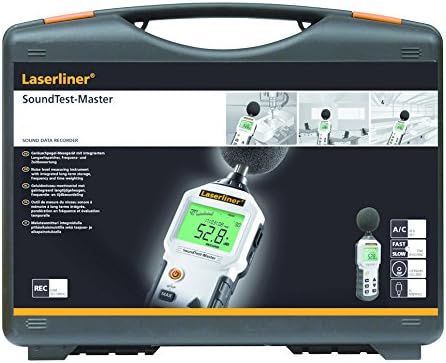
Слика 3: The SoundTest-Master 082.070A stored in its protective carrying case.
Решавање проблема
| Проблем | Могући узрок | Решење |
|---|---|---|
| Уређај се не укључује. | Мртве или неправилно инсталиране батерије. | Замените батерије, водећи рачуна о исправном поларитету. |
| Нетачна очитавања. | Microphone obstructed or dirty; device needs calibration. | Clean microphone; perform calibration with a standard calibrator. |
| No data transfer to PC. | Incorrect cable connection; software not installed or configured. | Check RS232 cable connection; ensure PC software is correctly installed and running. |
| Екран је замагљен или нечитљив. | Low battery power; display backlight off. | Replace batteries; check device settings for backlight control. |
Спецификације
| Феатуре | Детаљ |
|---|---|
| Назив модела | SoundTest-Master |
| Парт Нумбер | 082.070А |
| Произвођач | Umarex |
| Бранд | Ласерлинер |
| Пондерисање фреквенције | dB(A), dB(C) |
| Тиме Веигхтинг | FAST (125 ms), SLOW (1 second) |
| Меморија података | 16,000 мерних тачака |
| Интерфејс | Optoisolated RS232 |
| Аналогни излази | ДЦ и АЦ |
| Калибрација | Adjustable with 94 dB / 1 kHz standard calibrator |
| Микрофон | Sensitive electret condenser with removable windshield |
| Дисплаи | Illuminated, clear display |
| Тежина артикла | 1.18 килограма (2.6 фунте) |
| Димензије производа | 10.33 к 5.51 к 13.78 инча |
| Материјал | Metal (Frame, Barrel) |
| Боја | Црно и Сиво |
| Батерије су потребне | Yes (not included, type not specified in data) |
Гаранција и подршка
For warranty information and technical support, please refer to the documentation included with your purchase or visit the official Laserliner webсајту.