
1. Увод
This manual provides essential information for the proper installation, operation, and maintenance of your HEWLETT-PACKARD 8GB DDR3 1333MHZ PC3-10600 ECC Registered DIMM Memory Module (P/N: 500205-571). This memory module is designed for use in compatible server systems to enhance performance and reliability. Please read this manual thoroughly before installation and retain it for future reference.
2. Безбедносне информације
Always observe the following safety precautions to prevent damage to the memory module, the host system, and to ensure personal safety:
- Заштита од електростатичког пражњења (ESD): Memory modules are sensitive to static electricity. Always wear an anti-static wrist strap or frequently touch a grounded metal object before handling the module.
- Искључивање: Ensure the host system is completely powered off and disconnected from the power source before installing or removing the memory module.
- Пажљиво рукујте: Hold the memory module by its edges. Avoid touching the gold connector pins or the integrated circuits (ICs) on the module.
- Компатибилност: Verify that your server system supports DDR3 ECC Registered DIMMs and the specified capacity and speed before installation.
3. Производ је готовview
The HEWLETT-PACKARD 8GB DDR3 1333MHZ PC3-10600 ECC Registered DIMM is a high-performance memory solution designed for server environments. It features Error-Correcting Code (ECC) for data integrity and is a Registered (Buffered) module, which enhances stability in systems with a large number of memory modules. This module operates at a speed of 1333MHz (PC3-10600) and has a 240-pin form factor.
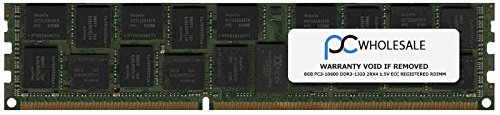
Слика 1: HEWLETT-PACKARD 8GB DDR3 ECC Registered DIMM Memory Module. This image shows the general appearance of the memory module, highlighting its form factor and integrated circuits.
4. Подешавање и инсталација
Follow these steps carefully to install the memory module into your compatible server system:
- Припремите систем:
- Shut down the server completely.
- Disconnect the power cord and any other cables connected to the server.
- Open the server chassis according to the manufacturer's instructions.
- Wear an anti-static wrist strap and connect it to a grounded metal part of the server chassis.
- Пронађите DIMM слотове: Identify the available DIMM slots on the server motherboard. Consult your server's documentation for the correct slot population order, especially if installing multiple modules.
- Отворите ретенционе клипове: Gently push the retention clips at both ends of the DIMM slot outwards to open them.
- Уметните меморијски модул: Align the memory module with the DIMM slot, ensuring the notch on the module matches the key in the slot. This prevents incorrect insertion.
- Seat the Module: Apply even pressure to both ends of the memory module until it clicks into place and the retention clips automatically snap shut. Do not force the module; if it does not seat easily, recheck alignment.
- Проверите инсталацију: Visually inspect the module to ensure it is fully seated and the retention clips are securely closed.
- Затвори и укључи: Close the server chassis, reconnect all cables, and power on the system. The system BIOS should automatically detect the new memory.
5. Оперативни
Once installed, the HEWLETT-PACKARD 8GB DDR3 1333MHZ PC3-10600 ECC Registered DIMM operates automatically within a compatible server system. No specific user interaction is typically required for its operation. The server's BIOS and operating system will manage the memory resources. Ensure your server's BIOS is updated to the latest version to ensure optimal compatibility and performance with new memory modules.
6. Одржавање
Memory modules generally require minimal maintenance. Follow these guidelines for optimal longevity:
- чистоћа: Keep the server environment clean and dust-free. Dust accumulation can impede airflow and lead to overheating.
- Руковање: When handling the module, always use ESD precautions and hold it by the edges.
- Складиштење: If storing the module, keep it in an anti-static bag in a cool, dry place away from direct sunlight and extreme temperatures.
- инспекција: Periodically inspect the module and its slot for any signs of damage or corrosion, especially during other system maintenance.
КСНУМКС. Решавање проблема
Ако наиђете на проблеме након инсталирања меморијског модула, размотрите следеће кораке за решавање проблема:
- Систем се не покреће/Нема приказа:
- Ensure the memory module is fully seated in its slot and the retention clips are closed.
- Verify that the module is installed in the correct slot according to your server's motherboard manual.
- Покушајте поново да инсталирате модул.
- Ако је инсталирано више модула, покушајте да покренете систем само са једним модулом истовремено да бисте идентификовали потенцијално неисправан модул.
- Incorrect Memory Detected:
- Check the server's BIOS/UEFI settings to confirm the detected memory amount.
- Ensure your server's motherboard and CPU support the total amount of RAM installed.
- Update the server's BIOS/UEFI to the latest version, as this often improves memory compatibility.
- Нестабилност/падови система:
- Покрените алат за дијагностику меморије (нпр. MemTest86) да бисте проверили да ли постоје грешке.
- Ensure the server's cooling system is functioning correctly to prevent overheating.
If problems persist, consult your server's documentation or contact HEWLETT-PACKARD technical support.
8. Спецификације
| Феатуре | Спецификација |
|---|---|
| Парт Нумбер | 500205-571 |
| Бранд | ХЕВЛЕТТ ПАЦКАРД |
| Величина меморије | 8 ГБ |
| Технологија меморије | ДДР3 |
| Брзина меморије | 1333 МХз |
| PC Standard | ПЦ3-10600 |
| Пин Цоунт | 240-пин |
| Исправљање грешака | ECC (Error-Correcting Code) |
| Пуферовање | Registered (Buffered) |
| Компатибилни уређаји | Сервер |
9. Гаранција и подршка
This HEWLETT-PACKARD memory module is covered by the manufacturer's standard warranty. For specific warranty terms and conditions, please refer to the documentation provided with your purchase or visit the official HEWLETT-PACKARD website. For technical assistance, troubleshooting, or warranty claims, please contact HEWLETT-PACKARD customer support through their official channels.
HEWLETT-PACKARD Official Webсајт: ввв.хп.цом


