
1. Увод
Thank you for choosing the Ultrak Heat Index Solar Powered Stopwatch, Model 830. This device is designed for precise timing and environmental monitoring, offering features such as temperature, humidity, heat index, and dew point calculations. It is ideal for athletes, coaches, and outdoor enthusiasts who require accurate data in various conditions. This manual provides detailed instructions to help you maximize the functionality and lifespan of your stopwatch.
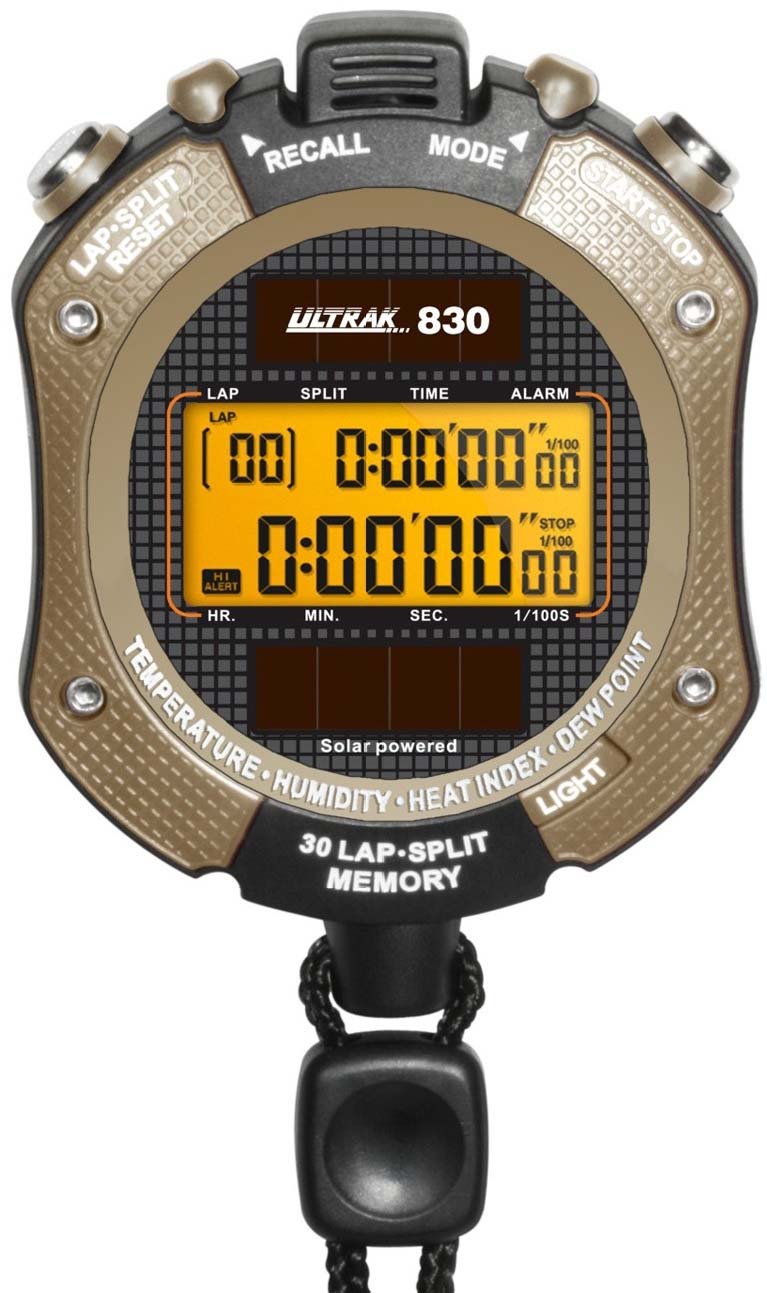
Слика 1: Фронт view of the Ultrak Heat Index Solar Powered Stopwatch, displaying its digital screen and control buttons.
2. Кључне карактеристике
- Accurate calculation of temperature, humidity, heat index, and dew point.
- 30 dual split recallable memory for tracking multiple laps or splits.
- Measures time up to 10 hours with 1/100 second resolution.
- Presettable countdown timer with an auto-repeat function.
- Displays time, calendar, and features an alarm function.
- LED backlight for visibility in low-light conditions.
- Solar-powered with a back-up lithium battery for continuous operation.
- Water-resistant design for use in various environments.
3. Подешавање и почетна употреба
3.1 Укључивање
The Ultrak 830 is solar-powered. Ensure the solar panel on the front of the stopwatch is exposed to light for initial power-up. A built-in lithium battery provides backup power.
3.2 Подешавање времена и датума
- У режиму Време, притисните и држите МОДЕ дугме док дисплеј не затрепери.
- Користите СТАРТ/СТОП button to adjust the flashing digit (hours, minutes, seconds, year, month, day).
- Притисните тастер ЛАП/РЕСЕТ дугме за прелазак на следећу поставку.
- Када су сва подешавања исправна, притисните дугме МОДЕ дугме за излазак из режима подешавања.
3.3 Активирање позадинског осветљења
Притисните тастер ЛИГХТ button (usually located on the side or top) to illuminate the display for a few seconds in low-light conditions.
4. Упутство за употребу
4.1 Функција штоперице
- Из режима Време, притисните тастер МОДЕ button repeatedly until "STOPWATCH" or a similar indicator appears.
- Притисните СТАРТ/СТОП за почетак мерења времена.
- Притисните ЛАП/РЕСЕТ to record a lap/split time while the stopwatch continues running. The display will momentarily show the lap time.
- Притисните СТАРТ/СТОП поново да бисте паузирали штоперицу.
- Притисните ЛАП/РЕСЕТ док је паузирано да би се штоперица ресетовала на нулу.
4.2 Recalling Memory
The stopwatch can store up to 30 dual split times. After stopping the stopwatch, press the МЕМОРИ button (or a designated button, refer to on-device labels) to scroll through recorded lap and split times.
4.3 Тајмер за одбројавање
- Navigate to the "TIMER" mode using the МОДЕ дугме.
- Притисните и држите ЛАП/РЕСЕТ да уђете у режим подешавања.
- Користите СТАРТ/СТОП to adjust the hours, minutes, and seconds. Use ЛАП/РЕСЕТ за кретање између цифара.
- Притисните МОДЕ да потврдите подешавање.
- Притисните СТАРТ/СТОП to begin the countdown. An alarm will sound when the timer reaches zero.
- To activate auto-repeat, ensure this option is enabled in the timer setting mode (if available).
4.4 Heat Index and Environmental Readings
In the dedicated "HEAT INDEX" or "ENVIRONMENT" mode (accessed via the МОДЕ button), the stopwatch will display current temperature, humidity, heat index, and dew point. Allow a few moments for the sensors to stabilize and provide accurate readings, especially after moving to a new environment.
4.5 Функција аларма
- Go to "ALARM" mode using the МОДЕ дугме.
- Притисните и држите ЛАП/РЕСЕТ за улазак у режим подешавања аларма.
- Подесите време аларма помоћу СТАРТ/СТОП and move between digits with ЛАП/РЕСЕТ.
- Притисните МОДЕ потврдити.
- Toggle the alarm ON/OFF using СТАРТ/СТОП while in Alarm mode (not setting mode).
5. Одржавање
- Чишћење: Wipe the stopwatch with a soft, damp тканина. Немојте користити јаке хемикалије или абразивна средства за чишћење.
- Складиштење: Чувати на хладном и сувом месту, заштићено од директне сунчеве светлости када се не користи дуже време.
- Отпорност на воду: The stopwatch is water-resistant, but not waterproof. Avoid submerging it in water or exposing it to high-pressure water jets.
- батерија: The solar panel charges the internal battery. Ensure regular exposure to light to maintain optimal battery life. No user-replaceable battery is required under normal operation.
КСНУМКС. Решавање проблема
| Проблем | Могући узрок | Решење |
|---|---|---|
| Екран је празан или замагљен. | Insufficient light exposure for solar charging. | Expose the solar panel to bright light for several hours. |
| Нетачно време/датум. | Time/date not set correctly or reset after power loss. | Refer to Section 3.2 "Setting Time and Date" to adjust. |
| Stopwatch not responding. | Привремени софтверски квар. | Attempt a soft reset by pressing all buttons simultaneously for a few seconds (if applicable, consult specific model instructions if available). If not, allow battery to fully drain and recharge. |
| Inaccurate environmental readings. | Sensor obstruction or not enough time for stabilization. | Ensure sensors are clean and unobstructed. Allow 5-10 minutes for readings to stabilize after moving to a new environment. |
7. Спецификације
- Модел: Ultrak 830
- Timing Resolution: 1/100 секунде
- Maximum Timing Capacity: 10 сата
- Меморија: 30 dual split recallable memory
- Сензори животне средине: Temperature, Humidity, Heat Index, Dew Point
- Извор напајања: Solar powered with lithium backup battery
- Приказ: Digital with LED backlight
- Отпорност на воду: Yes (splash resistant, not submersible)
- ГТИН (УПЦ): 743223008308
8. Гаранција и подршка
Ultrak products are manufactured to high-quality standards. For specific warranty information, please refer to the warranty card included with your purchase or visit the official Ultrak webсајту.
For technical support, troubleshooting assistance beyond this manual, or to inquire about replacement parts, please contact Ultrak customer service through their official webсајт или контакт информације које сте добили уз паковање производа.