
Увод
Thank you for choosing the Tele System TS6512HD Digital Terrestrial Receiver. This device allows you to receive digital terrestrial television broadcasts and offers additional features such as multimedia playback via USB and recording capabilities. This manual provides essential information for the safe and efficient use of your receiver, including setup, operation, maintenance, and troubleshooting.
Важне информације о безбедности
- Напајање: Користите само наведени адаптер за напајање. Уверите се да је јачина звукаtagе одговара вашем локалном извору напајања.
- вентилација: Do not block ventilation openings. Place the receiver on a stable, flat surface with adequate space around it for proper airflow.
- Вода и влага: Do not expose the receiver to rain, moisture, or liquids. Do not place objects filled with liquids, such as vases, on the receiver.
- Извори топлоте: Keep the receiver away from heat sources such as radiators, heat registers, stoves, or other heat-producing appliances.
- Чишћење: Unplug the receiver from the power outlet before cleaning. Use a soft, dry cloth. Do not use liquid or aerosol cleaners.
- Сервисирање: Не покушавајте сами да сервисирате овај производ. Све сервисирање препустите квалификованом сервисном особљу.
- Муња: Unplug the receiver during lightning storms or when unused for long periods.
Садржај пакета
Молимо вас да означите поље за следеће ставке:
- Tele System TS6512HD Digital Terrestrial Receiver
- Ремоте Цонтрол
- Повер Адаптер
- Кориснички приручник (овај документ)
Водич за подешавање
1. Повезивање пријемника
- Повезивање са ТВ-ом:
- For optimal picture quality, connect an HDMI cable (not included) from the receiver's HDMI OUT port to an available HDMI IN port on your television.
- Alternatively, if your TV does not have an HDMI port, connect a SCART cable (not included) from the receiver's SCART port to the SCART IN port on your television.
- Повезивање антене: Connect your terrestrial antenna cable to the ANT IN port on the back of the receiver.
- Прикључите напајање: Plug the power adapter into the DC IN port on the receiver, then plug the adapter into a wall outlet.
- Уметните батерије: Open the battery compartment on the remote control and insert two AAA batteries (not included), observing the correct polarity.
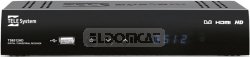
Слика 1: Предња страна view of the Tele System TS6512HD receiver, showing its compact design and essential indicators.
2. Прва инсталација
- Turn on your TV and select the correct input source (HDMI or SCART) corresponding to where you connected the receiver.
- Power on the Tele System TS6512HD receiver.
- The first-time installation wizard should appear on your TV screen. Follow the on-screen prompts to select your language, country, and initiate an automatic channel scan.
- Once the scan is complete, the receiver will save the found channels, and you can begin watching TV.
Упутство за употребу
Basic Remote Control Functions
- СНАГА: Укључује или искључује пријемник (режим приправности).
- ЦХ +/-: Мења канале горе или доле.
- ВОЛ +/-: Подешава ниво јачине звука.
- МУТЕ: Искључује или укључује звук.
- МЕНИ: Accesses the main menu for settings and features.
- ЕКСИТ: Излази из тренутног менија или приказа на екрану.
- ОК: Потврђује изборе у менијима.
- Тастери са стрелицама (горе/доле/лево/десно): Креће кроз меније и опције.
- ИНФО: Приказује информације о тренутном каналу.
- ЕПГ: Приступа електронском програмском водичу.
Навигација каналом
Користите ЦХ +/- buttons to browse channels sequentially. To directly enter a channel number, use the numeric keypad on the remote control.
Коришћење главног менија
Притисните тастер МЕНУ button to access the receiver's main menu. Here you can configure various settings, including:
- Претрага канала: Rescan for channels or perform a manual search.
- Системска подешавања: Adjust language, time, parental control, and other system preferences.
- Подешавања слике: Configure aspect ratio, resolution, and other display options.
- Аудио подешавања: Adjust audio output preferences.
- УСБ: Access multimedia files from a connected USB device or manage recordings.
Recording TV Programs (PVR Function)
The TS6512HD receiver supports recording of TV programs to an external USB storage device (e.g., USB flash drive or external hard drive, not included). Ensure your USB device is formatted correctly (FAT32 or NTFS) and has sufficient free space.
- Connect a compatible USB storage device to the USB port on the receiver.
- To record instantly, press the РЕЦ button on the remote control while watching a program. Press СТОП да завршите снимање.
- To schedule a recording, use the ЕПГ (Electronic Program Guide) to select a program and follow the on-screen prompts to set a timer recording. Alternatively, access the Timer settings via the main menu.
- Recorded programs can be accessed and played back through the "USB" section in the main menu.
Multimedia Playback via USB
The receiver can play various multimedia files (video, audio, photos) from a connected USB storage device.
- Connect a USB storage device containing your multimedia fileс на УСБ порт.
- Притисните тастер МЕНУ button, navigate to the "USB" section, and select "Multimedia" or "Player".
- Прегледајте своје fileс и притисните OK играти се.
- Note: The receiver supports specific file formats (e.g., H.264, MPEG2, MPEG4 for video; AAC+, LC-AAC for audio). Compatibility with all file types is not guaranteed.
Одржавање
Чишћење
To clean the receiver, first unplug it from the power outlet. Use a soft, dry, lint-free cloth to wipe the exterior surfaces. Do not use liquid cleaners, abrasive pads, or chemical solvents, as these can damage the finish or internal components.
Ажурирања софтвера
Periodically, Tele System may release software updates to improve performance or add new features. Check the manufacturer's website for available updates and instructions on how to install them via USB.
Решавање проблема
| Проблем | Могући узрок | Решење |
|---|---|---|
| No power / Receiver does not turn on. | Power cable not connected properly; Power outlet not working; Faulty power adapter. | Check power cable connection. Try a different power outlet. Ensure the power adapter is working. |
| Нема слике или звука. | Incorrect TV input selected; HDMI/SCART cable loose or faulty; Antenna not connected or signal too weak. | Select the correct TV input source. Check HDMI/SCART cable connections. Ensure antenna is connected and try rescanning channels. |
| Даљински управљач не ради. | Batteries are dead or inserted incorrectly; Obstruction between remote and receiver; Remote sensor blocked. | Replace batteries, ensuring correct polarity. Remove any obstructions. Ensure the remote sensor on the receiver is clear. |
| Poor picture quality / Pixelation. | Weak antenna signal; Antenna alignment issue; Interference. | Check antenna connection and alignment. Consider using a signal amplifier if signal is consistently weak. |
| Cannot record to USB device. | USB device not connected; USB device not formatted correctly; Insufficient storage space; USB device incompatible. | Ensure USB device is connected. Format the USB device to FAT32 or NTFS. Check available space. Try a different USB device. |
Техничке спецификације
| Назив модела | TS6512HD |
| Број модела | 21005197 |
| Бранд | Tele System |
| Тип тјунера | Terrestrial, DVB |
| Видео Ресолутион | 1920 к 810 пиксела |
| видео кодеци | H.264, MPEG2, MPEG4 |
| Аудио кодеци | AAC+, LC-AAC |
| Укупно УСБ портова | 1 |
| Укупни ХДМИ портови | 1 |
| Компатибилни уређаји | Телевизија |
| Боја | Црно |
| Димензије (пакет) | 24 к 23.4 к 5.2 цм |
| Тежина (пакет) | 421.84 г |
| GTIN (EAN/UPC) | 08024427014350 |
Гаранција и подршка
The Tele System TS6512HD receiver comes with a standard manufacturer's warranty. For specific warranty terms and conditions, please refer to the warranty card included with your product or visit the official Tele System website. For technical support, troubleshooting assistance beyond this manual, or service inquiries, please contact Tele System customer support through their official channels.