
1. Увод
Хвала вам на куповиниasing the Gemini PS3-USB 3 Channel 10-Inch Mixer. This manual provides essential information for the proper setup, operation, and maintenance of your mixer. Please read this manual thoroughly before use to ensure optimal performance and to prevent damage.
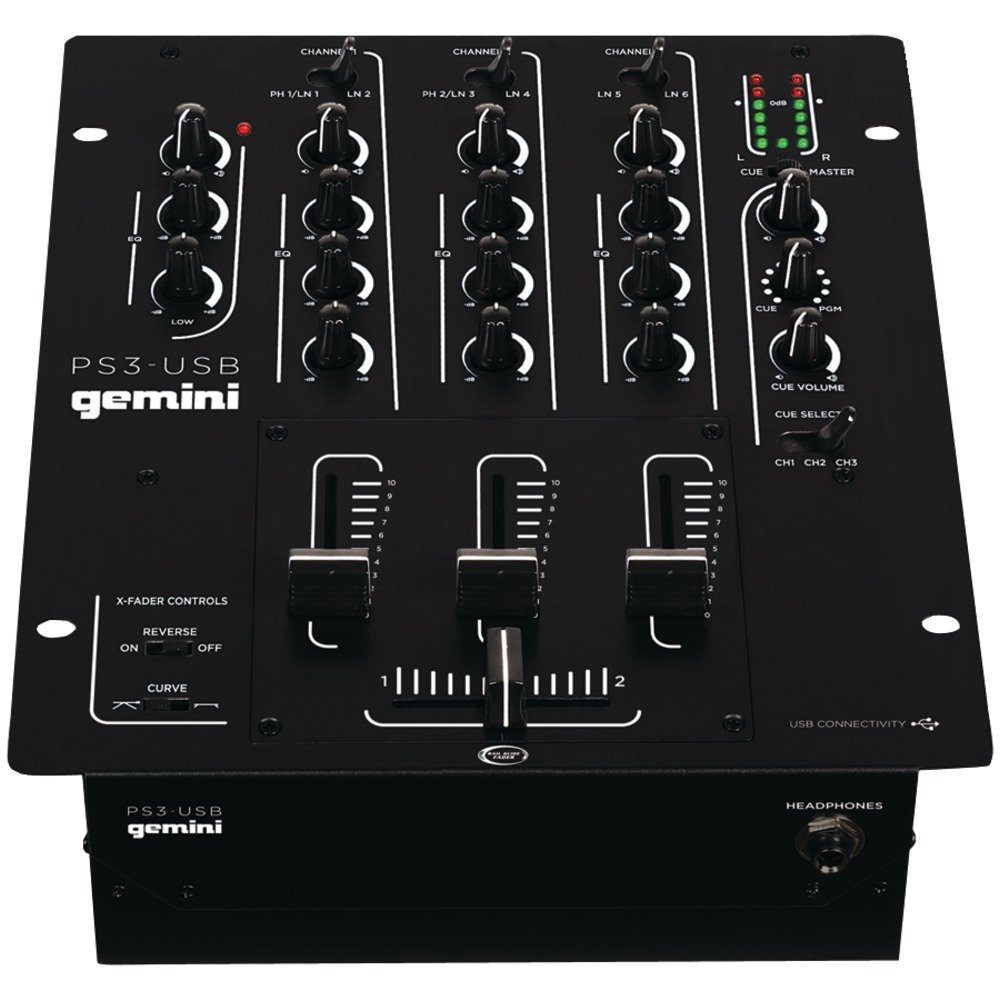
Слика 1: Предња страна view of the Gemini PS3-USB Mixer, showing controls and inputs.
2. Безбедносна упутства
- Извор напајања: Прикључите уређај само на наведено напајање.
- вентилација: Обезбедите одговарајућу вентилацију. Не блокирајте вентилационе отворе.
- Вода и влага: Не излажите уређај киши или влази. Не стављајте предмете напуњене течношћу на уређај.
- топлота: Држите уређај даље од извора топлоте као што су радијатори, грејни уређаји, шпорети или други уређаји (укључујући ampлифиерс) који производе топлоту.
- Чишћење: Чистите само сувом крпом.
- Сервисирање: Сва сервисирања препустите квалификованом сервисном особљу. Не покушавајте сами да сервисирате овај производ.
3. Подешавање
3.1 Распакивање
Carefully unpack the mixer and check for any signs of damage. Retain the packaging materials for future transport or storage.
3.2 Повезивање напајања
Connect the provided power adapter to the mixer's power input and then to a suitable electrical outlet.
3.3 Аудио везе
The PS3-USB features 5-line, 3-channel inputs with 2 convertible Phono/Line RCA inputs.
- Фоно/линијски улази: Connect turntables or line-level devices (CD players, media players) to the RCA inputs. Use the Phono/Line switch to select the appropriate input type for each channel.
- Главни излаз: Connect the Master RCA outputs to your ampлифиер или активни звучници.
- Излаз снимања: Connect the Record RCA outputs to a recording device if you wish to record your mix.
- Слушалице: Plug your 1/4" (6.3mm) headphones into the front panel headphone connector.
3.4 УСБ веза
Connect the mixer to your Mac or PC using a standard USB cable. This allows for simultaneous playback and recording through your computer's media player software.
4. Упутство за употребу
4.1 Controls and Functions Overview
Familiarize yourself with the mixer's layout:
- Channel Gain Control: Adjusts the input level for each channel.
- 3-Band Rotary EQ: Provides control over High, Mid, and Low frequencies for each channel.
- Цханнел Фадерс: Control the volume of each individual channel.
- Цроссфадер: A user-replaceable Rail Glide crossfader with curve and reverse controls for blending between channels.
- Мастер јачина звука: Контролише укупни излазни ниво миксера.
- ВУ метри: Visual indicators for master or cue levels.
- Cue Section: Includes rotary cue volume, CUE/PGM controls, and a split cue switch for headphone monitoring.
- Одељак за микрофон: Features a rotary microphone volume control and a 2-band EQ for microphone input.
4.2 Basic Mixing
- Connect your audio sources to the appropriate Phono/Line inputs.
- Set the Phono/Line switch for each channel to match your source.
- Adjust the Gain control for each active channel to achieve a healthy input level without clipping (distortion).
- Use the channel faders to bring up the volume of your desired audio sources.
- Utilize the 3-band EQ to shape the sound of each channel.
- Use the crossfader to smoothly transition between channels.
- Monitor your mix using headphones via the Cue section and adjust the Master Volume for the main output.
4.3 USB Playback and Recording
Once connected via USB, your computer should recognize the PS3-USB as an audio device.
- Репродукција: Select the PS3-USB as the output device in your computer's sound settings or media player software to route audio through the mixer.
- Снимање: Select the PS3-USB as the input device in your recording software. The mixer's master output will be sent to your computer for recording.
5. Одржавање
- Чишћење: Use a soft, dry cloth to clean the exterior of the mixer. Do not use liquid cleaners or solvents.
- Crossfader Replacement: The Rail Glide crossfader is user-replaceable. Refer to the Gemini website or authorized service centers for replacement parts and instructions if needed.
- Складиштење: When not in use for extended periods, store the mixer in a cool, dry place, preferably in its original packaging.
КСНУМКС. Решавање проблема
| Проблем | Могући узрок | Решење |
|---|---|---|
| No sound output from master. | Master volume too low; incorrect input selection; amplifier/speaker issues. | Increase Master Volume. Check Phono/Line switches. Verify amplifier/speaker connections and power. |
| No sound from a specific channel. | Channel fader down; Gain too low; incorrect Phono/Line selection; source device off/muted. | Raise channel fader. Adjust Gain. Correct Phono/Line switch. Check source device. |
| Изобличен звук. | Input Gain too high; Master Volume too high; faulty cable. | Reduce channel Gain. Reduce Master Volume. Replace cables. |
| USB recording/playback not working. | Incorrect USB connection; computer audio settings incorrect; driver issues. | Ensure USB cable is securely connected. Select PS3-USB as audio device in computer settings. Restart computer. |
7. Спецификације
- Модел: ПС3УСБ
- Канали: 3
- Улази: 5-Line, 2 Convertible Phono/Line RCA, USB
- Излази: Master RCA, Record RCA, 1/4" (6.3mm) Headphone
- ЕК: 3-Band Rotary EQ per channel, 2-Band EQ for Microphone
- Цроссфадер: User-replaceable Rail Glide with Curve and Reverse controls
- Повезивање: USB for Mac/PC Playback & Recording
- Dimensions (Approximate Shipping): 12.00 ин к 10.00 ин к 3.25 ин
- Weight (Approximate Shipping): 6.2 фунти (2.8 кг)
- УПЦ: 747705208149
8. Гаранција и подршка
This Gemini product is covered by a 90-дневна гаранција from the date of purchase. This warranty covers manufacturing defects and workmanship under normal use. It does not cover damage caused by misuse, accident, modification, or unauthorized repair.
For technical support, service inquiries, or warranty claims, please contact your authorized Gemini dealer or visit the official Gemini webсајт за контакт информације.
Молимо вас да сачувате доказ о куповини ради потврде гаранције.