
Увод
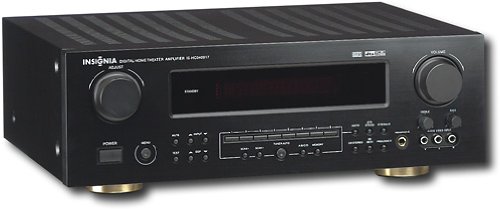
This manual provides essential instructions for the setup, operation, maintenance, and troubleshooting of your Insignia 6.1-Channel 600W Digital Home Theater Receiver, model IS-HC040917. Please read this manual thoroughly before using the receiver to ensure proper and safe operation.
Важна безбедносна упутства
- Не блокирајте отворе за вентилацију. Инсталирајте у складу са упутствима произвођача.
- Не постављајте у близини извора топлоте као што су радијатори, грејни регистри, пећи или други уређаји (укључујући ampлифиерс) који производе топлоту.
- Заштитите кабл за напајање од гажења или прикљештења, посебно на утикачима, утичницама и на месту где излазе из уређаја.
- Користите само додатке/прибор које је навео произвођач.
- Искључите овај апарат из струје током олуја са грмљавином или када га не користите дуже време.
- Упућивање свих сервиса квалификованом сервисном особљу. Сервисирање је потребно ако је апарат на било који начин оштећен.
Водич за подешавање
1. Распакивање
Carefully remove the receiver and all accessories from the packaging. Ensure all components are present:
- Insignia IS-HC040917 Receiver
- Ремоте Цонтрол
- АМ кружна антена
- ФМ жичана антена
- Кориснички приручник (овај документ)
2. Повезивање звучника
The IS-HC040917 receiver supports a 6.1-channel speaker configuration. Connect your speakers to the corresponding terminals on the rear panel. Ensure correct polarity (+ to + and - to -) for each speaker.
- Front Left/Right: For main stereo sound.
- центар: For dialogue.
- Surround Left/Right: For ambient sound effects.
- Сурроунд позади: For additional rear channel effects in 6.1 setups.
- Subwoofer (Pre-out): Connect to a powered subwoofer's LFE input.
Note: The receiver is designed for speakers with an impedance of 8 ohms.
3. Connecting Audio/Video Sources
Connect your external devices (e.g., DVD player, Blu-ray player, game console, cable box) to the appropriate input jacks on the receiver.
- ДВИ: Use HDMI cables for high-definition audio and video signals. The receiver has 3 HDMI input ports.
- Digital Audio (Optical/Coaxial): For digital audio from devices like CD players or set-top boxes.
- Analog Audio (RCA): For standard stereo audio connections from devices like VCRs or older CD players.
- С-Видео: For video signals from compatible devices.
4. Антенска веза
Connect the supplied AM loop antenna and FM wire antenna to their respective terminals on the rear panel for radio reception.
5. Прикључак за напајање
Once all audio/video and speaker connections are made, plug the receiver's power cord into a standard AC wall outlet.
слика: Rear panel of the Insignia IS-HC040917 receiver, showing various input and output connections for speakers, audio/video sources (HDMI, RCA, S-Video, Digital), and antenna terminals. This diagram is crucial for correctly wiring the home theater system.
Упутство за употребу
1. Укључивање/искључивање
Притисните тастер ПОВЕР дугме на предњој плочи или на даљинском управљачу да бисте укључили или искључили пријемник.
2. Избор улаза
Користите ИЗБОР УЛАЗА knob/buttons on the front panel or the remote control to choose the desired audio/video source (e.g., HDMI 1, DVD, CD, Tuner).
3. Контрола јачине звука
Подесите главну јачину звука помоћу великог ВОЛУМЕ дугме на предњој плочи или ВОЛУМЕ +/- дугмад на даљинском управљачу.
4. Audio Modes
The receiver supports various audio modes, including 6.1-channel surround sound. Use the МОДЕ or ДСП buttons on the remote to cycle through available sound modes (e.g., Stereo, Dolby Digital, DTS, Pro Logic).
5. Tuner Operation (AM/FM Radio)
Select the "Tuner" input. Use the БАНД button to switch between AM and FM. Use the ТУНЕ +/- buttons to manually tune to stations or УНАПРЕД ПОДЕСОВАНО +/- to select stored stations. Refer to the remote control for specific tuner functions.
Одржавање
1. Чишћење
Wipe the exterior of the receiver with a soft, dry cloth. Do not use liquid cleaners or aerosol sprays, as they may damage the finish or internal components. Ensure the unit is unplugged before cleaning.
2. Вентилација
Ensure that the ventilation openings on the top and sides of the receiver are not blocked. Proper airflow is essential to prevent overheating and ensure long-term performance.
3. Менаџмент каблова
Periodically check all cable connections to ensure they are secure. Loose connections can lead to poor audio or video quality.
Решавање проблема
| Проблем | Могући узрок | Решење |
|---|---|---|
| Нема струје | Кабл за напајање је искључен; утичница није активна. | Проверите везу кабла за напајање; покушајте са другом утичницом. |
| Нема звука | Изабран погрешан улаз; жице звучника лабаве; јачина звука прениска; активирано искључивање звука. | Select correct input; check speaker connections; increase volume; deactivate mute. |
| Нема видеа | Incorrect input selected; video cables loose or incorrect. | Select correct input; check video cable connections (HDMI, S-Video, RCA). |
| Даљински управљач не ради | Batteries depleted; obstruction between remote and receiver; incorrect remote mode. | Replace batteries; remove obstructions; ensure remote is in the correct operating mode. |
Спецификације
- Модел: IS-HC040917
- Бренд: ИНСИГНИА
- Излазна снага: 600 Ваттс
- Број канала: 6.1 канал
- Режим аудио излаза: Сурроунд
- Укупни ХДМИ портови: 3
- Типови конектора: 3.5mm Jack, HDMI, RCA, USB
- Компатибилни уређаји: Спеакер
- Метод контроле: Ремоте
- Боја: Црно
- УПЦ: 799530659962
- ASIN: B0075C3DN2
Гаранција и подршка
For warranty information and customer support, please refer to the warranty card included with your product or visit the official Insignia webсајту. Сачувајте рачун о куповини за гаранције.
For further assistance, you may contact Insignia customer service. Contact details are typically available on the manufacturer's webсајту или у паковању производа.