
Производ је завршенview
The iSound Twist Portable Bluetooth Wireless Speaker offers a unique design combined with superior sound quality. Its compact form factor allows for portability, while its advanced features enable wireless music streaming and hands-free calling. The speaker features full stereo sound with 6 watts total output from two 40mm drivers and a passive radiator for enhanced bass.
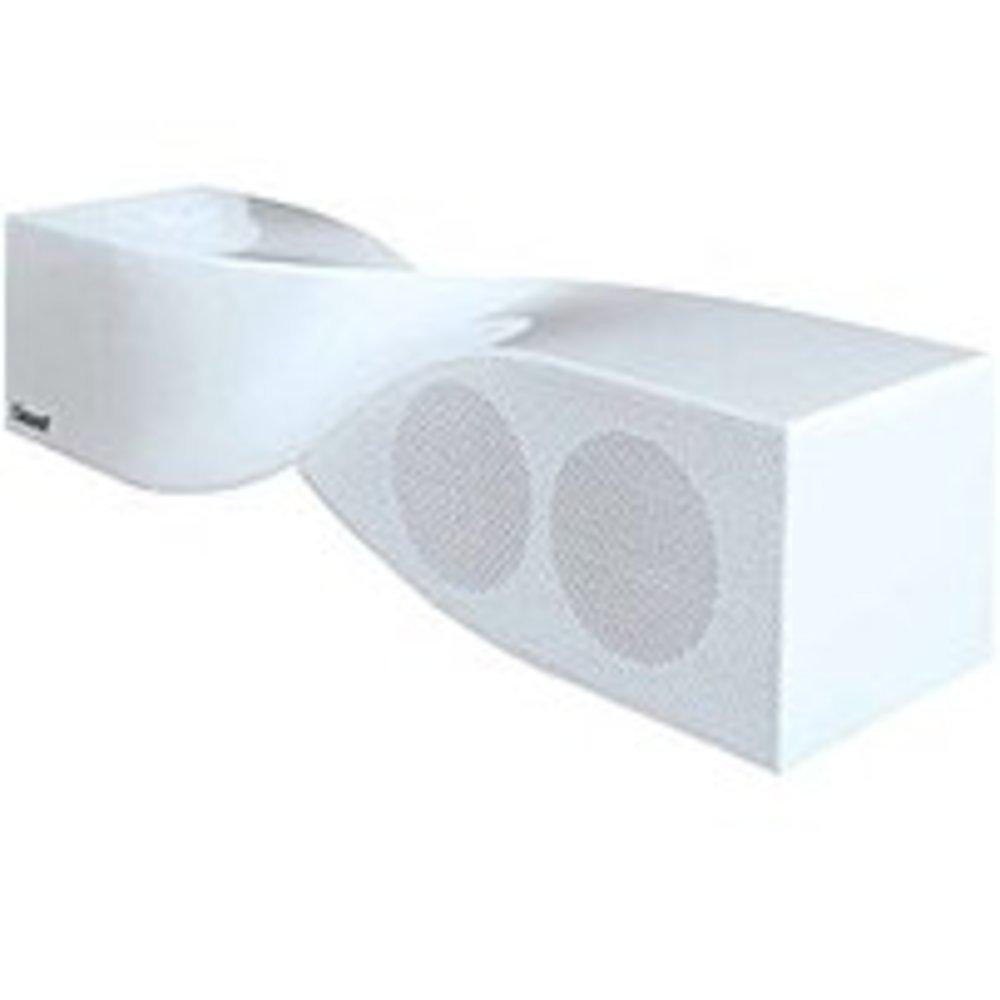
Image: The iSound Twist Portable Bluetooth Wireless Speaker in white, showcasing its unique twisted design.
Садржај пакета
- iSound Twist Portable Bluetooth Wireless Speaker
- УСБ кабл за пуњење
- 3.5 мм AUX улазни кабл
- Кориснички приручник (овај документ)
Сетуп
1. Пуњење звучника
Before initial use, fully charge the iSound Twist speaker. Connect the provided USB charging cable to the speaker's USB charging port and the other end to a powered USB source (e.g., computer, USB wall adapter). The charging indicator light will illuminate during charging and turn off when fully charged. A full charge provides up to 5 hours of continuous play.

Image: Rear panel of the speaker, highlighting the USB charging port, ON/OFF switch, and AUX IN port.
2. Укључивање/искључивање
Locate the ON/OFF switch on the rear panel of the speaker. Slide the switch to the "ON" position to power on the device. Slide it to the "OFF" position to power off.
3. Блуетоотх упаривање
- Ensure the speaker is powered on and within close proximity to your Bluetooth-enabled device (e.g., smartphone, tablet, laptop).
- The speaker will automatically enter Bluetooth pairing mode. A blue indicator light will flash, indicating it is discoverable.
- На свом уређају идите до подешавања Bluetooth-а и омогућите Bluetooth.
- Тражи available devices. The iSound Twist speaker should appear in the list, typically named "iSound Twist" or similar.
- Select the speaker from the list to initiate pairing. If prompted for a password, enter "0000".
- Once successfully paired, the blue indicator light on the speaker will stop flashing and remain solid. You will hear an audible confirmation.
- Ваш уређај је сада повезан и можете бежично стримовати звук.
4. Повезивање AUX улаза
For devices without Bluetooth capability, or if you prefer a wired connection, use the provided 3.5mm AUX cable.
- Connect one end of the 3.5mm AUX cable to the AUX IN port on the rear of the speaker.
- Connect the other end of the cable to the headphone jack or audio output port of your audio device.
- Звучник ће се аутоматски пребацити у режим AUX улаза.
Упутство за употребу
Функције контролне табле
The speaker features onboard controls located on its top surface for convenient operation.
- Дугме за напајање / режим рада: Press and hold to power on/off. Short press to switch between Bluetooth and AUX modes.
- Дугме за репродукцију/паузирање/позивање: Short press to play or pause music. During an incoming call, short press to answer or end the call. Press and hold to reject an incoming call.
- Дугме за појачавање јачине звука/следећу нумеру: Short press to increase volume. Press and hold to skip to the next track.
- Дугме за смањивање јачине звука/претходну нумеру: Short press to decrease volume. Press and hold to go to the previous track.
Хандс-фрее позивање
When connected via Bluetooth, the iSound Twist speaker's built-in microphone allows for hands-free phone calls.
- Одговарање на позив: When a call comes in, the music will pause. Press the Play/Pause/Call button once to answer.
- Завршавање позива: Током позива, притисните дугме Репродукуј/Паузирај/Позови једном да бисте завршили позив.
- Одбијање позива: Press and hold the Play/Pause/Call button to reject an incoming call.
Одржавање
- Држите звучник даље од воде, влаге и екстремних температура.
- Очистите звучник меком, сувом крпом. Не користите абразивна средства за чишћење или раствараче.
- Избегавајте испуштање или излагање звучника јаким ударима.
- When not in use for extended periods, store the speaker in a cool, dry place and charge it periodically to maintain battery health.
Решавање проблема
| Проблем | Решење |
|---|---|
| Звучник се не укључује. | Ensure the battery is charged. Connect the speaker to a power source using the USB cable and try again. |
| Није могуће упаривање преко Bluetooth-а. |
|
| Нема звука или је јачина звука ниска. |
|
| Квалитет позива је лош. |
|
Спецификације
| Феатуре | Детаљ |
|---|---|
| Назив модела | ИСОУНД-1691 |
| Бранд | иСоунд |
| Спеакер Типе | Торањ |
| Посебна карактеристика | Уграђен микрофон |
| Препоручена употреба | For Smartphones or Tablets, Music Players |
| Компатибилни уређаји | Десктоп, лаптоп, МП3 плејер, пројектор, паметни телефон, таблет, телевизор |
| Конфигурација канала сурроунд звука | 2.0 |
| Боја | Бела |
| Тежина артикла | 13.6 унци |
| Је водоотпоран | ФАЛСЕ |
| Бежична комуникациона технологија | Блуетоотх |
| Величина звучника | 0.75 инча |
| Извор напајања | Баттери Поверед |
| Број батерија | Потребна је 1 литијум-јонска батерија. (укључено) |
| Тип аудио драјвера | Динамички возач |
| Величина аудио драјвера | 40 милиметара |
| Димензије производа | 5 к 4 к 11.75 инча |
| Максимална излазна снага звучника | 6 Ваттс |
| Технологија повезивања | Бежични |
| Режим аудио излаза | Стерео |
| Тип монтаже | Таблетоп Моунт |
Званични видео производа
Video: Official product video for the iSound Twist Bluetooth Speaker, demonstrating its features and design. This video showcases the speaker's ability to stream audio from various devices and handle calls.
Гаранција и подршка
The iSound Twist Portable Bluetooth Wireless Speaker comes with a Ограничена гаранција. For specific warranty terms, conditions, and support inquiries, please refer to the warranty card included in your product packaging or visit the official iSound webсајту.
For further assistance, please contact iSound customer support.