
Увод
The Intermatic ET9250 is a 4-circuit relay module designed for use with the Intermatic ET90000 series controllers. This module serves as a replacement part or an upgrade component, allowing for the expansion of the controller's circuit capacity. Each ET9250 module includes four SPDT (Single Pole Double Throw) 30 amp relays, facilitating robust control over various electrical loads.
Важне информације о безбедности
Please read and understand all instructions before installing or operating this device. Failure to follow these instructions could result in property damage, personal injury, or death.
- Искључите напајање: Always disconnect power at the circuit breaker or fuse box before installing or servicing this module.
- Квалификовано особље: Installation and servicing should only be performed by qualified electrical personnel.
- Локални кодови: Све ожичење мора бити у складу са националним и локалним електричним прописима.
- Правилна употреба: Do not use this module for purposes other than those specified in this manual.
- Услови животне средине: Ensure the module is installed in an environment free from excessive moisture, dust, and extreme temperatures.
Производ је завршенview
The ET9250 module is a compact circuit board designed to integrate seamlessly with compatible Intermatic ET90000 series controllers. It provides additional switching capabilities for your system.
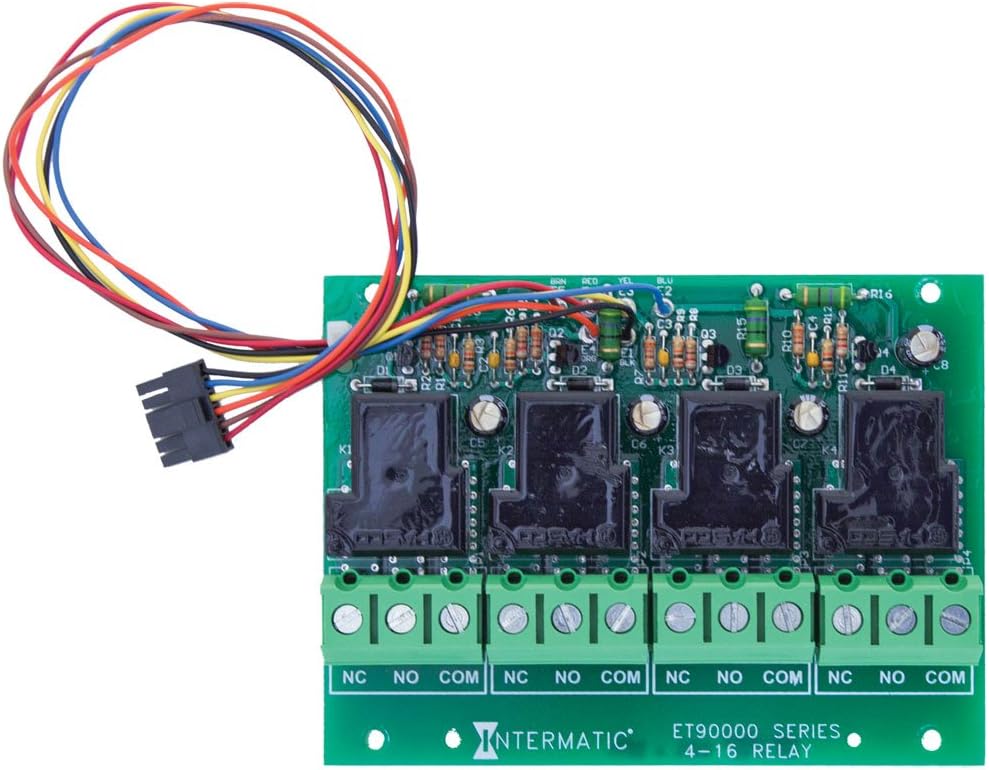
Кључне компоненте укључују:
- Four SPDT 30 Amp Релеји: These relays (K1-K4) are the primary switching components, capable of handling loads up to 30 amps.
- Терминални блокови: Screw terminals for connecting external loads, clearly marked NC, NO, and COM for each circuit.
- Кабелски свежањ: A multi-colored wire harness for connecting the module to the main ET90000 series controller.
Инсталација и подешавање
The ET9250 relay module is designed for integration with specific Intermatic ET90000 series controllers, including models such as ET90415CR, ET98015CR, ET91215CR, and ET91615CR. It comes in 4-circuit packs, allowing for system expansion up to a maximum of 16 circuits.
Кораци инсталације:
- Искључивање струје: Ensure all power to the ET90000 series controller is disconnected at the main circuit breaker before beginning installation.
- Access Controller: Open the ET90000 series controller enclosure to access the internal components.
- Положај модула: Carefully align the ET9250 module with the designated expansion slot or mounting points within the controller.
- Connect Wire Harness: Connect the multi-colored wire harness from the ET9250 module to the corresponding connector on the main controller board. Ensure a secure and correct connection.
- Безбедносни модул: Secure the module in place using any provided fasteners or clips.
- Wiring Loads: Connect the electrical loads to the NC, NO, and COM terminals on the ET9250 module as required by your application. Refer to the specific wiring diagram for your ET90000 series controller for detailed instructions.
- Затвори прилог: Once all connections are made and verified, close the controller enclosure.
- Врати снагу: Restore power to the controller at the main circuit breaker.
- Конфигурација система: Follow the instructions in your ET90000 series controller manual to configure the newly added circuits.
Операција
The ET9250 relay module operates under the control of the main ET90000 series controller. Each of the four SPDT 30 amp relays can be programmed and controlled independently by the timer or automation functions of the primary unit. When the controller sends a signal, the corresponding relay will switch, opening or closing the circuit to which it is connected. This allows for automated control of various electrical devices or systems.
Одржавање
The Intermatic ET9250 relay module is designed for reliable, long-term operation with minimal maintenance. However, periodic inspection can help ensure continued performance.
- Визуелни преглед: Annually inspect the module and its connections for any signs of damage, corrosion, or loose wiring.
- чистоћа: Keep the controller enclosure clean and free of dust and debris, which can impede proper operation and heat dissipation.
- Заштита животне средине: Ensure the module remains protected from moisture and extreme temperatures as per its operating specifications.
- Искључивање струје: Увек искључите напајање пре него што извршите било какву инспекцију или чишћење.
Решавање проблема
If you experience issues with your ET9250 relay module, consider the following troubleshooting steps:
- Нема снаге за оптерећење: Verify that the main controller is receiving power and is programmed correctly. Check the wiring connections to the ET9250 module and the load for looseness or damage.
- Incorrect Switching: Ensure the programming in the main ET90000 series controller is correct for the desired switching action. Check for any error codes or indicators on the main controller.
- Модул није препознат: If the main controller does not recognize the newly installed module, ensure the wire harness is securely connected and that the module is properly seated. Refer to the main controller's manual for module detection procedures.
- Преоптерећење: If a relay is not switching or appears damaged, check the connected load to ensure it does not exceed the 30 amp rating of the relay.
- Стручна помоћ: For persistent issues or if you are unsure about any troubleshooting steps, contact a qualified electrician or Intermatic customer support.
Техничке спецификације
| Спецификација | Детаљ |
|---|---|
| Број модела | ЕТ9250 |
| Бранд | Интерматиц |
| Тип контакта | SPDT (Једнополни двоструки преклопник) |
| Цуррент Ратинг | 30 Amps |
| Максимална струја пребацивања | 30 Amps |
| Број кола | 4 |
| Тип монтаже | Surface Mount (within controller) |
| Оперативни режим | Automatic (controlled by main unit) |
| Димензије производа | 5 к 3.75 к 1.25 инча |
| Тежина артикла | 4.8 унци |
| УПЦ | 078275127746 |
Информације о гаранцији
For detailed warranty information regarding the Intermatic ET9250 4-Circuit Relay Module, please refer to the manufacturer's official warranty description provided with your product or visit the Intermatic webсајт. Услови гаранције могу да се разликују.
Корисничка подршка
If you require further assistance, have questions about installation, operation, or troubleshooting that are not covered in this manual, please contact Intermatic customer support. You can typically find contact information on the Intermatic website or within the documentation provided with your ET90000 series controller.