
1. Увод
Хвала вам на куповиниasing the Medeli M30 61-Key Professional Keyboard. This instrument is designed to provide a rich musical experience with its touch-sensitive keys, extensive voice library, and versatile accompaniment styles. This manual will guide you through the setup, operation, and maintenance of your new keyboard.
Садржај пакета
- Medeli M30 61-Key Professional Keyboard
- Повер Адаптер
- Мусиц Рест
- Кориснички приручник (овај документ)
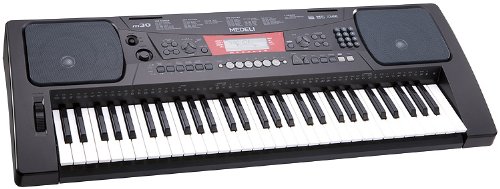
Figure 1: Medeli M30 61-Key Professional Keyboard. This image shows the keyboard from a front-angle view, highlighting its 61 keys, control panel, and display.
2. Безбедносна упутства
- Напајање: Користите само наведени адаптер за напајање. Уверите се да је јачина звукаtagе одговара вашем локалном извору напајања.
- Вода и влага: Do not expose the keyboard to water or moisture. Avoid placing liquids near the instrument.
- вентилација: Do not block ventilation openings. Ensure adequate airflow around the keyboard.
- Извори топлоте: Keep the keyboard away from heat sources such as radiators, heat registers, stoves, or other apparatus (including ampлифиерс) који производе топлоту.
- Чишћење: Clean only with a dry cloth. Do not use liquid cleaners or aerosols.
- Сервисирање: Не покушавајте сами да сервисирате овај производ. Све сервисирање препустите квалификованом сервисном особљу.
3. Подешавање
3.1 Распакивање
Пажљиво извадите све компоненте из амбалаже. Сачувајте амбалажу за будући транспорт или складиштење.
3.2 Прикључак за напајање
- Ensure the keyboard's power switch is in the "OFF" position.
- Connect the power adapter to the DC IN jack on the rear panel of the keyboard.
- Укључите адаптер за напајање у стандардну утичницу.
- Turn the power switch to the "ON" position to power on the keyboard.
3.3 Инсталација сталака за ноте
Insert the music rest into the designated slots on the top panel of the keyboard. Ensure it is securely seated.
4. Упутство за употребу
4.1 Основна репродукција
- Укључено: Press the [POWER] button to turn on the keyboard.
- Подешавање јачине звука: Користите дугме [MASTER VOLUME] да бисте подесили укупни ниво звука.
- Играње тастера: The M30 features 61 touch-sensitive keys. The harder you press, the louder the sound.
4.2 Избор гласова
The M30 offers 359 different voices (instrument sounds).
- Притисните дугме [ВОИЦЕ].
- Use the numeric keypad or the [+] / [-] buttons to select a voice number.
- The selected voice name will appear on the display.
4.3 Selecting Styles
The keyboard includes 150 accompaniment styles.
- Притисните дугме [СТИЛЕ].
- Use the numeric keypad or the [+] / [-] buttons to select a style number.
- Press [START/STOP] to begin the accompaniment.
- Adjust the style volume using the [ACCOMPANIMENT VOLUME] button (if available, or general volume).
4.4 Playing Songs
The M30 has 100 built-in songs and 2 demo songs.
- Притисните дугме [СОНГ].
- Use the numeric keypad or the [+] / [-] buttons to select a song number.
- Press [PLAY/PAUSE] to start or pause the song.
- Press [STOP] to stop the song.
5. Повезивање
5.1 УСБ веза
The Medeli M30 features a USB port for connecting to a computer. This allows for MIDI data transfer, enabling the keyboard to be used as a MIDI controller or to connect with music software.
- Connect a standard USB cable (Type B to Type A, not included) from the keyboard's USB port to your computer's USB port.
- Your computer should automatically recognize the keyboard as a MIDI device.
- Refer to your music software's documentation for instructions on setting up MIDI input devices.
6. Одржавање
6.1 Чишћење
- Обришите површину тастатуре меком, сувом крпом.
- За тврдокорну прљавштину, благо дampнатопите крпу водом и благим детерџентом, а затим одмах обришите сувим.
- Не користите абразивна средства за чишћење, воскове или раствараче.
6.2 Складиштење
- When not in use for extended periods, disconnect the power adapter.
- Чувајте тастатуру на хладном и сувом месту, даље од директне сунчеве светлости и екстремних температура.
- Consider using a dust cover to protect the keys and control panel.
КСНУМКС. Решавање проблема
| Проблем | Могући узрок | Решење |
|---|---|---|
| Нема звука | Јачина звука је прениска или искључена. | Increase the [MASTER VOLUME] knob. |
| Тастатура се не укључује | Адаптер за напајање није повезан или је неисправан. | Ensure power adapter is securely connected and plugged into a working outlet. Check power switch position. |
| Кључеви не реагују | Keyboard may be in a specific mode (e.g., demo mode). | Try powering off and on again. Refer to the operating section for specific mode exits. |
8. Спецификације
| Феатуре | Детаљ |
|---|---|
| Кључеви | 61, Touch-Sensitive |
| Гласови | 359 |
| Стилови | 150 |
| Песме | 100 (plus 2 Demo Songs) |
| Повезивање | УСБ (МИДИ) |
| Димензије (Д к Ш к В) | 93.98 к 35.56 к 15.24 цм |
| Тежина | 6.8 кг |
| Број модела | М30 |
| УПЦ/ГТИН | 857285003529 |
9. Гаранција и подршка
For warranty information and technical support, please refer to the warranty card included with your product or visit the official Medeli webсајт. Сачувајте доказ о куповини за евентуалне рекламације по гаранцији.
Произвођач: Медели
Webсајт: www.medeli.com (Напомена: Ово је резервисано место URL, погледајте актуелну документацију производа за исправан контакт за подршку.)