
Увод
This manual provides detailed instructions for the operation and maintenance of your TIMEX Expedition Analog-Digital Watch, model MF46. Please read this manual thoroughly to ensure proper use and to maximize the lifespan of your timepiece.
Пазити наview
The TIMEX Expedition Analog-Digital Watch MF46 combines traditional analog timekeeping with digital functionalities. It features a durable design suitable for various activities, including water resistance up to 50 meters.
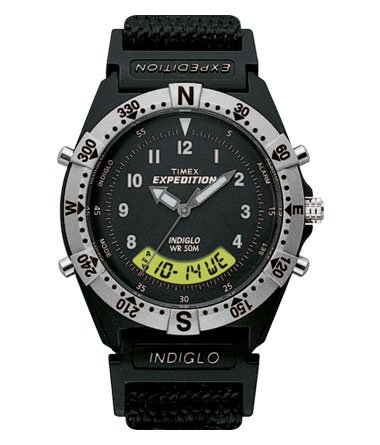
Слика 1: Фронт view of the TIMEX Expedition Analog-Digital Watch MF46. This image displays the TIMEX Expedition Analog-Digital Watch MF46. It features a black dial with white hour markers and hands, a digital display showing date and day, and a silver-toned bezel with compass markings (N, E, S, W) and degree indicators. The watch has multiple pushers on the sides and a crown for adjustments. The strap is black fabric.
Сетуп
1. Подешавање аналогног времена
- Повуците круницу (која се налази на десној страни кућишта сата) у први положај.
- Окрените круницу у смеру казаљке на сату или супротно од смера казаљке на сату да бисте подесили казаљке за сате и минуте на жељено време.
- Push the crown back into its original position to start the analog timekeeping.
2. Setting Digital Time and Date
The digital display can be adjusted using the pushers located on the sides of the watch case. Refer to the watch diagram (Figure 1) for pusher locations.
- Press the "MODE" pusher (typically on the bottom left) repeatedly to cycle through different digital display modes (e.g., Time, Date, Alarm, Stopwatch).
- When in the desired setting mode (e.g., Time/Date), press and hold the "SET" pusher (typically on the bottom right) until the digits begin to flash.
- Use the "ADJUST" or "START/STOP" pushers (typically top left/right) to increment or decrement the flashing digits.
- Press the "MODE" pusher to move to the next setting field (e.g., hours, minutes, month, day, year).
- Once all settings are complete, press the "SET" pusher again to exit the setting mode.
Упутство за употребу
1. Digital Display Modes
Press the "MODE" pusher to cycle through the following functions:
- Временски режим: Displays current digital time (hours, minutes, seconds) and often the day of the week.
- Режим датума: Displays the current month, day, and year.
- Режим аларма: Омогућава подешавање и активирање звучног аларма.
- Режим штоперице: Functions as a timer for measuring elapsed time.
2. INDIGLO ноћно светло
To illuminate the watch face in low-light conditions, press the INDIGLO pusher (typically the top right pusher or the crown itself, depending on the model). The entire dial will glow for a few seconds.
3. Отпорност на воду
This watch is water resistant to 50 meters (164 feet). This rating means it is suitable for short periods of recreational swimming, but not for diving or snorkeling. Do not operate pushers or the crown while the watch is wet or submerged, as this can compromise the water resistance seal.
Одржавање
1. Чишћење
Редовно чистите сат меком крпомamp cloth. For the fabric strap, a mild soap solution can be used, followed by thorough rinsing and air drying. Avoid harsh chemicals or abrasive materials.
2. Замена батерије
The watch is powered by a quartz movement, which requires a battery. When the watch stops or the INDIGLO light dims significantly, the battery may need replacement. It is recommended to have the battery replaced by a qualified watch technician to ensure proper sealing and maintain water resistance.
3. Складиштење
When not in use, store your watch in a cool, dry place away from direct sunlight and extreme temperatures. Avoid exposing the watch to strong magnetic fields.
Решавање проблема
- Сат не ради: Проверите да ли је круница потпуно угурана. Ако сат и даље не ради, можда је потребно заменити батерију.
- Digital Display Blank or Faint: Ово обично указује на слабу батерију.
- Вода унутра: Вожња If moisture appears inside the watch, have it inspected by a professional immediately to prevent damage.
- Нетачно време/датум: Refer to the "Setting Analog Time" and "Setting Digital Time and Date" sections for adjustment procedures.
Спецификације
| Број модела | МФ46 |
| Боја бирања | Греи |
| Цасе Схапе | Роунд |
| Банд Цолор | Црно |
| Банд Материал | Фабриц |
| Мовемент Типе | кварц |
| Дисплаи Типе | Аналогно-Дигитални |
| Дубина водоотпорности | 50 метара (164 стопа) |
| Материјал кућишта | Пластика |
| Тежина артикла | 140 г |
Гаранција и подршка
1. Информације о гаранцији
This TIMEX Expedition Analog-Digital Watch MF46 comes with a 1 године гаранције произвођача. This warranty covers manufacturing defects under normal use. It does not cover damage resulting from improper handling, accidents, unauthorized repairs, or normal wear and tear.
2. Корисничка подршка
For warranty claims, service, or technical assistance, please contact TIMEX customer support. Refer to the official TIMEX webвеб-сајт или вашу документацију о куповини за контакт податке специфичне за ваш регион.