
1. Увод
This manual provides essential information for the safe and efficient operation of your Alto Professional TMX160 DFX 16-Channel Powered Mixer. The TMX160 DFX is a versatile audio mixing console featuring 16 input channels, a built-in Alesis digital effects processor, and an integrated power amplifier capable of delivering 750W stereo output at 4Ω or 1500W mono output at 8Ω. It includes 12 XLR microphone inputs with phantom power, 16 line inputs, and stereo RCA inputs, along with a 3-band equalizer on each mono and stereo channel.
Please read this manual thoroughly before using the product to ensure proper setup and operation. Keep this manual for future reference.
2. Безбедносне информације
Увек се придржавајте основних мера безбедности када користите овај производ како бисте смањили ризик од пожара, струјног удара и повреда особа.
- Извор напајања: Уређај повежите само на утичницу наизменичне струје наведене јачинеtage.
- уземљење: Ensure the unit is properly grounded. Do not defeat the safety purpose of the polarized or grounding-type plug.
- Вода и влага: Do not expose this equipment to rain or moisture. Do not use near water.
- вентилација: Обезбедите одговарајућу вентилацију. Не блокирајте вентилационе отворе.
- топлота: Не постављајте у близини извора топлоте као што су радијатори, грејни регистри, пећи или други уређаји (укључујући ampлифиерс) који производе топлоту.
- Каблови: Заштитите каблове за напајање од ходања или прикљештења.
- Сервисирање: Сва сервисирања препустите квалификованом сервисном особљу. Не покушавајте сами да сервисирате овај производ.
3. Подешавање
3.1 Распакивање и преглед
Carefully unpack the TMX160 DFX mixer and inspect it for any signs of damage that may have occurred during transit. If any damage is found, contact your dealer immediately.
3.2 Повезивање напајања
Connect the supplied AC power cord to the mixer's power input and then to a suitable grounded AC power outlet. Ensure the mixer's power switch is in the OFF position before connecting to power.
3.3 Connecting Inputs
The TMX160 DFX offers a variety of input options:
- Microphone Inputs (MIC 1-12): Use XLR cables to connect microphones to the 12 XLR inputs. Phantom power (+48V) can be activated for condenser microphones.
- Line Inputs (Channels 1-16): Use 1/4-inch TRS or TS cables for line-level instruments or devices. Channels 13/14 and 15/16 are stereo line inputs, also accepting RCA for 2-Track In.
- 2-Track In: Connect external audio sources like CD players or media players using RCA cables.
3.4 Повезивање излаза
Connect your speakers or monitoring system to the appropriate outputs:
- Излази за звучнике: Connect passive speakers to the power amplifier outputs. Ensure the impedance of your speakers matches the mixer's output capabilities (e.g., 4Ω for 750W stereo, 8Ω for 1500W mono).
- Monitor/Aux Outputs: Use these outputs to send signals to stagе монитори или екстерни процесори ефеката.
- Stereo Out/Mono Out: These outputs provide the main mix signal for recording or connecting to additional sound systems.
3.5 Почетно укључивање
After all connections are made, ensure all channel faders and the main mix fader are at their lowest settings. Turn on any connected devices (e.g., microphones, instruments) first, then power on the TMX160 DFX mixer. Finally, turn on your power ampлифиерс или активни говорници.
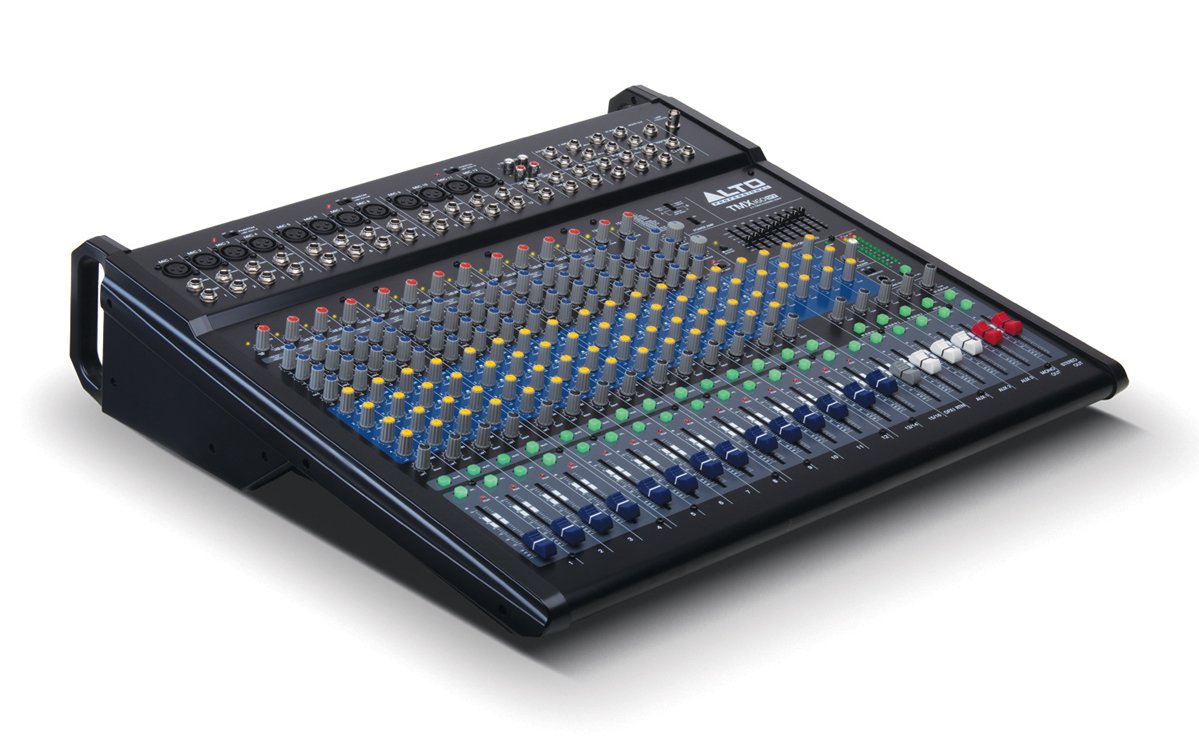
Слика 1: Предња плоча прекоview of the Alto Professional TMX160 DFX mixer. This image shows the comprehensive layout including microphone and line inputs at the top, channel controls in the middle, and faders at the bottom.
4. Операција
4.1 Контроле канала
Each input channel (1-16) features a set of controls to shape its sound:
- ДОБИТАК: Adjusts the input sensitivity for the connected microphone or line-level device. Set this to achieve a strong signal without clipping (distortion).
- ЕК (висок, средњи, низак): A 3-band equalizer allows you to boost or cut frequencies (treble, midrange, bass) for each channel.
- АУКС шаље: Controls the amount of signal sent from the channel to the auxiliary outputs (e.g., for monitors or external effects).
- ПАН: Positions the channel's signal within the stereo field (left to right).
- LEVEL Fader: Контролише укупну јачину звука канала у главном миксу.
4.2 Главни део
The master section controls the overall output of the mixer:
- Main Mix Faders: Control the overall volume of the stereo output.
- DFX (Digital Effects) Controls: Select and adjust parameters for the built-in Alesis digital effects.
- Stereo Graphic EQ: A 7-band graphic equalizer allows for fine-tuning the overall frequency response of the main mix.
- Повер Amp Контроле: Adjust the output level and mode (Stereo/Mono) for the integrated power ampлифиер.
4.3 Built-in Alesis Digital Effects
The TMX160 DFX features a high-quality Alesis digital effects processor. Use the DFX controls in the master section to browse and select from various effects such as reverb, delay, chorus, and more. Adjust the effect send levels on individual channels and the overall effect return level in the master section to blend the effects into your mix.
Слика 2: Детаљно view of the input channels, showing individual GAIN, EQ, AUX, PAN, and LEVEL controls for precise audio shaping.
5. Одржавање
Proper maintenance ensures the longevity and optimal performance of your TMX160 DFX mixer.
- Чишћење: Use a soft, dry cloth to clean the exterior of the mixer. Avoid using abrasive cleaners, solvents, or waxes.
- прашина: Regularly remove dust from the ventilation openings to prevent overheating.
- Складиштење: Када се миксер не користи дуже време, чувајте га на хладном и сувом месту, даље од директне сунчеве светлости и екстремних температура.
- Фејдери и дугмад: Avoid applying excessive force to faders and knobs. Keep them free from dust and debris.
КСНУМКС. Решавање проблема
If you encounter issues with your TMX160 DFX, refer to the following common problems and solutions:
- Нема напајања:
- Check if the power cord is securely connected to both the mixer and the AC outlet.
- Проверите да ли је АЦ утичница функционална.
- Ensure the power switch on the mixer is in the ON position.
- Нема излаза звука:
- Проверите све кабловске везе на улазу и излазу.
- Ensure channel GAIN and LEVEL faders are appropriately set.
- Verify the Main Mix faders are raised.
- Check if connected speakers or power amplifiers are turned on and functioning.
- Осигурајте снагу Amp controls are set correctly for your speaker configuration.
- Изобличен звук:
- Reduce the GAIN setting for the input channel.
- Lower the channel LEVEL fader or Main Mix faders.
- Проверите да ли има оштећених каблова.
- Effects Not Heard:
- Ensure the DFX send controls on the channels are turned up.
- Verify the DFX return level in the master section is raised.
- Check the selected effect program.
If the problem persists after trying these steps, contact Alto Professional customer support.
7. Спецификације
| Феатуре | Спецификација |
|---|---|
| Бранд | Алто Профессионал |
| Модел | TMX160 DFX |
| Број канала | 16 |
| Тежина артикла | 12.5 килограма |
| Технологија повезивања | Аукилиари |
| Аудио улаз | XLR, RCA, Line, AUX, 2-Track |
| Произвођач | у музици |
| ASIN | B007T1VZ52 |
| Power Output (Stereo) | 750 В @ 4 Ω |
| Power Output (Mono) | 1500 В @ 8 Ω |
| Еквилајзер | 3-band EQ per channel, Stereo Graphic EQ |
| Ефекти | Built-in Alesis Digital Effector (24-bit A/D and D/A converters) |
| Димензије (Ш к Д к В) | Прибл. 21.9 к 22.2 к 5.7 инча (555 к 565 к 145 мм) |
8. Гаранција и подршка
For warranty information and technical support, please refer to the documentation included with your product or visit the official Alto Professional webсајт. Сачувајте рачун као доказ о куповини за потребе гаранције.
For further assistance, you may contact Alto Professional customer service directly.