
Увод
The Jabra Music Street2 Bluetooth Stereo Headset is designed to provide high-quality audio and hands-free communication. This manual provides essential information for the proper use, maintenance, and troubleshooting of your device. Please read it carefully before use.
Сетуп
1. Пуњење слушалица
Before first use, fully charge the headset. Connect the micro-USB charging cable to the charging port on the headset and the other end to a USB power source.
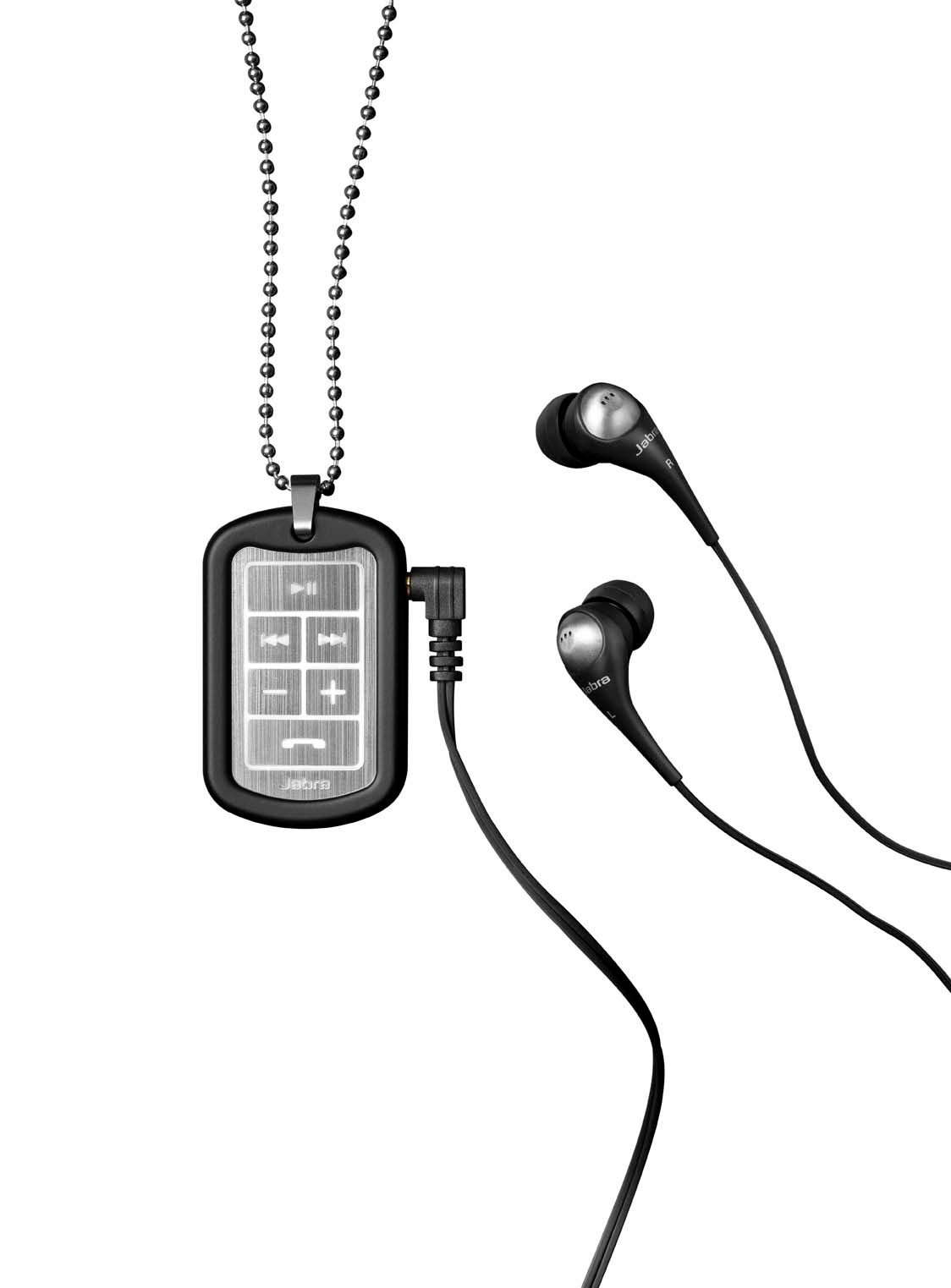
Image: The Jabra Music Street2 headset, highlighting the micro-USB charging port located on the side of the control unit.
- Потпуно пуњење обично траје отприлике 2 сата.
- ЛЕД индикатор ће приказивати статус пуњења (нпр. црвена за пуњење, плава за потпуно напуњено).
2. Упаривање са Блуетоотх уређајем
- Уверите се да су слушалице искључене.
- Press and hold the Multi-function button (usually the play/pause button) for approximately 5-7 seconds until the LED indicator flashes blue rapidly. This indicates pairing mode.
- На уређају који подржава Bluetooth (паметни телефон, таблет итд.), идите на подешавања Bluetooth-а и омогућите Bluetooth.
- Тражи available devices. "Jabra Street2" should appear in the list.
- Select "Jabra Street2" to connect. If prompted for a passcode, enter "0000" (four zeros).
- Once successfully paired, the LED indicator will flash blue slowly.
The headset can remember multiple paired devices but can only be connected to one at a time.
Упутство за употребу
Укључивање/искључивање
- Укључено: Притисните и држите вишефункционално дугме док ЛЕД диода не затрепери плаво.
- Искључивање: Press and hold the Multi-function button until the LED flashes red and then turns off.
Контрола музике
- Пусти/паузирај: Притисните вишенаменско дугме једном.
- Следећа нумера: Press the "Next Track" button (usually marked with a forward arrow).
- Претходни запис: Press the "Previous Track" button (usually marked with a backward arrow).
- Појачавање звука: Притисните дугме „+“.
- Смањивање јачине звука: Притисните дугме „-“.
Управљање позивима
- Одговори на позив: Притисните вишенаменско дугме једном.
- Заврши позив: Притисните вишефункционални тастер једном током позива.
- Одбиј позив: Притисните и држите вишенаменско дугме 2 секунди.
- Поновно бирање последњег броја: Двапут притисните вишефункционално дугме када нисте у току позива.
- Гласовно позивање: Press the Multi-function button once when not on a call (if supported by your phone).
The headset automatically switches between music and calls.
Одржавање
- Keep the headset dry. Moisture can damage the electronic circuits.
- Избегавајте екстремне температуре. Високе температуре могу скратити век трајања електронских уређаја, оштетити батерије и деформисати или истопити одређене пластике.
- Do not attempt to open the headset. Unauthorized modifications can damage the unit and void your warranty.
- Clean the headset with a soft, dry cloth. Do not use harsh chemicals or detergents.
- Чувајте слушалице на хладном и сувом месту када их не користите дуже време.
Решавање проблема
Но Повер
- Ensure the headset is fully charged. Connect it to a power source and check the charging indicator.
Није могуће упарити са уређајем
- Make sure the headset is in pairing mode (LED flashing blue rapidly).
- Уверите се да је Bluetooth омогућен на вашем уређају и да је у домету (обично 10 метара или 33 стопе).
- Try turning off and on both the headset and your Bluetooth device.
- If previously paired, try deleting "Jabra Street2" from your device's Bluetooth list and re-pairing.
Нема звука или је лош квалитет звука
- Проверите нивое јачине звука и на слушалицама и на повезаном уређају.
- Уверите се да су слушалице правилно повезане са вашим уређајем.
- Приближите се уређају да бисте избегли сметње.
- Ensure the ear buds are correctly inserted and fit snugly to block external noise.
Calls Not Switching Automatically
- Verify that the headset is the active audio device for calls on your phone's Bluetooth settings.
- Some phone models may require manual selection of the audio output during a call.
Спецификације
| Назив модела | Jabra Music Street2 |
| Блуетоотх верзија | 3.0 + ЕДР |
| Домет | До 10 метара (33 стопе) |
| Талк Тиме | До 8 сати |
| Време приправности | До 9.5 дана |
| Време пуњења | Отприлике 2 сата |
| Повезивање | Bluetooth, 3.5 mm Jack (for wired connection if applicable) |
| Карактеристике | Virtual surround sound, power bass, noise-blocking ear buds, automatic music/call switching |
Гаранција и подршка
Jabra products are covered by a limited warranty. For specific warranty terms and conditions, please refer to the warranty card included with your product or visit the official Jabra webсајту.
For technical support, frequently asked questions, or to download the latest software/firmware updates, please visit the official Jabra support page:
You may also contact Jabra customer service directly for assistance.


