
1. Увод
The D-Link GO-SW-5G is a 5-Port Unmanaged Gigabit Desktop Switch designed for home and small office environments. This device provides a simple and cost-effective solution to expand your network connectivity, offering high-speed Gigabit Ethernet ports for reliable data transfer. It incorporates D-Link's Green Technology for energy efficiency, reduced heat generation, and extended product lifespan.
This switch is a plug-and-play device, requiring no complex configuration or software installation, making it easy to integrate into an existing network.
2. Садржај пакета
Молимо вас да проверите да ли су све ставке наведене у наставку укључене у ваш пакет:
- D-Link GO-SW-5G 5-Port Gigabit Desktop Switch
- Повер Адаптер
- Водич за брзу инсталацију
Ако било који предмет недостаје или је оштећен, обратите се продавцу за помоћ.
3. Упутства за подешавање
The D-Link GO-SW-5G switch is designed for easy plug-and-play installation. Follow these steps to set up your device:
3.1. Повежите адаптер за напајање
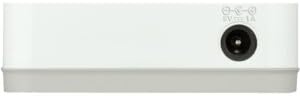
- Locate the power input port on the side of the D-Link GO-SW-5G switch.
- Прикључите приложени адаптер за напајање на овај порт.
- Укључите други крај адаптера за напајање у стандардну електричну утичницу.
- The power LED on the front of the switch will illuminate, indicating that the device is receiving power.

Слика 1: Сиде view of the D-Link GO-SW-5G switch with the power input port.
3.2. Повежите се на своју мрежу
- Using a standard Ethernet cable (RJ45), connect one end to an available LAN port on your router (not your modem).
- Connect the other end of this Ethernet cable to any of the five available ports on the back of the D-Link GO-SW-5G switch.
- The corresponding LED on the front of the switch will light up, indicating an active connection.
Слика 2: Позади view of the D-Link GO-SW-5G switch with five Ethernet ports.
3.3. Connect Network Devices
- Connect your network devices (e.g., computers, gaming consoles, network printers, smart TVs) to the remaining available Ethernet ports on the D-Link GO-SW-5G switch using Ethernet cables.
- Each connected device will have its corresponding LED on the front of the switch illuminate, confirming a successful connection.

Слика 3: Фронт view of the D-Link GO-SW-5G switch showing active port LEDs.
4. Упутство за употребу
The D-Link GO-SW-5G is an unmanaged switch, meaning it operates automatically without requiring user configuration. Once connected as described in the Setup section, it will begin forwarding network traffic between connected devices.
- Automatic Negotiation: The switch automatically detects the network speed (10/100/1000 Mbps) and duplex mode (half/full) of connected devices and adjusts accordingly.
- Аутоматски MDI/MDIX: All ports support automatic MDI/MDIX crossover, eliminating the need for crossover cables when connecting to other switches or hubs.
- ЛЕД индикатори: Each port has an LED indicator on the front panel. A lit LED indicates an active link, and blinking indicates network activity.
5. Одржавање
To ensure optimal performance and longevity of your D-Link GO-SW-5G switch, consider the following maintenance guidelines:
- Пласман: Place the switch in a cool, dry location away from direct sunlight, heat sources, and excessive moisture. Ensure adequate ventilation around the device.
- Чишћење: Use a soft, dry cloth to clean the exterior of the switch. Avoid using liquid or aerosol cleaners, as they may damage the device.
- Управљање кабловима: Keep Ethernet cables neatly organized to prevent tangles and accidental disconnections.
- Циклус напајања: If you experience network issues, a simple power cycle (unplugging the power adapter for 10 seconds and then plugging it back in) can often resolve minor problems.
КСНУМКС. Решавање проблема
If you encounter issues with your D-Link GO-SW-5G switch, refer to the following common troubleshooting steps:
- Без ЛЕД диоде за напајање:
- Уверите се да је адаптер за напајање безбедно повезан и са прекидачем и са исправном електричном утичницом.
- Проверите да ли је електрична утичница функционална тако што ћете укључити други уређај.
- No Link/Activity LED for a Connected Device:
- Проверите да ли је Етернет кабл безбедно прикључен и у порт прекидача и у мрежни уређај.
- Пробајте други Етернет кабл да бисте искључили могућност неисправног кабла.
- Уверите се да је повезани уређај укључен и да његов мрежни адаптер исправно функционише.
- Покушајте да повежете уређај са другим портом на прекидачу.
- Мала брзина мреже:
- Verify that all connected devices and cables support Gigabit Ethernet (1000 Mbps) for optimal performance. The switch will operate at the lowest common speed.
- Ensure your router and internet service provider (ISP) plan support the desired speeds.
- Perform a power cycle on the switch and your router.
- Повремено повезивање:
- Проверите да ли су каблови лабави.
- Ensure the switch is not overheating; provide adequate ventilation.
- Тестирајте са различитим Етернет кабловима.
7. Спецификације
| Бранд | Д-Линк |
| Број модела | GO-SW-5G/B |
| Број портова | 5 |
| Тип прекидача | Унманагед |
| Брзина преноса података | 1 Gigabits Per Second (10/100/1000 Mbps) |
| Интерфејс | РЈ45 |
| Боја | Бела |
| Тежина артикла | 0.22 фунти |
| Волtage | 100-240 волти |
| Компатибилни уређаји | PC, Mac, and other Ethernet-enabled devices |
| Свитцхинг Фабриц | 10 Гбпс |
| УПЦ | 790069365669 |
8. Гаранција и подршка
Ограничена гаранција: The D-Link GO-SW-5G switch comes with a 3-year limited warranty. For detailed terms and conditions, please refer to the warranty information included in your package or visit the official D-Link webсајту.
техничка подршка: For technical assistance, product registration, or to download the latest firmware and documentation, please visit the Подршка за Д-Линк Webсајту or contact D-Link customer service.