
Увод
Thank you for choosing the Severin KV 8021 S2 One Touch Automatic Coffee Machine. This appliance is designed to provide high-quality coffee and milk-based beverages with ease. To ensure safe operation and optimal performance, please read this instruction manual thoroughly before first use and keep it for future reference.
Безбедносна упутства
Увек се придржавајте следећих мера предострожности како бисте спречили повреде или оштећење уређаја:
- Уверите се да је волtage specified on the rating plate matches your mains supply.
- Не урањајте уређај, кабл за напајање или утикач у воду или било коју другу течност.
- Држите уређај ван домашаја деце.
- Do not operate the appliance if it shows any signs of damage.
- Exercise caution when handling hot water and steam to avoid burns.
- Only use original Severin spare parts and accessories.
Производ је завршенview
The Severin KV 8021 S2 features a compact design with intuitive controls for various coffee specialties. Key components include the water tank, bean container, ground coffee chute, control panel with display, rotary knob, and integrated milk frothing system.

The Severin KV 8021 S2 automatic coffee machine, featuring a sleek silver design, preparing a layered latte macchiato.
Кључне карактеристике:
- One Touch Technology: Prepare espresso, cappuccino, and latte macchiato with a single touch.
- Unique Hygiene System: Ensures cleanliness and longevity of the milk system.
- Опције прилагођавања: Adjust coffee strength, volume, and grind settings.
- Ceramic Disc Grinder: For consistent and quiet grinding of coffee beans.

Отворено view of the top of the Severin KV 8021 S2, showing the coffee bean hopper filled with whole beans and a separate compartment for pre-ground coffee.

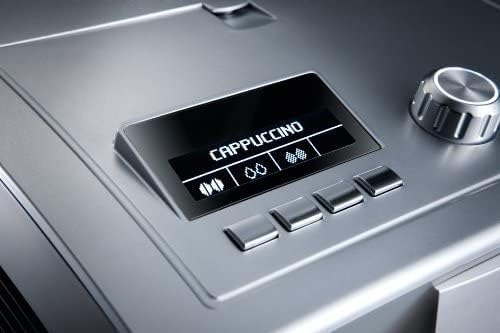
A close-up of the digital display on the Severin KV 8021 S2, indicating 'CAPPUCCINO' as the selected beverage, with control buttons below.
Detail of the rotary control knob on the Severin KV 8021 S2, used for navigating menus and adjusting settings.

A close-up of the external milk frother tube connection on the side of the Severin KV 8021 S2, ready to draw milk from a container.
Сетуп
- Распакивање: Пажљиво уклоните сав материјал за паковање и уверите се да су све компоненте присутне.
- Пласман: Поставите машину на стабилну, равну и топлотно отпорну површину, даље од извора воде и директне сунчеве светлости.
- Напуните резервоар за воду: Remove the water tank, rinse it, and fill it with fresh, cold tap water up to the MAX mark. Reinsert the tank securely.
- Напуните посуду за зрно: Open the lid of the bean container and fill it with whole coffee beans. Close the lid.
- Циклус испирања при првој употреби: Plug in the machine and switch it on. The machine will prompt you to perform an initial rinse cycle. Follow the on-screen instructions, placing a container under the coffee spout.
Упутство за употребу
The Severin KV 8021 S2 offers various beverage options and customization.
Making Espresso or Coffee:
- Ставите шољу испод грла за кафу.
- Select your desired coffee strength and volume using the rotary knob and display.
- Press the corresponding button for Espresso or Coffee. The machine will grind the beans and brew your beverage.
Making Cappuccino or Latte Macchiato (One Touch):
- Connect the milk tube to a container of cold milk.
- Place a suitable glass under the coffee spout.
- Select Cappuccino or Latte Macchiato from the menu.
- Press the One Touch button. The machine will automatically froth the milk, brew the coffee, and dispense the beverage.
Подешавање подешавања млевења:
The grind setting can be adjusted using the dial inside the bean container. Only adjust the grind setting while the grinder is operating to prevent damage.
Одржавање и чишћење
Редовно чишћење је неопходно за оптималне перформансе и хигијену.
Дневно чишћење:
- Посуда за капање и посуда за талог кафе: Испразните и исперите свакодневно.
- Систем млека: After each milk-based beverage, perform the automatic milk system cleaning cycle as prompted by the machine.
Недељно/месечно чишћење:
- Јединица за кување: The brew unit is removable. Switch off the machine, remove the brew unit, rinse it thoroughly under running water, and allow it to air dry before reinserting.
- Уклањање каменца: The machine will indicate when descaling is required. Use a suitable descaling solution and follow the instructions on the display.
Решавање проблема
Ако наиђете на проблеме, погледајте следеће уобичајене проблеме и решења:
| Проблем | Могући узрок | Решење |
|---|---|---|
| Не се точи кафа. | Water tank empty, beans empty, brew unit clogged. | Refill water/beans, clean brew unit. |
| Нема млечне пене или је квалитет пене лош. | Milk system dirty, milk tube blocked, milk too warm. | Perform milk system cleaning, check milk tube, use cold milk. |
| Машина се не укључује. | Power cord not connected, power outlet faulty. | Check power connection, try another outlet. |
For further assistance, please contact Severin customer support.
Спецификације
| Феатуре | Детаљ |
|---|---|
| Број модела | КВ 8021 |
| Боја | Сребро |
| Димензије производа | 33 к 24 к 35 цм |
| Тежина артикла | 10.9 кг (24.03 лбс) |
| Капацитет резервоара за воду | 1.5 литара |
| Снага/Ватtage | 1500 вати |
| Волtage | 240 Волтс |
| Материјал | нерђајући челик |
| Посебне карактеристике | Automatic shut-off, Dishwasher-safe parts, Display, Height-adjustable spout, Removable brew unit, One Touch, Cleaning program |
Гаранција и подршка
This Severin KV 8021 S2 Automatic Coffee Machine comes with a manufacturer's warranty. Please refer to the warranty card included in the original packaging for specific terms and conditions. For technical support, spare parts, or service inquiries, please visit the official Severin website or contact their authorized customer service center.