
Увод
This manual provides comprehensive instructions for the safe and efficient use of your Marmitek BoomBoom 560 Bluetooth Over-Ear Headphones. These headphones offer excellent digital sound quality with clear mid-tones and deep bass, along with passive noise reduction for an immersive audio experience. Please read this manual thoroughly before operating the device.

Image: Marmitek BoomBoom 560 Bluetooth Over-Ear Headphones, black, shown from a slight angle.
Садржај пакета
Молимо вас да проверите да ли се у вашем пакету налазе све доле наведене ставке:
- 1x Marmitek BoomBoom 560 Bluetooth Over-Ear Headphones
- 1x Micro USB to USB charging cable
- 1x 3.5mm Mini-jack audio cable (160 cm)
- 1x Упутство за употребу (овај документ)

Image: Visual representation of the Marmitek BoomBoom 560 package contents, including the headphones, charging cable, audio cable, and user manual.
Производ је завршенviewКонтроле и портови
Familiarize yourself with the controls and ports on your BoomBoom 560 headphones:
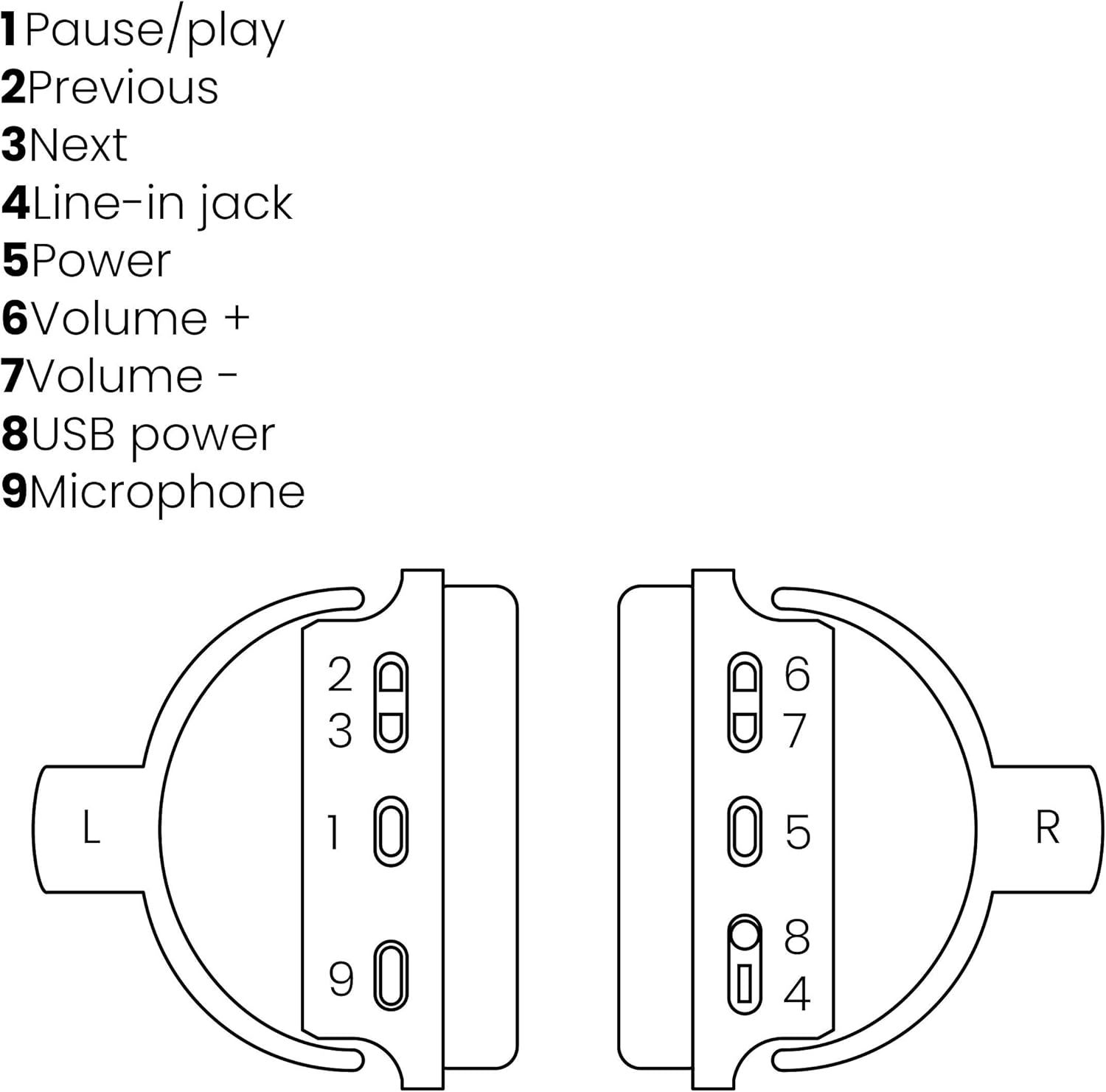
Image: A line drawing illustrating the left and right ear cup controls and ports, numbered for identification.
- Дугме за паузу/пусти: Контролише репродукцију музике.
- Дугме за претходну нумеру: Прескаче на претходну песму.
- Дугме за следећу нумеру: Прескаче на следећу песму.
- Лине-ин Јацк: За жично повезивање звука помоћу 3.5 мм кабла.
- Дугме за напајање: Turns the headphones on/off and initiates Bluetooth pairing.
- Јачина звука + дугме: Повећава јачину звука.
- Дугме за јачину звука: Смањује јачину звука.
- УСБ порт за напајање: For charging the headphones using the Micro USB cable.
- микрофон: Уграђен микрофон за хандс-фрее позиве.
Сетуп
1. Пуњење слушалица
Before first use, fully charge your headphones. Connect the Micro USB end of the charging cable to the USB Power Port (8) on the headphones and the standard USB end to a USB power adapter (not included) or a computer's USB port. The LED indicator will show charging status. A full charge provides over 8 hours of playback time.
2. Блуетоотх упаривање
To connect your headphones wirelessly to a Bluetooth-enabled device:
- Уверите се да су слушалице искључене.
- Притисните и држите Дугме за напајање (5) until the LED indicator flashes blue and red, indicating pairing mode.
- На паметном телефону, таблету или другом Bluetooth уређају омогућите Bluetooth и потражите доступне уређаје.
- Select "BoomBoom 560" from the list of found devices.
- Када се повеже, ЛЕД индикатор ће полако трептати плаво.

Image: Illustration depicting various Bluetooth-enabled devices (laptop, smartphone, tablet) wirelessly transmitting audio to the headphones.
3. Жична веза
If Bluetooth is not available or the battery is depleted, you can use the included 3.5mm audio cable. Connect one end of the cable to the Line-in Jack (4) on the headphones and the other end to the audio output of your device.
Упутство за употребу
Укључивање/искључивање
- За укључивање: Притисните и држите Дугме за напајање (5) for approximately 3 seconds until the LED indicator flashes blue.
- За искључивање: Притисните и држите Дугме за напајање (5) for approximately 3 seconds until the LED indicator turns off.
Репродукција музике
- Пусти/паузирај: Притисните тастер Pause/Play Button (1) једном.
- Следећа нумера: Притисните тастер Next Track Button (3) једном.
- Претходни запис: Притисните тастер Previous Track Button (2) једном.
Управљање позивима
When connected via Bluetooth, you can manage phone calls using the built-in microphone (9):
- Одговори/заврши позив: Притисните тастер Pause/Play Button (1) једном.
- Одбиј позив: Притисните и држите Pause/Play Button (1) отприлике 2 секунде.
Контрола јачине звука
- Повећајте јачину звука: Притисните тастер Volume + Button (6).
- Смањи јачину звука: Притисните тастер Volume - Button (7).

Image: A user enjoying music or media with the Marmitek BoomBoom 560 headphones while relaxing at home.
Одржавање
Да бисте осигурали дуготрајност и оптималне перформансе ваших слушалица:
- Очистите слушалице меком, сувом крпом. Не користите абразивна средства за чишћење или раствараче.
- Избегавајте излагање слушалица екстремним температурама, влази или директној сунчевој светлости.
- Чувајте слушалице на хладном и сувом месту када се не користе.
- Не покушавајте сами да растављате или поправљате слушалице, јер ће то поништити гаранцију.
Решавање проблема
If you encounter issues with your BoomBoom 560 headphones, refer to the following common solutions:
- Нема напајања: Ensure the headphones are fully charged. Connect them to a power source using the USB charging cable.
- Не могу да упарим преко Bluetooth-а:
- Уверите се да су слушалице у режиму упаривања (ЛЕД диода трепери плаво и црвено).
- Ensure your Bluetooth device's Bluetooth function is enabled and within range (typically 10 meters).
- Try turning off and on both the headphones and your Bluetooth device.
- Delete "BoomBoom 560" from your device's Bluetooth list and attempt to pair again.
- Нема звука:
- Проверите нивое јачине звука и на слушалицама и на повезаном уређају.
- Ensure the headphones are properly paired or the 3.5mm audio cable is securely connected.
- Ако користите Bluetooth, покушајте да искључите и поново повежете.
- Лош квалитет звука:
- Move closer to your Bluetooth device to reduce interference.
- Ensure there are no obstacles between the headphones and the device.
- Проверите извор звука да ли има проблема са квалитетом.
- Loose Earcup Bracket: If the earcup bracket feels loose, handle the headphones with care. Avoid excessive force when adjusting or folding. If the issue persists and affects functionality, contact customer support.
Спецификације
| Назив модела | БоомБоом 560 |
| Број модела | 8122 |
| Бранд | Мармитек |
| Технологија повезивања | Wireless (Bluetooth), Wired (3.5mm jack) |
| Блуетоотх компатибилност | Да |
| Форм Фацтор | Преко уха |
| Материјал | Кожа (шкољке за уши) |
| Посебне карактеристике | Смањење буке |
| Технологија микрофона | Omni (Built-in) |
| Опис батерије | Литијум јон (Ли Ион) |
| Трајање батерије | Over 8 hours (approx.) |
| Однос сигнал-шум (СНР) | 82 дБ |
| Димензије производа | КСНУМКС к КСНУМКС к КСНУМКС цм; КСНУМКС г |
Гаранција и подршка
Marmitek products are designed and manufactured to high quality standards. For information regarding warranty terms and conditions, please refer to the documentation provided with your purchase or visit the official Marmitek webсајту.
За додатну помоћ или техничку подршку, посетите Marmitek Store on Amazon or the official Marmitek support channels.

Image: Logo indicating "Dutch Quality" and compliance with "EU European Standards".