
Увод
This manual provides comprehensive instructions for the setup, operation, and maintenance of your AT&T CL2940 Corded Phone. The CL2940 is designed for ease of use, featuring a large tilt display, extra-large buttons, a speakerphone, Caller ID/Call Waiting, and Audio Assist functionality. Please read this manual thoroughly to ensure proper use and to take full advantagсвих доступних функција.
Садржај пакета
Уверите се да су све ставке присутне у вашем пакету:
- AT&T CL2940 Corded Speakerphone with Large Display
- Слушалица
- Намотани кабл за слушалицу
- Кабл за телефонску линију
- Кориснички приручник (овај документ)
- Note: 4 AA batteries (not included) are required for Caller ID functionality.
Производ је завршенview
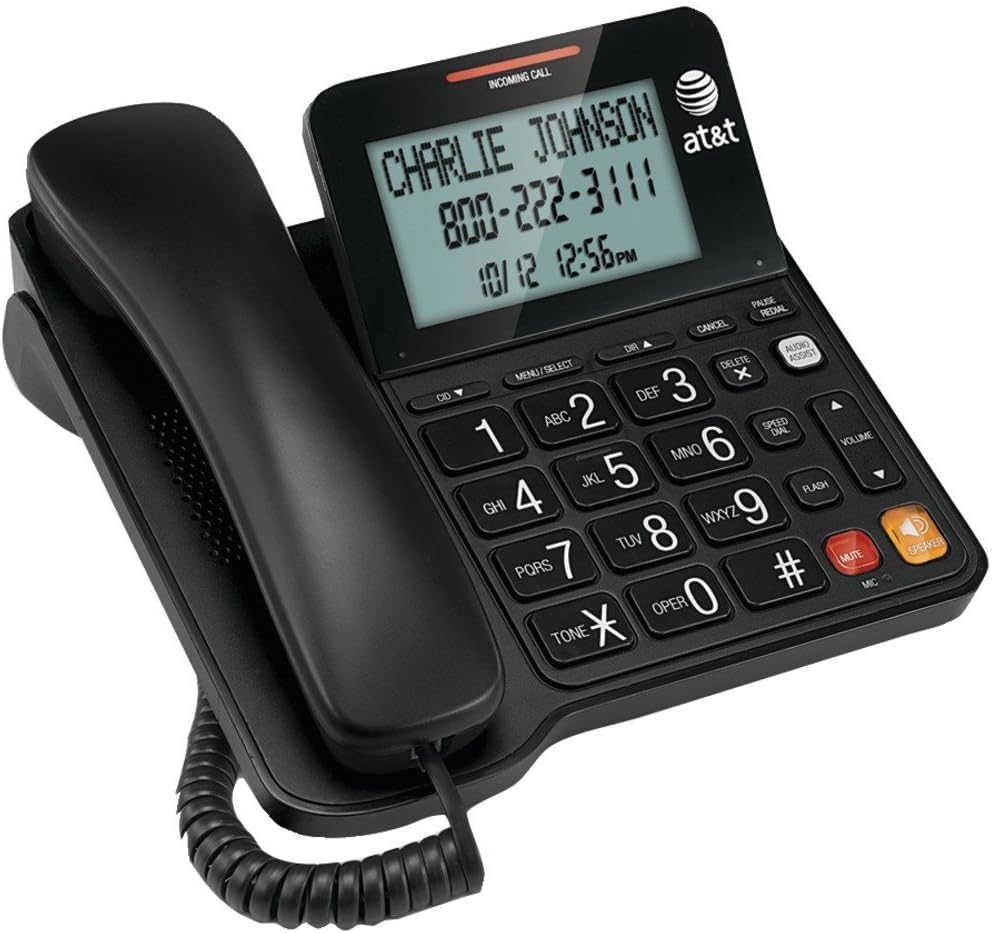
Figure 1: AT&T CL2940 Corded Phone
This image shows the AT&T CL2940 corded phone in black. The phone features a large, easy-to-read tilt display that currently shows an incoming call from 'CHARLIE JOHNSON' with the number '800-222-3111' and the date/time '10/12 12:56PM'. The large, clearly labeled buttons are visible on the keypad, including number keys, navigation buttons, and dedicated buttons for Speaker, Mute, Volume, and Audio Assist. The coiled handset cord connects the handset to the main unit.
Кључне карактеристике и компоненте:
- Extra-Large Tilt Display: Provides clear visibility of Caller ID information, time, and menu options.
- Extra-Large Buttons: Designed for easy dialing and navigation.
- спикерфон: Омогућава разговоре без употребе руку.
- Audio Assist: Enhances audio clarity during calls.
- ИД позиваоца/позив на чекању: Displays incoming caller information and manages multiple calls.
- Именик именика: Stores up to 25 names and numbers.
- Брзо бирање: 10-number speed dial for frequently called contacts.
- Extra-Loud Ringer: Adjustable ringer volume for clear alerts.
- Може се монтирати на зид: Може се поставити на сто или монтирати на зид.
Сетуп
1. Повезивање телефона
- Повежите један крај спиралног кабла слушалице са слушалицом, а други крај са прикључком означеним са ХАНДСЕТ on the side of the phone base.
- Прикључите један крај телефонског кабла на прикључак означен са ЛИНЕ on the back of the phone base.
- Прикључите други крај телефонског кабла на телефонску утичницу у зиду.
2. Installing Batteries (for Caller ID/Display)
The phone operates without AC power for basic calling functions. However, to enable the Caller ID display and other display-dependent features, 4 AA batteries (not included) are required.
- Locate the battery compartment on the underside of the phone base.
- Отворите поклопац одељка за батерије.
- Insert 4 AA batteries, observing the correct polarity (+ and -) as indicated inside the compartment.
- Вратите поклопац одељка за батерије.
3. Монтажа на зид (опционо)
The CL2940 can be mounted on a wall to save desk space. Ensure you have a standard wall plate with two pins spaced appropriately.
- Remove the desk stand if attached.
- Align the two keyhole slots on the back of the phone with the wall plate pins.
- Slide the phone downwards to secure it in place.
Упутство за употребу
Упућивање позива
- Подигните слушалицу или притисните СПЕАКЕР дугме.
- Позовите жељени телефонски број помоћу тастатуре.
- To end the call, place the handset back on the cradle or press the СПЕАКЕР дугме поново.
Примање позива
- Када телефон зазвони, подигните слушалицу или притисните СПЕАКЕР дугме за одговор.
- To end the call, place the handset back on the cradle or press the СПЕАКЕР дугме.
Коришћење спикерфона
- Да бисте активирали звучник током позива, притисните СПЕАКЕР дугме.
- To switch back to the handset, pick up the handset.
- Да бисте завршили позив преко звучника, притисните СПЕАКЕР дугме поново.
ИД позиваоца и позив на чекању
- When an incoming call is received, the caller's name and number will appear on the display (requires battery installation and subscription to Caller ID service).
- Користите ИД клијента ▼ и DIR ▲ дугмад за кретање кроз дневник идентификације позиваоца.
- If you subscribe to Call Waiting, a tone will indicate a second incoming call. Press ФЛАСХ за пребацивање између позива.
Телефонски именик и брзо бирање
The phone allows you to store frequently called numbers for quick access.
- Programming Phonebook Entries: Refer to the detailed instructions in the full user manual for programming names and numbers into the 25-entry phonebook.
- Коришћење брзог бирања: Притисните тастер БРЗО БИРАЊЕ button, then the corresponding number (0-9) for the stored entry.
Аудио Ассист
Притисните тастер АУДИО АССИСТ button during a call to temporarily boost the audio volume and clarity, making conversations easier to hear.
Контрола јачине звука и искључење звука
- Волумен: Користите VOLUME ▲/▼ buttons to adjust the listening volume during a call (for both handset and speakerphone).
- Искључи звук: Притисните тастер МУТЕ button to temporarily silence your microphone during a call. The other party will not hear you, but you can still hear them. Press МУТЕ again to resume speaking.
Одржавање
Чишћење телефона
To keep your phone in good condition, periodically wipe it with a soft, slightly damp cloth. Avoid using harsh chemicals or abrasive cleaners, as these can damage the phone's finish or electronic components.
Замена батерије
If the Caller ID display becomes dim or unresponsive, it may be time to replace the 4 AA batteries. Follow the battery installation steps outlined in the "Setup" section.
Решавање проблема
If you experience issues with your AT&T CL2940 phone, try the following common troubleshooting steps:
- Нема тона за бирање:
- Уверите се да је телефонски кабл безбедно повезан и са телефоном и са зидном утичницом.
- Test the wall jack with another working phone to confirm the line is active.
- ИД позиваоца се не приказује:
- Verify that 4 AA batteries are correctly installed in the battery compartment.
- Check if your telephone service provider offers Caller ID service and that it is activated on your line.
- Замените старе батерије новим.
- Лош квалитет звука:
- Подесите јачину звука помоћу ВОЛУМЕ дугмад.
- Уверите се да је кабл слушалице безбедно повезан.
- If using the speakerphone, ensure you are within a reasonable distance from the microphone.
- Try activating the АУДИО АССИСТ карактеристика.
- Дугмад не реагују:
- Ensure the phone is connected to a live telephone line.
- If the issue persists, try disconnecting the phone from the wall jack for a few minutes, then reconnecting it.
For more detailed troubleshooting or persistent issues, please refer to the full product support documentation or contact AT&T customer service.
Спецификације
| Бранд | АТ&Т |
| Број модела | ЦЛ2940 |
| Тип телефона | Цордед |
| Боја | Црно |
| Димензије производа | 7.9 к 8.8 к 3.7 инча |
| Тежина артикла | 1 фунта |
| Извор напајања | Telephone Line Powered (Batteries for Caller ID/Display) |
| Батерије су потребне | 4 AA batteries (for Caller ID/Display, not included) |
| Произвођач | Втецх |
| Карактеристике | Caller ID/Call Waiting, Speakerphone, Audio Assist, Extra-Large Tilt Display, Extra-Large Buttons, Extra-Loud Ringer, 10-Number Speed Dial, 25-Name/Number Phonebook |
Гаранција и подршка
Your AT&T CL2940 Corded Phone is manufactured by Vtech. For warranty information and customer support, please refer to the documentation included with your purchase or visit the official AT&T or Vtech support websites. Keep your purchase receipt as proof of purchase.
For assistance, you may contact AT&T customer service directly.