
AT&T TL88102
AT&T TL88102 DECT 6.0 2-линијски бежични телефонски систем - упутство за употребу
Модел: ТЛ88102
1. Увод
This manual provides comprehensive instructions for the AT&T TL88102 DECT 6.0 2-Line Cordless Telephone System, including the TL88102 base unit and TL88002 accessory handsets. This system is designed for clear, interference-free communication with extended range, featuring a 2-line answering system with caller ID/call waiting, and intercom capabilities.
The AT&T TL88102 system is ideal for busy households or home offices requiring dual line functionality and multiple cordless handsets for convenience.

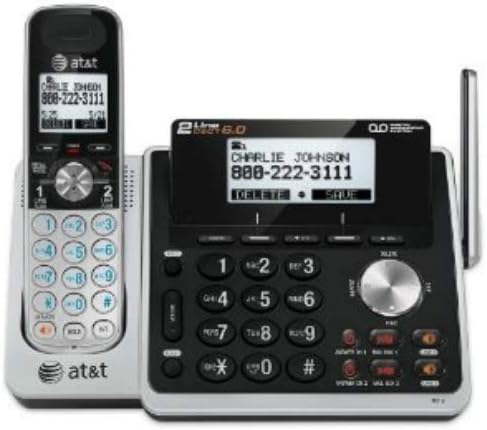
Figure 1: The AT&T TL88102 base unit with one cordless handset, and three additional TL88002 accessory handsets.
2. Подешавање
2.1 Садржај пакета
- AT&T TL88102 Base Unit with Cordless Handset
- АЦ адаптер за основну јединицу
- Кабл за телефонску линију
- TL88002 Accessory Handsets (quantity may vary based on bundle)
- Chargers for Accessory Handsets
- Rechargeable Batteries for Handsets (AAA batteries required)
2.2 Повезивање основне јединице
- Connect the small end of the AC power adapter to the POWER jack on the back of the TL88102 base unit.
- Укључите већи крај адаптера за наизменичну струју у стандардну електричну утичницу.
- Connect one end of the telephone line cord to the TEL LINE 1 or TEL LINE 2 jack on the back of the base unit. If using two lines, connect the second line cord to the other TEL LINE jack.
- Plug the other end(s) of the telephone line cord(s) into your telephone wall jack(s).
Слика 2: Задња страна view of the TL88102 base unit, illustrating the connection points for power and telephone lines.
2.3 Инсталирање и пуњење батерија слушалице
- Отворите поклопац одељка за батерију на полеђини сваке бежичне слушалице.
- Insert the supplied rechargeable AAA batteries, observing the correct polarity (+ and - markings).
- Затворите поклопац одељка за батерије.
- Place each handset in its respective charger (base unit or accessory charger). The CHARGE light on the handset will illuminate, indicating proper charging.
- Оставите телефоне да се пуне најмање 16 сати пре прве употребе како бисте осигурали оптималне перформансе батерије.
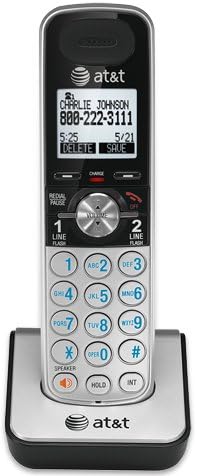
Figure 3: A cordless handset correctly seated in its charging cradle.
2.4 Регистровање слушалица
All accessory handsets (TL88002) must be registered to the TL88102 base unit before use. The handset included with the base unit is pre-registered.
- Place the handset you wish to register into the base unit's charger cradle.
- На базној јединици притисните и држите Пронађи слушалицу button for approximately 4 seconds until the IN USE light on the base unit begins to flash.
- На слушалици притисните # key. The handset will display "Registering..." and then "Handset Registered" upon successful registration.
- If registration fails, remove the handset from the charger and repeat the steps.
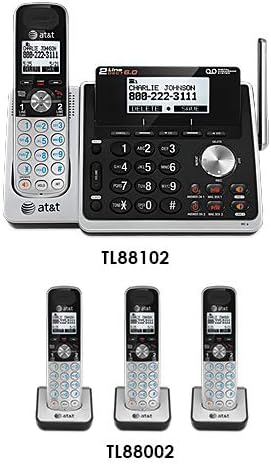
Figure 4: Illustration of the TL88102 base unit and TL88002 accessory handsets, indicating their relationship within the system.
3. Упутство за употребу
3.1 Упућивање и примање позива
- Да бисте упутили позив: Притисните ЛИНИЈА 1 or ЛИНИЈА 2, then dial the number. Alternatively, dial the number first, then press ЛИНИЈА 1 or ЛИНИЈА 2.
- Да одговорите на позив: Притисните ЛИНИЈА 1, ЛИНИЈА 2, или СПЕАКЕР.
- Да бисте завршили позив: Притисните ОФФ или ставите слушалицу у пуњач.

Figure 5: The TL88102 base unit and its cordless handset, highlighting the keypad and display for call management.
3.2 Ансверинг Систем
The TL88102 features a digital answering system for both lines, capable of storing up to 14 minutes of messages per line.
- Укључивање/искључивање: Притисните ANS ON/OFF 1 or ANS ON/OFF 2 on the base unit to activate or deactivate the answering system for each line.
- Message Playback: Притисните ПЛАИ/СТОП on the base unit or access the answering system menu from any handset.
- Даљински приступ: You can retrieve messages remotely by calling your phone number and entering your remote access code.
3.3 Caller ID/Call Waiting
The system supports Caller ID and Call Waiting features. Ensure you subscribe to these services from your telephone service provider.
- Incoming call information (name and number) will display on the handset and base unit screens.
- During a call, if another call comes in, you will hear a tone. Press ФЛАСХ за пребацивање између позива.
3.4 Интерфон
Use the intercom feature to communicate between the base unit and handsets, or between multiple handsets.
- Да бисте покренули интерфон: Притисните ИНТ on the handset, then select the desired handset or base unit to call.
4. Одржавање
4.1 Cleaning the Product
Clean the telephone system with a soft, damp крпа. Не користите спрејеве за чишћење или јаке хемикалије, јер могу оштетити завршну обраду или електричне компоненте.
4.2 Одржавање батерије
- Always use the supplied rechargeable AAA batteries.
- For optimal performance, keep handsets in their chargers when not in use.
- Ако се слушалица неће користити дуже време, извадите батерије да бисте спречили цурење.
- Replace batteries when the handset displays "Low Battery" or when talk time significantly decreases.
КСНУМКС. Решавање проблема
| Проблем | Решење |
|---|---|
| Нема тона за бирање. |
|
| Слушалица приказује „Ван домета“ или „Нема напајања на бази“. |
|
| Лош квалитет позива или статички шум. |
|
| Секретна секретарица не снима поруке. |
|
6. Спецификације
- технологија: ДЕЦТ 6.0 Дигитална технологија
- линије: 2-линијски рад
- Систем за одговор: Digital, up to 14 minutes recording time per line
- ИД позиваоца/позив на чекању: Да (потребна је претплата)
- Именик: 50-number phonebook
- интерфон: Handset to Handset, Handset to Base
- Извор напајања: AC Power Adapter (Base Unit), Rechargeable AAA Batteries (Handsets)
- Product Dimensions (Base Unit): Приближно 12.1 к 10.2 к 8.6 инча
- Тежина артикла: Отприлике 1.8 фунти
- Боја: Сребро
- Материјал: Пластика
- Компатибилни уређаји: Компатибилан са слушним помагалима
7. Гаранција и подршка
For warranty information and technical support, please refer to the documentation included with your product or visit the official AT&T website. You may also contact AT&T customer service directly for assistance with product setup, operation, or troubleshooting.
Сачувајте рачун као доказ о куповини за потребе гаранције.
Ask a question about this manual
Ask about setup, troubleshooting, compatibility, parts, safety, or missing instructions. Manuals+ will review the question and use this page’s manual context to help answer it.