
OneConcept MG3-V12-WH_SML
OneConcept V-12 Stereo System
Упутство за употребу
Model: MG3-V12-WH_SML
Увод
This manual provides detailed instructions for the safe and efficient operation of your OneConcept V-12 Stereo System. Please read this manual thoroughly before using the device and retain it for future reference.

Слика: Фронт view of the OneConcept V-12 Stereo System, showing the main unit with integrated CD player, control buttons, digital display, and two detachable speakers. The system is white and rests on a circular stand.
Безбедносна упутства
- Не излажите јединицу киши или влази.
- Не блокирајте вентилационе отворе.
- Обезбедите правилно напајање волtagе као што је назначено на јединици.
- Држите уређај даље од директне сунчеве светлости, извора топлоте и јаких магнетних поља.
- Не покушавајте сами да растављате или поправљате уређај. Све сервисне радове препустите квалификованом особљу.
Сетуп
Распакивање и садржај
Пажљиво извадите све компоненте из паковања. Проверите да ли су све ставке присутне:
- OneConcept V-12 Main Unit
- Two Detachable Speakers
- Повер Адаптер
- Кориснички приручник (овај документ)
Опције пласмана
The OneConcept V-12 offers versatile placement options:
- Desktop/Shelf Placement: Use the integrated stand for stable placement on any flat surface.
- Монтажа на зид: The main unit and speakers can be detached from the stand and mounted on a wall using appropriate hardware (not included). Ensure the wall can support the weight of the unit.

Слика: Са стране view of the OneConcept V-12 Stereo System, highlighting its compact design and the circular stand. This view demonstrates the unit's suitability for various placements.

Image: The OneConcept V-12 Stereo System with its two speakers detached from the central unit. This illustrates the modular design, allowing for flexible speaker placement or wall mounting.
Connecting Power and Speakers
- Connect the power adapter to the DC IN port on the back of the main unit.
- Укључите адаптер за напајање у стандардну зидну утичницу.
- Connect the speaker cables from the detachable speakers to the corresponding speaker output jacks on the back of the main unit. Ensure correct polarity.

Слика: Позади view of the OneConcept V-12 Stereo System, showing the speaker cable connections and the main power input. This view also highlights the ventilation grilles on the back of the unit and speakers.

Image: Top-down rear view of the OneConcept V-12 Stereo System, focusing on the manual switches for AM/FM radio selection and the main mode selector (AUX, Radio, CD, Alarm). Also visible is the tuning wheel.
Упутство за употребу
Основне контроле
- УКЉУЧЕЊЕ/ИСКЉУЧЕЊЕ НАПАЈАЊА: Притисните тастер ПОВЕР дугме за укључивање или искључивање јединице.
- ВОЛУМЕ: Користите ВОЛ+ и ВОЛ- дугмад за подешавање нивоа јачине звука.
- НАЧИН: Притисните тастер МОДЕ button to cycle through available input sources: CD, USB, SD, FM Radio, AM Radio, AUX.
ЦД/МП3 репродукција
- Притисните тастер ОПЕН/ЦЛОСЕ дугме да бисте отворили лежиште за ЦД.
- Place a CD or MP3 CD onto the spindle with the label side facing up.
- Притисните тастер ОПЕН/ЦЛОСЕ поново притисните дугме да бисте затворили лежиште.
- Ensure the unit is in CD mode. Playback should begin automatically.
- Користите СКИП дугмад (◀◀ / ▶▶) to navigate tracks.
- Притисните ПЛАИ/ПАУСЕ да паузирате или наставите репродукцију.
- Притисните СТОП да бисте зауставили репродукцију.

Image: The OneConcept V-12 Stereo System with its front-loading CD tray open, revealing the disc compartment. The detached speakers are also visible, emphasizing the system's modularity.
УСБ/СД репродукција
- Уметните USB флеш диск у USB порт или SD картицу у слот за SD картицу.
- Притисните тастер МОДЕ button until "USB" or "SD" is displayed.
- Уређај ће аутоматски детектовати и почети да репродукује компатибилан аудио fileс (МП3).
- Користите РЕПЕАТ/ПРОГ button for repeat modes and programming playback.
- Користите АЛБУМ button to navigate between folders (albums) on the storage device.
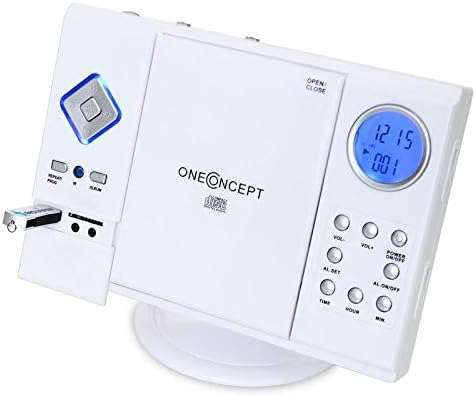
Image: Close-up of the left side of the OneConcept V-12 Stereo System, clearly showing a USB flash drive inserted into its dedicated port. This highlights the system's USB playback capability.

Слика: Детаљна view of the OneConcept V-12 Stereo System's left panel, featuring the USB port, SD card slot, and two 3.5mm audio jacks (likely headphone out and AUX in). This image emphasizes the various connectivity options.
Рад радија (FM/AM)
- Switch the AM/FM selector on the back of the unit to the desired band.
- Притисните тастер МОДЕ дугме док се не прикаже „Радио“.
- Користите ТУНИНГ wheel on the back of the unit to manually tune to a station.
- For better reception, extend the FM wire antenna fully.
АУКС улаз
Connect an external audio device (e.g., smartphone, MP3 player) to the AUX IN jack using a 3.5mm audio cable (not included). Press the МОДЕ button until "AUX" is displayed. Audio from the connected device will play through the stereo system.
Функција аларма
The unit features an alarm function. Refer to the buttons on the right side of the main unit for setting the alarm:
- AL. SET: Press to enter alarm setting mode.
- TIME / HOUR / MIN: Use these buttons to set the alarm time.
- AL. ON/OFF: Press to activate or deactivate the alarm.
Одржавање
Чишћење
- Увек искључите јединицу из утичнице пре чишћења.
- Користите меку, суву крпу за брисање спољашњих површина.
- Не користите абразивна средства за чишћење, воскове или раствараче јер могу оштетити завршну обраду.
- За CD сочиво користите специјализовани диск за чишћење CD сочива.
Складиштење
If storing the unit for an extended period, disconnect it from power and store it in a cool, dry place, away from direct sunlight and extreme temperatures.
Решавање проблема
| Проблем | Могући узрок | Решење |
|---|---|---|
| Но Повер | Кабл за напајање није безбедно повезан. | Проверите прикључак кабла за напајање на уређај и зидну утичницу. |
| Нема звука | Volume too low; incorrect mode selected; speaker cables loose. | Increase volume; select correct input mode; check speaker connections. |
| CD/USB/SD картица се не репродукује | Disc/device inserted incorrectly; incompatible file format; dirty disc. | Reinsert disc/device correctly; ensure MP3 format; clean disc; try another disc/device. |
| Слаб радио пријем | Antenna not extended; weak signal. | Fully extend FM wire antenna; reposition unit for better signal. |
Спецификације
| Феатуре | Детаљ |
|---|---|
| Бранд | OneConcept |
| Број модела | MG3-V12-WH_SML |
| Боја | Бела |
| Технологија повезивања | УСБ |
| Посебне карактеристике | CD changer, Alarm function |
| Компатибилни уређаји | MP3 player, Smartphone |
| Спеакер Типе | Стерео |
| Конфигурација канала сурроунд звука | 2.0 |
| Подржани стандарди | МП3 |
| Димензије артикла (Д к Ш к В) | 28 к 20 к 33 центиметара |
| Тежина артикла | 2.4 килограма |
| Извор напајања | Цордед Елецтриц |
Гаранција и подршка
This product is covered by a standard return policy. For specific warranty details and support, please refer to your point of purchase or the official OneConcept webсајту. Сачувајте рачун о куповини за гаранције.
For technical assistance or inquiries, please contact OneConcept customer support, providing your product model number (MG3-V12-WH_SML) and a detailed description of the issue.
Ask a question about this manual
Ask about setup, troubleshooting, compatibility, parts, safety, or missing instructions. Manuals+ will review the question and use this page’s manual context to help answer it.