
Увод
The CEM DT-123 is a compact, handheld device designed for measuring the moisture content in wood. It provides quick and accurate readings, essential for woodworking, construction, and home inspection applications. The meter utilizes two sharp, integrated pins to penetrate the wood surface and determine its moisture level, displayed clearly on an LCD screen.
Безбедносне информације
- Keep the device out of reach of children. The measurement pins are sharp and can cause injury.
- Do not attempt to measure live electrical circuits or materials. This device is not designed for electrical testing.
- Avoid exposing the meter to extreme temperatures, high humidity, or direct sunlight.
- Не урањајте уређај у воду или било коју другу течност.
- Извадите батерије ако уређај неће бити коришћен дуже време како бисте спречили цурење.
- Користите само наведени тип батерије (9V).
Производ је завршенview
The CEM DT-123 features a durable casing, an easy-to-read LCD display, and integrated measurement pins. A protective cap covers the pins when not in use.
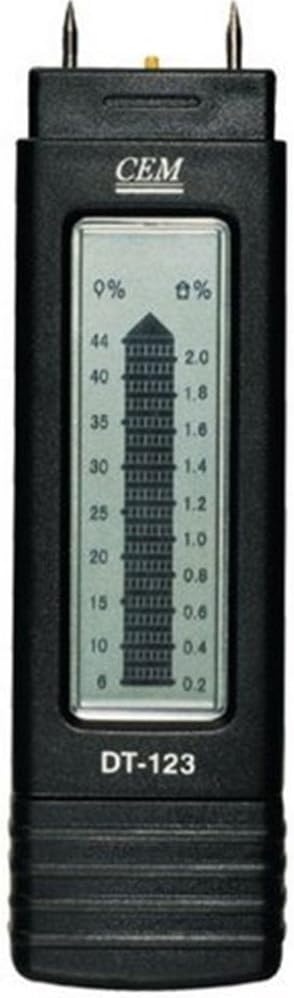
Слика 1: Предња страна view of the CEM DT-123 moisture meter, highlighting the LCD display and measurement pins.

Слика 2: Позади view of the CEM DT-123, showing the battery cover and product markings.
Сетуп
Инсталација батерије
- Уверите се да је уређај искључен.
- Locate the battery compartment cover on the back of the meter (refer to Figure 2).
- Померите или откопчајте поклопац да бисте отворили одељак.
- Insert a new 9V battery, observing the correct polarity (+/-) as indicated inside the compartment.
- Вратите поклопац одељка за батерије безбедно.
The meter is now ready for operation.
Упутство за употребу
- Скините заштитни поклопац са мерних иглица.
- Press the power button to turn on the meter. The LCD display will illuminate.
- Carefully push the two measurement pins into the wood surface to be tested. Ensure the pins are fully inserted and parallel to the wood grain for accurate readings.
- Read the moisture content percentage directly from the LCD display. The display shows the moisture percentage on the left scale (0% to 44%) and a corresponding value on the right scale (0.2 to 2.0), which may represent a different unit or a relative scale.
- After taking the reading, gently pull the meter out of the wood.
- Press the power button again to turn off the meter. If left idle, the meter may have an auto-off function to conserve battery life.
- Replace the protective cap over the pins for storage.

Figure 3: The CEM DT-123 in use, demonstrating proper pin insertion into wood.
Одржавање
Чишћење
Wipe the meter's body with a soft, dry cloth. Do not use abrasive cleaners or solvents. Ensure the measurement pins are clean and free of debris after each use.
Складиштење
Store the meter in a cool, dry place, away from direct sunlight and extreme temperatures. Always replace the protective cap over the pins before storage.
Решавање проблема
| Проблем | Могући узрок | Решење |
|---|---|---|
| Мерач се не укључује. | Мртва или неправилно инсталирана батерија. | Проверите поларитет батерије. Замените је новом батеријом од 9 V. |
| Нетачна или флуктуирајућа очитавања. | Pins not fully inserted; pins dirty or damaged; measuring wet surface. | Ensure pins are fully inserted. Clean pins. Avoid measuring standing water. |
| Display shows "LO" or low battery indicator. | Ниска запремина батеријеtage. | Замените 9В батерију. |
Спецификације
- Модел: ДТ-КСНУМКС
- Measurement Range (Wood): 6% до 44%
- Приказ: ЛЦД
- Извор напајања: 9V батерија (није укључена)
- Тежина артикла: 6.4 унци (приближно 181 г)
- Димензије пакета: 10.5 x 6.4 x 1.8 инча (приближно 26.7 x 16.3 x 4.6 цм)
Гаранција и подршка
For warranty information or technical support, please refer to the documentation provided with your purchase or contact the manufacturer directly. Keep your proof of purchase for warranty claims.