
Увод
This manual provides essential instructions for the safe and efficient operation of your VisionTek Pitbull RockDoc Power Portable MP3 Speaker. Please read this manual thoroughly before using the device and retain it for future reference.
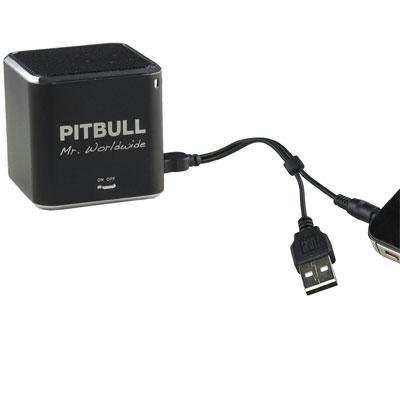
This image displays the compact, black cube-shaped Pitbull RockDoc Power Portable MP3 Speaker. The front face features the 'PITBULL Mr. Worldwide' logo and an 'ON OFF' switch. An integrated cable with a USB connector and a 3.5mm audio jack is shown connected to the speaker, ready for charging or audio input.
Карактеристике производа
- Преносиви дизајн: Компактан и лаган за лак транспорт.
- Integrated MP3 Player: Features 4GB of internal memory for direct music playback.
- Бежична повезаност: Supports Bluetooth for audio streaming from compatible devices.
- Wired Audio Input: Includes a 3.5 mm audio jack for connecting non-Bluetooth devices.
- Напаја се батеријама: Operates on an internal battery for cordless use.
- 1-смерни систем звучника: Delivers clear audio output.
Сетуп
Пуњење звучника
- Locate the integrated USB cable attached to the speaker.
- Повежите USB-A крај кабла са USB портом са напајањем (нпр. рачунар, USB адаптер за зид).
- The speaker's indicator light will illuminate to show charging status. Refer to the device for specific light indications.
- Када се потпуно напуни, искључите УСБ кабл.
Укључивање/искључивање
- To power on, slide the 'ON OFF' switch to the 'ON' position.
- To power off, slide the 'ON OFF' switch to the 'OFF' position.
Повезивање извора звука
Your speaker supports three primary methods for audio input:
1. Using Internal 4GB Memory (MP3 Playback)
- To load music onto the internal 4GB memory, connect the speaker to a computer using the USB cable. The speaker should appear as a removable storage device.
- Drag and drop your MP3 audio files into the speaker's storage.
- Једном files are transferred, safely eject the speaker from your computer.
- The speaker will automatically play files from its internal memory when powered on and no other audio source is connected.
2. Блуетоотх веза
- Уверите се да је звучник укључен.
- Активирајте Блутут на свом паметном телефону, таблету или другом компатибилном уређају.
- Тражи available Bluetooth devices. The speaker should appear as "Pitbull RockDoc" or similar.
- Select the speaker from the list to pair. A confirmation sound or light indication may occur upon successful pairing.
3. 3.5 mm Audio Jack Connection
- Locate the integrated 3.5 mm audio jack on the speaker's cable.
- Connect this jack to the headphone output or audio-out port of your external audio device (e.g., MP3 player, phone, laptop).
- Ensure the speaker is powered on. Audio will be routed through this connection.
Упутство за употребу
Основне контроле репродукције
The speaker features basic controls for media playback. These controls typically include:
- Пусти/паузирај: Press to start or pause audio playback.
- Следећа нумера: Press to skip to the next audio file.
- Претходни запис: Press to go back to the beginning of the current track or to the previous track.
- Контрола јачине звука: Adjust the volume level. (Specific button layout not provided, assume standard controls).
Note: When connected via Bluetooth or 3.5mm audio jack, playback controls on the speaker may control the connected device, or you may need to control playback directly from the source device.
Одржавање
Чишћење
- Обришите спољашњост звучника меком, сувом крпом која не оставља влакна.
- Не користите абразивна средства за чишћење, раствараче или јаке хемикалије.
- Избегавајте улазак влаге у било какве отворе.
Складиштење
- Чувајте звучник на хладном и сувом месту, даље од директне сунчеве светлости и екстремних температура.
- Ако складиштите батерију дуже време, уверите се да је делимично напуњена (око 50%) како бисте продужили њен век трајања.
Решавање проблема
| Проблем | Могући узрок | Решење |
|---|---|---|
| Нема струје | Батерија је испражњена | Напуните звучник помоћу УСБ кабла. |
| Нема звука из звучника | Volume too low; Incorrect input source; Device not paired (Bluetooth); Cable not connected (3.5mm) | Increase speaker volume; Ensure correct mode (internal MP3, Bluetooth, or AUX); Re-pair Bluetooth device; Check 3.5mm cable connection. |
| Блуетоотх упаривање није успело | Звучник није у режиму упаривања; Уређај је предалеко; Сметње | Ensure speaker is discoverable; Move device closer to speaker; Turn off other Bluetooth devices. |
| Није могуће пренети files to 4GB memory | Incorrect USB connection; Driver issue; Memory full | Ensure speaker is connected to computer via USB; Try a different USB port/cable; Check available memory space. |
Спецификације
| Феатуре | Детаљ |
|---|---|
| Број модела | 900584 |
| Спеакер Типе | 1-Way Portable Speaker |
| Интерна меморија | 4 ГБ (за репродукцију МП3 меморије) |
| Повезивање | Bluetooth, 3.5 mm Audio Jack |
| Извор напајања | Баттери Поверед |
| Максимална излазна снага звучника | 3 Ваттс |
| Тежина артикла | 159 г |
| Димензије производа (ДкШкВ) | 5 к 5 к 4.9 цм |
| Произвођач | VISIONTEK MASS STORAGE |
Информације о гаранцији
For detailed warranty information regarding your VisionTek Pitbull RockDoc Power Portable MP3 Speaker, please refer to the warranty card included with your purchase or contact the manufacturer directly. Amazon's buying options mention a 'Warranty Policy', indicating manufacturer coverage.
Подршка
If you require technical assistance or have questions not covered in this manual, please contact VisionTek Mass Storage, the manufacturer of this product. Contact details can typically be found on their official webсајт или паковање производа.