
Увод
The D-Link DGS-1210-52 is a 52-Port Gigabit Web Smart Switch designed for small and medium-sized businesses. It integrates D-Link Green 3.0 technology and complies with IEEE 802.3az Energy Efficient Ethernet standards. This switch offers advanced Layer 2 features, IPv6 management, and comprehensive security functions to ensure network protection and efficient operation. This manual provides essential information for setting up, operating, maintaining, and troubleshooting your DGS-1210-52 switch.
Шта је у кутији
Проверите да ли ваш пакет садржи следеће ставке:
- D-Link DGS-1210-52 52-портни гигабитни Web Смарт Свитцх
- Power Cord and Retainer
- Рацк-Моунт Кит
- Руббер Феет
- Водич за брзу инсталацију
Карактеристике производа
The DGS-1210-52 switch offers a robust set of features for enhanced network performance and security:
- 48 Gigabit Ports: Provides high-speed connectivity for a wide range of network devices.
- 4 Gigabit Optical SFP Ports: Enables high-speed uplinks and long-distance fiber connectivity, enhancing network flexibility and scalability.
- Напредно управљање саобраћајем: Includes bandwidth control, Quality of Service (QoS), VLAN support, Port Mirroring, Link Aggregation Control Protocol (LACP), Spanning Tree Protocol, and IGMP Snooping to optimize network performance.
- Свеобухватна безбедност: Features Access Control List (ACL), 802.1X port-based authentication, RADIUS support, ARP Spoofing Prevention, and D-Link Safeguard Engine.
- Режим надзора са ONVIF подршком: Streamlines IP surveillance network deployment and management by automatically detecting ONVIF-compliant devices and optimizing video traffic.
- Енергетски ефикасан рад: Complies with IEEE 802.3az Energy Efficient Ethernet standard and features a fan-less design for silent running and reduced power consumption.
- У складу са NDAA: Meets strict regulatory standards for government and high-security enterprise projects.

Слика 1: Завршеноview of DGS-1210-52 features.
Упутства за подешавање
Follow these steps to set up your DGS-1210-52 switch:
- Физички смештај: Place the switch on a stable, flat surface or mount it in a standard 19-inch equipment rack using the provided rack-mount kit. Ensure adequate ventilation around the device.
- Прикључите напајање: Connect the power cord to the switch's power inlet and then to a suitable power outlet. Use the power cord retainer to secure the connection.
- Повежите мрежне уређаје: Connect your network devices (e.g., computers, servers, printers, IP cameras) to the 48 Gigabit Ethernet ports using standard Ethernet cables. For high-speed uplinks or fiber connections, use the 4 Gigabit SFP ports with compatible SFP transceivers.
- Initial Configuration (Web-based Management):
- Connect a computer directly to any Ethernet port on the switch.
- Конфигуришите IP адресу рачунара тако да буде у истој подмрежи као и подразумевана IP адреса прекидача (погледајте Водич за брзу инсталацију за подразумевану IP адресу).
- Отвори а web прегледач и унесите подразумевану ИП адресу прекидача.
- Log in using the default credentials (refer to the Quick Installation Guide).
- Once logged in, you can configure various network settings, including IP address, VLANs, QoS, and security features.
- Surveillance Mode Activation: If deploying an IP surveillance network, navigate to the Surveillance Mode section in the web user interface. Activating this mode will automatically detect ONVIF-compliant devices and segment them into a dedicated Auto Surveillance VLAN for optimized video traffic management.
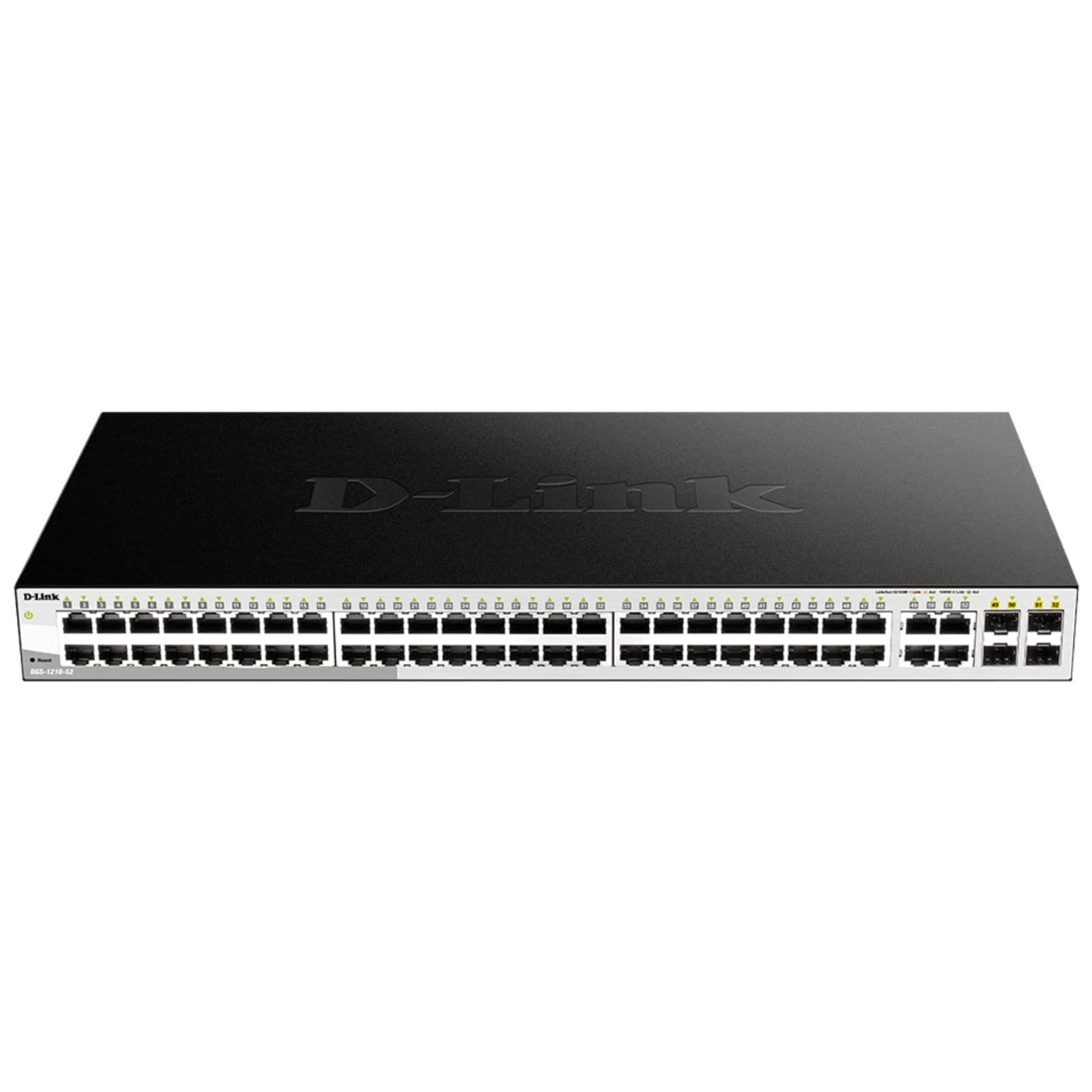
Figure 2: Front panel of the DGS-1210-52 switch showing Ethernet and SFP ports.

Figure 3: Rear panel of the DGS-1210-52 switch.
Упутство за употребу
The DGS-1210-52 switch provides extensive management capabilities through its intuitive web-интерфејс.
Управљање мрежом
- Конфигурација VLAN-а: Create and manage Virtual Local Area Networks (VLANs) to segment your network, improving security and performance.
- Квалитет услуге (КоС): Prioritize critical network traffic (e.g., VoIP, video streaming) to ensure consistent performance.
- Link Aggregation (LACP): Комбинујте више физичких веза у једну логичку везу да бисте повећали пропусни опсег и обезбедили редундантност везе.
- Spanning Tree Protocol (STP): Prevent network loops and ensure network stability.
- ИГМП њушкање: Оптимизујте испоруку вишеадресног саобраћаја, посебно корисно за IPTV апликације.
- Статичко рутирање: Configure static routes for basic Layer 3 functionality, directing traffic between different IP subnets.
Сигурносне карактеристике
- Листа контроле приступа (АЦЛ): Filter network traffic based on MAC or IP addresses, port numbers, and other criteria to enhance security.
- 802.1X Authentication: Authenticate network clients through external RADIUS servers for secure network access.
- ARP Spoofing Prevention: Protect against malicious intruders sending fake ARP messages.
- D-Link Safeguard Engine: Protects the switch from traffic flooding caused by virus attacks.
- DHCP Server Screening: Blocks rogue DHCP server packets from user ports to prevent unauthorized IP assignment.
Nuclias Connect Management (Optional)
The DGS-1210-52 can be optionally managed via D-Link's Nuclias Connect software. This free software provides scalable, flexible control and insightful reporting for up to 1,500 D-Link access points and DGS-1210 Smart Switches, offering centralized management for your network infrastructure.

Figure 4: Nuclias Connect for centralized network management.
Одржавање
Proper maintenance ensures the longevity and optimal performance of your DGS-1210-52 switch.
- Енергетска ефикасност: The switch's compliance with IEEE 802.3az Energy Efficient Ethernet helps reduce power consumption during periods of low network utilization.
- Тиха операција: The fan-less design eliminates noise and reduces potential points of failure, contributing to a longer lifespan.
- Чување конфигурације: Always save the running configuration to the switch's non-volatile memory (NVRAM) after making changes. Changes take effect immediately but will be lost upon reboot or power cycle if not explicitly saved.
- Ажурирања фирмвера: Периодично проверавајте подршку за D-Link webсајт за ажурирања фирмвера како бисте били сигурни да ваш прекидач има најновије функције и безбедносна побољшања.
- Услови животне средине: Operate the switch within the specified temperature range (23 to 122 Degrees Fahrenheit) and ensure proper airflow to prevent overheating.
Решавање проблема
If you encounter issues with your DGS-1210-52 switch, consider the following:
- Нема напајања: Ensure the power cord is securely connected to both the switch and the power outlet. Verify the power outlet is functional.
- Без светла везе: Check the Ethernet cable connections between the switch and the connected device. Try a different cable or port. Ensure the connected device is powered on and functioning correctly.
- Проблеми са перформансама мреже:
- Лоопбацк детекција: The switch features loopback detection to identify and resolve network loops that can cause performance degradation. Check the switch logs for loop detection events.
- Дијагностика каблова: Use the cable diagnostics feature in the web interface to test the integrity of connected Ethernet cables.
- Verify QoS settings are correctly configured if specific traffic types are experiencing issues.
- Приступ Web Интерфејс: Ensure your computer's IP address is in the same subnet as the switch. Clear your browser's cache or try a different browser. If the password is unknown, a factory reset may be required (refer to the Quick Installation Guide for reset procedures).
- Фацтори Ресет: If configuration issues persist or you forget the password, perform a factory reset. This will revert all settings to their default values. Consult the Quick Installation Guide for specific instructions on performing a factory reset.
Спецификације
| Феатуре | Спецификација |
|---|---|
| Бранд | Д-Линк |
| Број модела | ДГС-1210-52 |
| Број портова | 52 (48 Gigabit Ethernet, 4 Gigabit SFP) |
| Интерфејс | РЈ45, СФП |
| Брзина преноса података | 104 гигабита у секунди (капацитет пребацивања) |
| Тип прекидача | Metal, Smart Managed Layer 2+ |
| Број слојева | 2 |
| Тип материјала кућишта | Метал |
| Димензије артикла (Д к Ш к В) | 17.25 cm D x 8.21 cm Š x 1.73 cm V |
| Тежина артикла | 7.65 фунти |
| Волtage | 120 Волтс |
| Цуррент Ратинг | 0.01 Amps |
| Радна температура | 23 to 122 Degrees Fahrenheit (-5 to 50 Degrees Celsius) |
| Компатибилни уређаји | Desktop, Laptop, Printer, Router |
Информације о гаранцији
The D-Link DGS-1210-52 switch is backed by a Ограничена доживотна гаранција. This warranty provides long-term confidence in the quality and reliability of your network infrastructure. For detailed terms and conditions, please refer to the warranty documentation included with your product or visit the official D-Link webсајту.
Подршка
For technical assistance, product documentation, or further information, please visit the official D-Link support website. You can also find resources related to Nuclias Connect management software and other D-Link business solutions.
D-Link is a business solutions provider with over 35 years of experience in networking, committed to providing reliable and secure products.
Видео о производу
Видео 1: Оверview of D-Link Gigabit Smart Managed and Surveillance Switches, highlighting their features and applications.