
1. Увод
The MFJ-4115 is a compact switching power supply designed to provide stable 13.8 VDC output with a continuous current of 15 Ampс (17 Amps surge). It features over-voltage and over-current protection systems, a quiet fan, and super regulation. This manual provides essential information for the safe and efficient operation of your MFJ-4115 power supply.
Безбедносне информације
- Always ensure proper ventilation around the unit. Do not block air vents.
- Не излажите уређај влази или екстремним температурама.
- Искључите напајање пре него што направите било каква повезивања или извршите одржавање.
- Ensure all connections are secure and correct polarity is observed.
2. Карактеристике производа
- Оутпут Волtage: 13.8 ВДЦ
- Излазна струја: 15 Ampс континуирано, 17 Amps surge
- Улазни волtage: AC 90 to 130 Volts
- Системи заштите: Овер-волtagе и прекострујна заштита
- Индикатори: Load fault indicator
- Додатне карактеристике: Automatic shut-down, quiet fan, super regulation
- Компактне димензије: Приближно 3.75 инча (Ш) x 2.25 инча (В) x 7.75 инча (Д)
- Тежина: Отприлике 5.89 фунти
- Везе: One set of 5-way binding post connections
3. Подешавање
Follow these steps to set up your MFJ-4115 Switching Power Supply:
- Распакујте и прегледајте: Carefully remove the power supply from its packaging. Inspect the unit for any visible damage.
- Пласман: Place the power supply on a stable, flat surface that allows for adequate ventilation. Ensure the fan vents are not obstructed.
- Повежите уређај: Connect your device (e.g., radio equipment) to the 5-way binding post connections on the front of the power supply. Ensure correct polarity: the red terminal is positive (+), and the black terminal is negative (-). Tighten the connections securely.
- Повежите наизменичну струју: Connect the provided AC power cord to the AC input receptacle on the rear of the power supply. Then, plug the other end of the AC power cord into a standard AC wall outlet (90-130V AC).
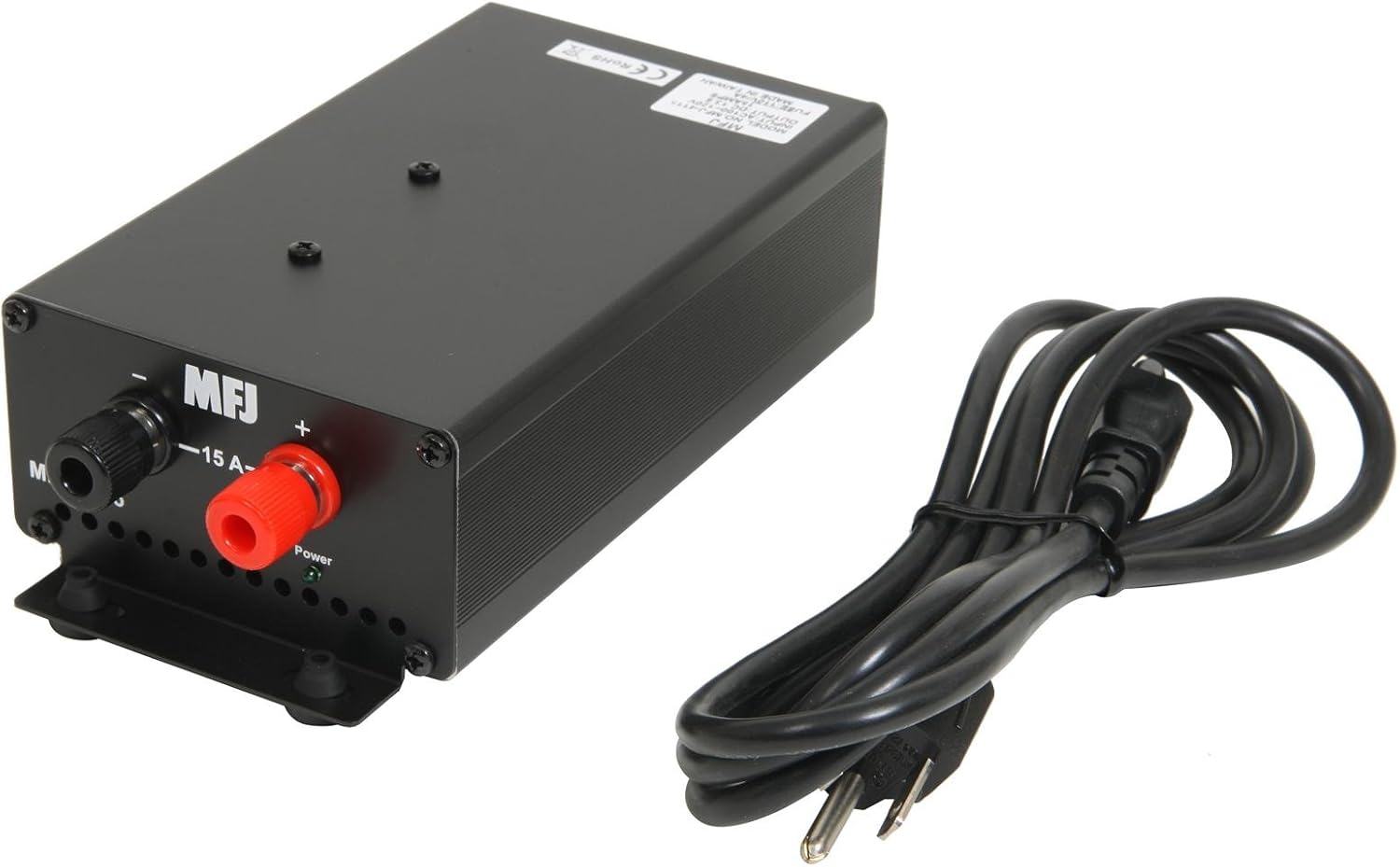
Слика 1: Предња страна view showing the 5-way binding posts for device connection and the included power cord.

Слика 2: Задња страна view illustrating the AC power input, power switch, and cooling fan for ventilation.
4. Упутство за употребу
Once the power supply is properly set up and connected:
- Укључено: Locate the power switch on the rear of the unit (refer to Figure 2) and switch it to the 'ON' position.
- Рад монитора: The power supply will now provide 13.8 VDC to your connected device. Observe the load fault indicator. If it illuminates or the unit automatically shuts down, refer to the Troubleshooting section.
- Искључивање: To turn off the power supply, switch the power switch to the 'OFF' position. For extended periods of non-use, it is recommended to unplug the AC power cord from the wall outlet.
5. Одржавање
Правилно одржавање осигурава дуготрајност и поуздан рад вашег напајања:
- Чишћење: Keep the unit clean and free from dust. Use a soft, dry cloth for cleaning. Do not use liquid cleaners or solvents.
- вентилација: Regularly check that the fan vents are clear of obstructions to ensure proper airflow and cooling.
- Бука вентилатора: The internal cooling fan may produce some noise, especially upon startup or in colder environments. This is often normal and may subside after a short period of operation. If excessive or persistent noise occurs, ensure proper ventilation.
КСНУМКС. Решавање проблема
If you encounter issues with your MFJ-4115 power supply, refer to the following common problems and solutions:
- Уређај се не укључује:
- Check that the AC power cord is securely plugged into both the power supply and the wall outlet.
- Ensure the power switch on the rear of the unit is in the 'ON' position.
- Проверите да ли зидна утичница доводи струју.
- Load Fault Indicator Active / Automatic Shut-down:
- This indicates an over-current or over-voltage condition. Immediately disconnect the load from the power supply.
- Verify that the connected device's current draw does not exceed the power supply's continuous rating of 15 Amps or surge rating of 17 Amps.
- Check for any short circuits in the connected device or its wiring.
- If the issue persists with a known good load within specifications, the power supply may require service.
- Noisy Fan:
- A slight fan noise, especially at startup or in cold conditions, is normal. It should quiet down after a short operating period.
- Ensure the unit has adequate ventilation and the fan vents are not blocked.
- If the noise is excessive or persistent, and not related to startup or cold, contact customer support.
7. Спецификације
| Спецификација | Валуе |
|---|---|
| Број модела | 4115 |
| Оутпут Волtage | 13.8 ВДЦ |
| Цонтинуоус Цуррент | 15 Amps |
| Сурге Цуррент | 17 Amps |
| Улазни волtage | АЦ 90-130 волти |
| Ватtage | 207 Ваттс |
| Димензије производа (Д к Ш к В) | 7.75 к 3.75 к 2.25 инча |
| Тежина артикла | 5.89 фунти |
| Метод хлађења | Air (with 1 fan) |
| Тип конектора | 5-смерни стубови за везивање |
8. Гаранција и подршка
For warranty information, technical assistance, or service inquiries regarding your MFJ-4115 Switching Power Supply, please contact MFJ customer service directly. Refer to the official MFJ webвеб-сајт или паковање производа за најновије контакт податке и услове гаранције.