
1. Увод
This manual provides detailed instructions for the setup, operation, and maintenance of your Rii Mini i8 2.4GHz Wireless Keyboard with Touchpad. This device combines a full QWERTY keyboard with a multi-touch touchpad, designed for convenient control of various devices such as PCs, Smart TVs, Android TV Boxes, and game consoles.

Слика: Под углом view of the Rii Mini i8 Wireless Keyboard, showcasinг његов компактан дизајн и распоред тастера.
2. Садржај пакета
Молимо вас да проверите садржај пакета како бисте били сигурни да су сви предмети присутни:
- Rii Mini i8 Wireless Keyboard with Touchpad
- USB Receiver (stored inside the battery compartment)
- УСБ кабл за пуњење
- Кориснички приручник (овај документ)
3. Подешавање
- Пронађите УСБ пријемник: Open the battery compartment cover on the back of the keyboard. The USB receiver is stored inside.
- Уметните УСБ пријемник: Plug the USB receiver into an available USB port on your device (PC, Smart TV, Android TV Box, etc.).
- Укључивање тастатуре: Locate the ON/OFF switch on the side of the keyboard and slide it to the "ON" position.
- Аутоматско повезивање: The keyboard should automatically connect to your device. No additional drivers are typically required.

Слика: Позади view of the Rii Mini i8 keyboard, showing the battery compartment and the USB receiver stored within.

Слика: Позади view of the Rii Mini i8 keyboard with the battery cover open, illustrating the location of the removable USB receiver.
4. Упутство за употребу
Once connected, the Rii Mini i8 functions as a standard keyboard and mouse.
- куцање: Use the QWERTY keyboard layout for text input.
- Функција миша: The central touchpad allows for cursor control.
- Мултимедијални тастери: Dedicated keys for volume control, play/pause, and other media functions are located on the left side.
- Функцијски тастери (Fn): Притисните и држите Fn key (bottom left) and then press a key with a blue icon to access its secondary function (e.g., Фн + Ф1 for email).

Image: A user holding the Rii Mini i8 keyboard, demonstrating its use for controlling a television display.
5. Keyboard Layout and Functions
The Rii Mini i8 features a compact QWERTY layout with additional function and multimedia keys.

Слика: Одозго надоле view of the Rii Mini i8 Wireless Keyboard, clearly showing the full QWERTY layout, touchpad, and dedicated function keys.
- QWERTY Keys: Standard alphanumeric keys for typing.
- Функцијски тастери (F1-F12): Приступа се притиском на Fn + corresponding key.
- Multimedia Control Keys: Volume up/down, mute, play/pause, next/previous track.
- Тастер за смер: Located on the right side for navigation.
- Лево/десно дугме миша: Посебна дугмад испод тачпеда.
6. Функције тачпеда
The integrated touchpad supports multi-touch gestures for intuitive navigation.
- Додир једним прстом: Функционише као клик левим мишем.
- Додир са два прста: Функционише као десни клик миша.
- Two Finger Drag (Vertical): Scrolls up or down.
- Повлачење једним прстом: Помера курсор.
7. Пуњење уређаја
The Rii Mini i8 keyboard is powered by a rechargeable Lithium Metal battery.
- Повежите кабл за пуњење: Plug the small end of the included USB charging cable into the mini-USB port on the top edge of the keyboard.
- Повежите се на извор напајања: Plug the standard USB end of the cable into a USB port on your computer, a USB wall adapter, or a power bank.
- Индикатор пуњења: A charging indicator light (usually red) will illuminate during charging and turn off or change color when fully charged.
- Трајање батерије: The keyboard is designed for extended use on a single charge.

Image: The included USB charging cable, showing the mini-USB connector for the keyboard and the standard USB connector for a power source.
8. Одржавање
- Чишћење: Користите меку, суву крпу за чишћење површине тастатуре. За тврдокорну прљавштину, благо дamp Може се користити крпа, водећи рачуна да течност не уђе у уређај.
- Складиштење: When not in use for extended periods, turn off the keyboard to conserve battery life. Store in a cool, dry place.
- Одржавање батерије: Avoid fully discharging the battery frequently. Charge the device regularly to maintain battery health.
КСНУМКС. Решавање проблема
| Проблем | Могуће решење |
|---|---|
| Тастатура не реагује |
|
| Покрет курсора је неправилан или спор |
|
| Кључеви не раде |
|
10. Спецификације
Key technical specifications for the Rii Mini i8 Wireless Keyboard:
- Модел: RT-MWK08RF
- Повезивање: 2.4 GHz бежична веза (преко USB адаптера)
- Хардверски интерфејс: Радио фреквенција
- Оператинг Волtage: 3.3 Волтс
- Извор напајања: Battery Powered (Lithium Metal, included)
- Димензије производа: 5.79 x 0.75 x 3.86 цм (приближно 147 x 18 x 97 мм)
- Тежина артикла: 110 г
- Посебне карактеристике: Бежична, додирна табла
- Технологија детекције покрета: Optical (for touchpad)
- Опис тастатуре: Индоор
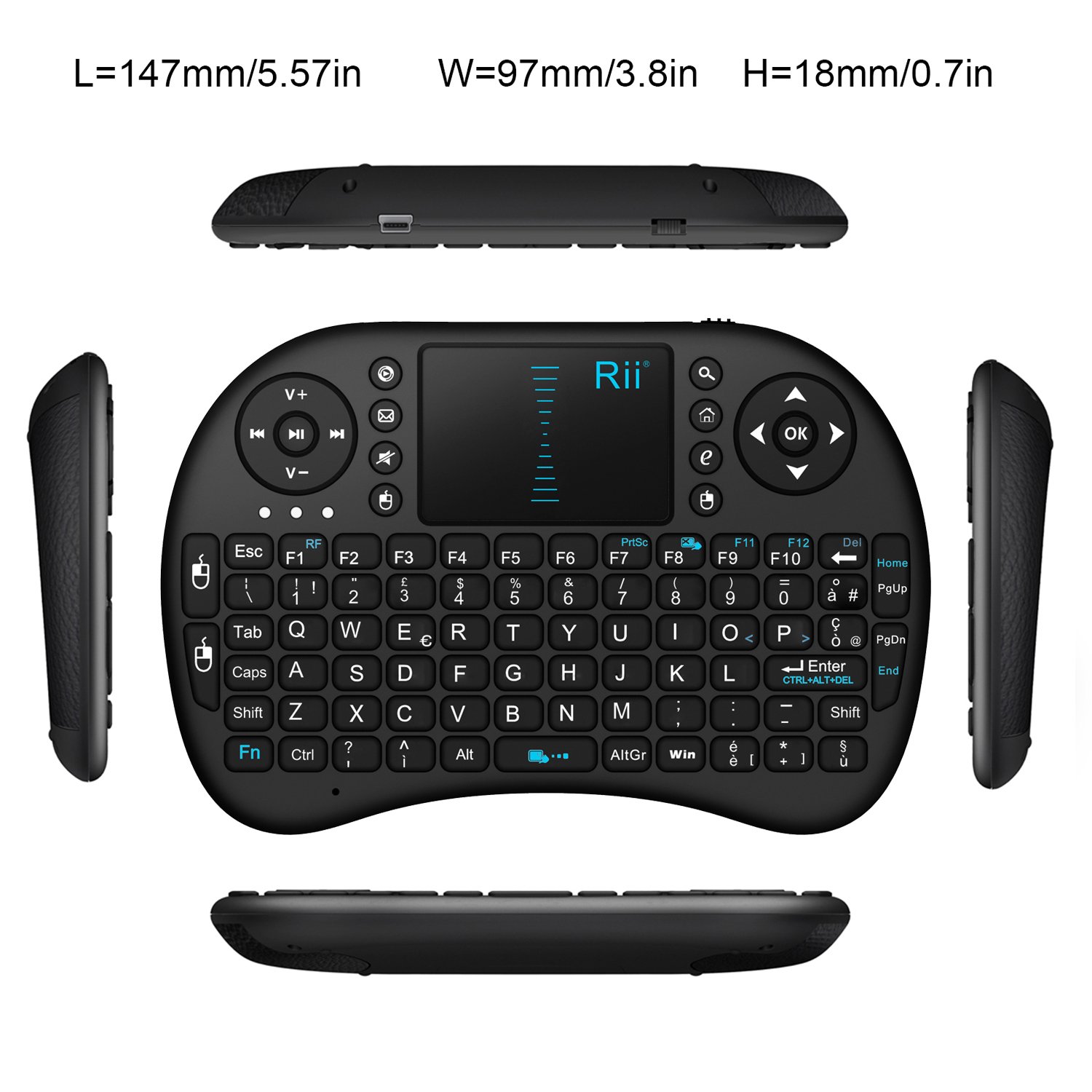
Слика: Одозго надоле view of the Rii Mini i8 keyboard with its dimensions (length, width, height) indicated in millimeters and inches.
11. Гаранција и подршка
За информације о гаранцији и техничкој подршци, обратите се званичном сервису произвођача webсајт или контактирајте продавца. Сачувајте рачун за куповину за потребе гаранције.