
1. Увод
Хвала вам на куповиниasing the KLH R5100 Surround Sound Receiver. This receiver is designed to provide high-quality audio and video performance for your home entertainment system. It features multiple audio and video inputs, surround sound processing, and a powerful amplifier to deliver an immersive listening experience. Please read this manual thoroughly before operating the unit to ensure proper setup and optimal performance.
2. Важне информације о безбедности
Да бисте смањили ризик од струјног удара, пожара или оштећења уређаја, молимо вас да се придржавате следећих мера безбедности:
- Извор напајања: Уређај повежите само на напајање наизменичне струје од 120 V, 60 Hz.
- вентилација: Ensure adequate ventilation. Do not block ventilation openings. Allow sufficient space around the unit for proper airflow.
- Вода и влага: Не излажите уређај киши, влази или прекомерној влажности. Не стављајте предмете напуњене течношћу, као што су вазе, на уређај.
- топлота: Држите уређај даље од извора топлоте као што су радијатори, грејни уређаји, шпорети или други уређаји (укључујући ampлифиерс) који производе топлоту.
- Чишћење: Искључите уређај из зидне утичнице пре чишћења. Користите суву крпу за чишћење.
- Сервисирање: Не покушавајте сами да сервисирате овај уређај. Сво сервисирање препустите квалификованом сервисеру.
- Каблови: Заштитите кабл за напајање од гажења или прикљештења, посебно код утикача, утичница и места где излазе из јединице.
3. Садржај пакета
Молимо вас да проверите да ли ваш пакет садржи следеће ставке:
- KLH R5100 Surround Sound Receiver
- Јединица за даљинско управљање
- Упутство за употребу
- Audio/Video Cables (RCA type)
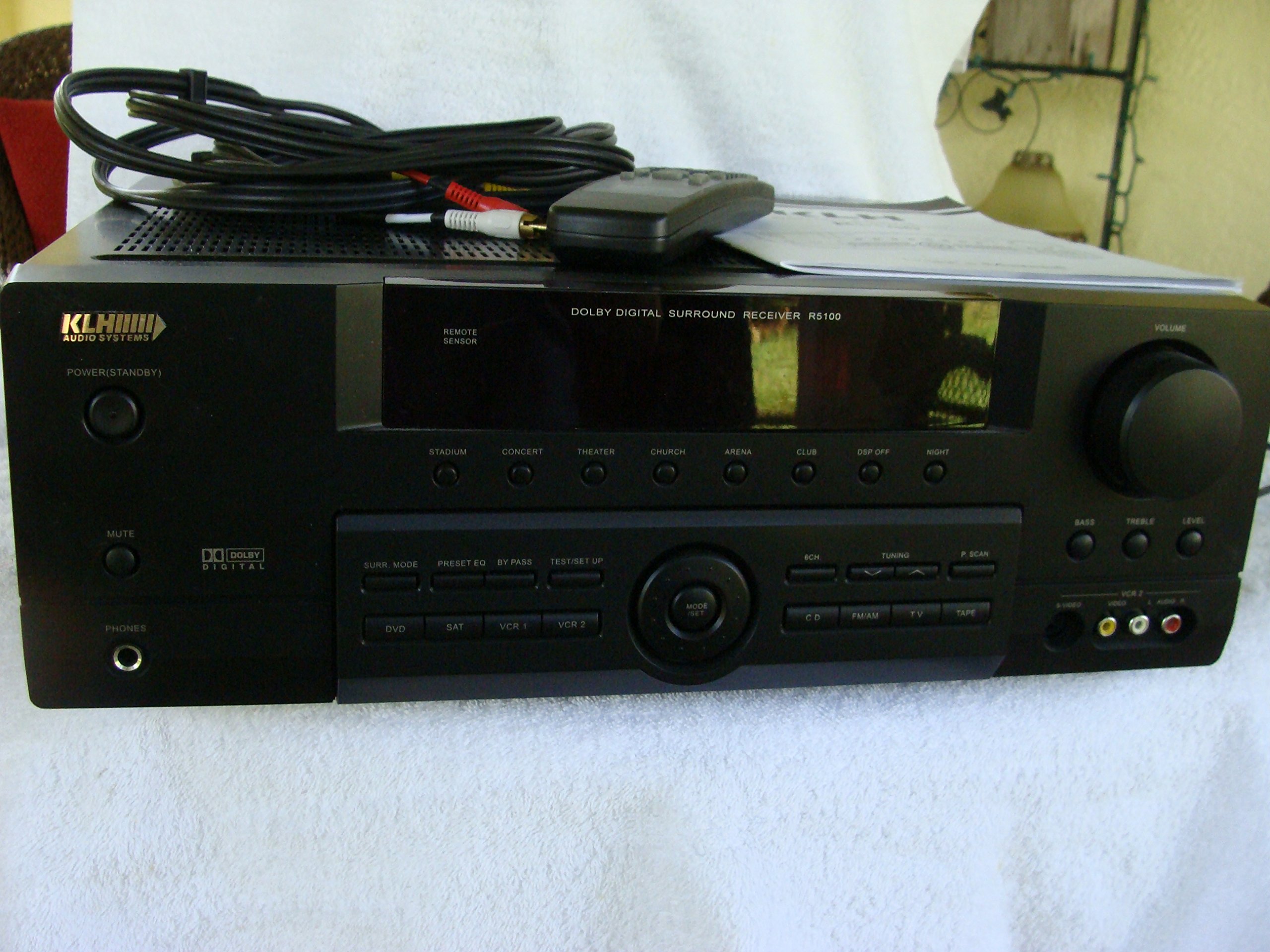
Image: The KLH R5100 receiver, its remote control, user manual, and included audio/video cables.
4. Производ је готовview
4.1 Контроле на предњој плочи
Предња плоча омогућава приступ основним контролама и индикаторима за свакодневни рад.

Слика: Детаљна view of the receiver's front panel, highlighting the display, volume control, and input selection buttons.
- Дугме за напајање: Укључује или искључује пријемник.
- Бирачи улаза: Buttons for DVD, SAT, VCR 1, VCR 2, CD, FM/AM, TV, TAPE to choose your audio/video source.
- Дугме за јачину звука: Подешава укупну јачину звука.
- Surround Mode Buttons: Select various sound fields like Stadium, Concert, Theater, Church, Arena, Club, DSP Off, Night.
- Bass/Treble/Level: Controls for adjusting audio tone and individual channel levels.
- Слушалице: За приватно слушање.
4.2 Прикључци задње плоче
The rear panel houses all input and output terminals for connecting your audio and video components, as well as speakers.

Image: The full rear panel of the receiver, displaying all connection ports for audio, video, and speakers.
- Звучнички терминали: Connections for Main (Front Left/Right), Center, and Rear (Surround Left/Right) speakers.
- Audio Inputs (RCA): For connecting CD players, tape decks, VCRs, TVs, and other stereo audio sources.
- Video Inputs/Outputs (RCA/S-Video): For connecting video sources like DVD players, VCRs, and TVs.
- Дигитални аудио улази (оптички/коаксијални): For connecting digital audio sources like DVD players or set-top boxes.
- 6CH Direct Input: For connecting external multi-channel decoders or players with 5.1 analog outputs.
- Излаз за сабвуфер: RCA излаз за повезивање активног сабвуфера.
- Антенски терминали: For FM and AM antennas.
4.3 Јединица за даљинско управљање
The remote control provides convenient access to all receiver functions from your listening position.

Слика: Крупни план view of the remote control unit, detailing its buttons for various functions.
- Укључивање/искључивање: Укључује или искључује пријемник.
- Бирачи улаза: Dedicated buttons for each input source (DVD, CD, TV, etc.).
- Појачавање/утишавање: Подешава главну јачину звука.
- Искључи звук: Привремено искључује звук.
- Сурроунд режим: Cycles through available surround sound modes.
- Level/Test: For adjusting individual speaker levels and running a test tone.
- Контроле тјунера: For FM/AM station tuning and memory functions.
5. Подешавање
5.1 Повезивање звучника
Ensure the receiver is unplugged from the power outlet before making any connections.
- Предњи звучници: Connect your main left and right speakers to the 'MAIN SPEAKERS (8Ω)' terminals. Ensure correct polarity (+ to + and - to -).
- Централни звучник: Connect your center channel speaker to the 'CENTER SPEAKER (8Ω)' terminals.
- Задњи звучници: Connect your surround left and right speakers to the 'REAR SPEAKERS (8Ω)' terminals.
- Субвоофер: Connect an active subwoofer to the 'SUBWOOFER OUT' RCA jack using a single RCA cable.

Слика: Детаљна view of the speaker connection terminals on the rear panel.
5.2 Connecting Audio/Video Sources
Use appropriate cables (RCA, Optical, Coaxial) to connect your source components to the receiver.
- ДВД плејер: Connect the audio output of your DVD player to the 'DVD' audio input jacks (RCA) on the receiver. For digital audio, use either the 'DIGITAL IN OPTICAL' or 'DIGITAL IN COAXIAL' input. Connect the video output to the 'DVD' video input.
- ЦД плејер: Connect the audio output of your CD player to the 'CD' audio input jacks (RCA).
- TV/Cable Box: Connect the audio output of your TV or cable box to the 'TV' audio input jacks (RCA). Connect video output to the 'TV' video input.
- Остали уређаји: Use 'SAT', 'VCR 1', 'VCR 2', or 'TAPE' inputs for other audio/video components as needed.

Image: A close-up of the digital audio inputs (Coaxial, Optical) and the 6-channel direct input section on the rear panel.
5.3 Повезивање антене
Повежите испоручене FM и AM антене на одговарајуће терминале на задњој плочи за радио пријем.
6. Упутство за употребу
6.1 Основни рад
- Укључено: Press the Power button on the front panel or remote control.
- Изаберите унос: Press the desired input selector button (e.g., 'DVD', 'CD') on the front panel or remote control to choose your source.
- Подесите јачину звука: Turn the Volume knob on the front panel or use the Volume Up/Down buttons on the remote control.
6.2 Surround Sound Modes
The R5100 offers various sound modes to enhance your listening experience:
- стадион: Simulates the acoustics of a large stadium.
- Концерт: Creates a concert hall ambiance.
- позориште: Optimized for movie playback, enhancing dialogue and effects.
- Црква: Replicates the spaciousness of a church.
- Arena: Provides a wide, open sound field.
- Клуб: Simulates a lively club environment.
- DSP Off: Disables digital sound processing for a direct stereo signal.
- ноћ: Reduces dynamic range for late-night listening without disturbing others.
Press the 'SURR. MODE' button on the remote or front panel to cycle through these modes.
6.3 Тоне Цонтрол
Use the BASS and TREBLE controls on the front panel or remote to adjust the low and high frequency response. The LEVEL controls allow for fine-tuning of individual speaker output levels.
6.4 Рад тјунера
To listen to radio:
- Press the 'FM/AM' input selector.
- Use the 'TUNING' buttons on the front panel or remote to find stations.
- Press 'MEMORY' to store favorite stations, and 'P.SCAN' to scan through presets.
7. Одржавање
To ensure the longevity and optimal performance of your KLH R5100 receiver, follow these maintenance guidelines:
- Чишћење: Wipe the exterior surfaces with a soft, dry cloth. Do not use abrasive cleaners, waxes, or solvents as they may damage the finish.
- вентилација: Regularly check that the ventilation openings are not obstructed by dust or debris. Use a soft brush or vacuum cleaner to gently remove any build-up.
- Кабл за напајање: Inspect the power cord periodically for any signs of damage. If damaged, discontinue use and contact qualified service personnel.
- Складиштење: If storing the unit for an extended period, unplug it from the power outlet and cover it to protect against dust.
КСНУМКС. Решавање проблема
If you encounter problems with your receiver, refer to the following common issues and solutions before seeking professional service.
| Проблем | Могући узрок | Решење |
|---|---|---|
| Нема струје | Power cord unplugged; Power outlet not active | Ensure power cord is securely plugged in; Check power outlet with another device |
| Нема звука | Incorrect input selected; Speakers not connected properly; Volume too low; Mute function active | Select correct input source; Check speaker connections and polarity; Increase volume; Deactivate Mute |
| Даљински управљач не ради | Batteries depleted; Obstruction between remote and receiver; Remote sensor blocked | Replace batteries; Remove any obstructions; Ensure remote sensor on receiver is clear |
| Лош радио пријем | Antenna not connected or poorly positioned | Connect antennas securely; Adjust antenna position for better reception |
| Изобличен звук | Input signal too high; Speaker impedance mismatch; Damaged cables | Reduce source volume; Ensure speakers match 8Ω impedance; Check and replace damaged cables |
9. Спецификације
The following are the technical specifications for the KLH R5100 Surround Sound Receiver:
- Број модела: Р5100
- Димензије производа: 16.88 к 6.88 к 15.75 инча
- Тежина артикла: 24.2 фунти
- Извор напајања: АЦ 120В, 60Хз
- Потрошња енергије: 320В
- Режим аудио излаза: Сурроунд
- Конфигурација канала сурроунд звука: 5.1
- Технологија повезивања: RCA, 3.5mm Jack, Optical, Coaxial
- Компатибилни уређаји: Звучници
- Тип контролера: Ремоте
- Посебна карактеристика: Advanced Room Calibration (as per product listing, though specific details may vary)
- Боја: Црно
10. Гаранција и подршка
For warranty information and customer support, please refer to the documentation included with your purchase or contact KLH customer service directly. Keep your proof of purchase for any warranty claims.