
1. Увод
This manual provides instructions for the OEM RMT-B119A remote control, designed as a replacement or secondary remote for various Sony Blu-ray player models. This remote offers full functionality for controlling your Blu-ray player's features.
Compatible Sony Blu-ray Player Models:
- БДП-БКС59
- БДП-С390
- БДП-С590
- БДП-БКС110
- БДП-С1100
- БДП-С3100
- БДП-БКС310
2. Подешавање
2.1 Инсталација батерије
Даљински управљач захтева две (2) ААА батерије (нису укључене). Пратите ове кораке да бисте инсталирали батерије:
- Пронађите поклопац одељка за батерије на задњој страни даљинског управљача.
- Притисните језичак и померите поклопац надоле да бисте отворили одељак.
- Уметните две ААА батерије, водећи рачуна да позитивни (+) и негативни (-) терминали буду правилно поравнати са ознакама унутар одељка.
- Вратите поклопац одељка за батерију на место док не кликне чврсто.
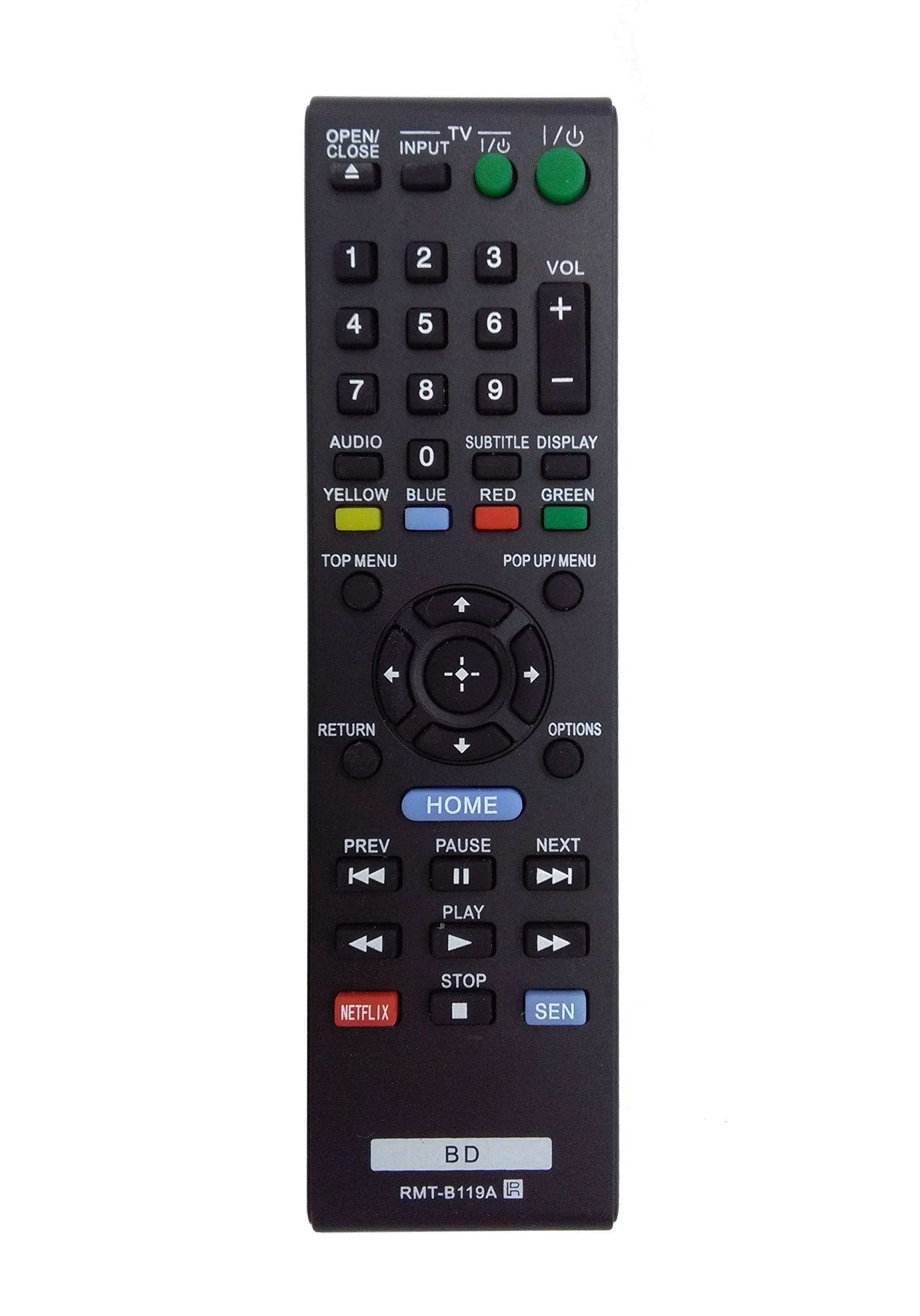
Image: The OEM RMT-B119A remote control, showing the full button layout on the front and a partial view of the open battery compartment on the back, revealing the battery terminals.
3. Упутство за употребу
3.1 Распоред даљинског управљача и функције дугмади
Familiarize yourself with the buttons on your RMT-B119A remote control. Below is a description of each button's primary function.
Image: The OEM RMT-B119A remote control, displaying all buttons and their labels.
- Напајање (У/И): Turns the Blu-ray player on or off.
- OPEN/CLOSE (▲): Отвара или затвара лежиште диска.
- УЛАЗНИ: Switches the input source on the connected TV (if programmed).
- ТВ: Switches the remote to TV control mode (if programmed).
- Нумеричка тастатура (0-9): Used for direct track selection, chapter selection, or entering numerical data.
- ВОЛ (+/-): Adjusts the volume level (typically for the connected TV, if programmed).
- АУДИО: Changes the audio track or language during playback.
- SUBTITLE DISPLAY: Toggles subtitle display on or off, or cycles through available subtitle languages.
- YELLOW, BLUE, RED, GREEN: Color-coded function buttons, typically used for specific features within menus or interactive content. Their function varies depending on the disc or menu.
- ТОП МЕНУ: Accesses the main menu of the Blu-ray disc.
- POP UP/MENU: Displays the pop-up menu during disc playback.
- Directional Pad (↑↓←→): Креће кроз меније и опције.
- Center Button (Enter/Select): Потврђује избор или улази у ставку менија.
- ПОВРАТАК: Враћа се на претходни екран или мени.
- ОПЦИЈЕ: Displays context-sensitive options or settings.
- КУЋА: Accesses the Blu-ray player's home menu.
- PREV (◀◀): Skips to the beginning of the current track/chapter or the previous track/chapter.
- PAUSE (▌▌): Паузира репродукцију.
- NEXT (▶▶): Прескаче на следећу нумеру или поглавље.
- ИГРАЈ (▶): Покреће или наставља репродукцију.
- СТОП (■): Зауставља репродукцију.
- НЕТФЛИКС: Direct access button for the Netflix streaming service.
- СЕН: Direct access button for the Sony Entertainment Network (now PlayStation Video/Music).
- БД: Likely a dedicated button for Blu-ray Disc functions or to switch to Blu-ray mode.
4. Одржавање
Да бисте осигурали дуготрајност и правилно функционисање вашег даљинског управљача, пратите ова упутства за одржавање:
- Чишћење: Обришите даљински управљач меком, сувом крпом. За тврдокорну прљавштину, благо дampОперите крпу водом или благим, неабразивним средством за чишћење. Избегавајте употребу јаких хемикалија или растварача.
- Замена батерије: Replace batteries when the remote's response becomes sluggish or it stops functioning. Always replace both batteries at the same time with new ones of the same type.
- Складиштење: Даљински управљач чувајте на хладном и сувом месту, даље од директне сунчеве светлости, екстремних температура и високе влажности. Ако даљински управљач неће бити коришћен дуже време, извадите батерије да бисте спречили цурење.
- Избегавајте капи: Заштитите даљински управљач од физичких удара, јер падови могу оштетити унутрашње компоненте.
КСНУМКС. Решавање проблема
If you experience issues with your remote control, refer to the following table for common problems and solutions:
| Проблем | Могући узрок | Решење |
|---|---|---|
| Даљински не ради. | Празне или неправилно уметнуте батерије. | Замените батерије новим, водећи рачуна о исправном поларитету (+/-). |
| Даљински управљач ради повремено. | Low battery power or obstruction. | Replace batteries. Ensure no objects are blocking the remote's signal path to the Blu-ray player. |
| Даљински управљач не контролише телевизор. | Remote not programmed for TV or TV mode not selected. | This remote is primarily for Blu-ray players. TV control functionality may require specific programming not covered by this manual, or may not be supported by this OEM model. |
| Дугмад не реагују или су лепљива. | Прљавштина или остаци испод дугмади. | Clean the remote control surface. Avoid spilling liquids on the remote. |
6. Спецификације
- Бренд: ОЕМ
- Број модела: RMT-B119A
- Технологија повезивања: Инфрацрвени (ИР)
- Компатибилни уређаји: Sony Blu-ray Players (specific models listed in Introduction)
- Извор напајања: 2 к ААА батерије (нису укључене)
- Максимални домет: Приближно 10 метара (33 стопе)
- Посебна карактеристика: Ергономски дизајн
7. Гаранција и подршка
This OEM RMT-B119A remote control comes with a 30-дневна гаранција од датума куповине, покривајући производне недостатке. Молимо вас да сачувате доказ о куповини за потребе гаранције.
For technical support or warranty inquiries, please contact the retailer or manufacturer directly. Refer to your purchase documentation for specific contact information.