
1. Увод
This manual provides instructions for the APEX LD200RM remote control, designed for use with various APEX LCD and LED television models. This remote control offers full functionality for your compatible APEX television, ensuring convenient operation of all features.
Compatible APEX TV Models:
- ЛД3249
- LD3288, LD3288T, LD3288M
- LD4077, LE4077M
- ЛД4088
- ЛД4688
- LE3212, LE3212D
- ЛЕ4012
- ЛЕ4612
- ЛЕ3242
- ЛЕ3942
- LE40B12
- ЛЕ4243
- ЛЕ4643
- ЛЕ5043
2. Подешавање
2.1 Инсталација батерије
The APEX LD200RM remote control requires two (2) AA batteries for operation. Follow these steps to install the batteries:
- Пронађите поклопац одељка за батерије на задњој страни даљинског управљача.
- Притисните језичак надоле и скините поклопац.
- Уметните две АА батерије, водећи рачуна да позитивни (+) и негативни (-) терминали буду правилно поравнати са ознакама унутар одељка.
- Вратите поклопац одељка за батерију на место док не кликне чврсто.
Напомена: Увек мењајте обе батерије истовремено. Не мешајте старе и нове батерије, нити различите типове батерија.
2.2 Прва употреба
The APEX LD200RM remote control is an original replacement and typically does not require any programming or pairing. Once batteries are installed, point the remote control towards your compatible APEX television and begin operation.
3. Упутство за употребу
This section details the functions of the buttons on your APEX LD200RM remote control.
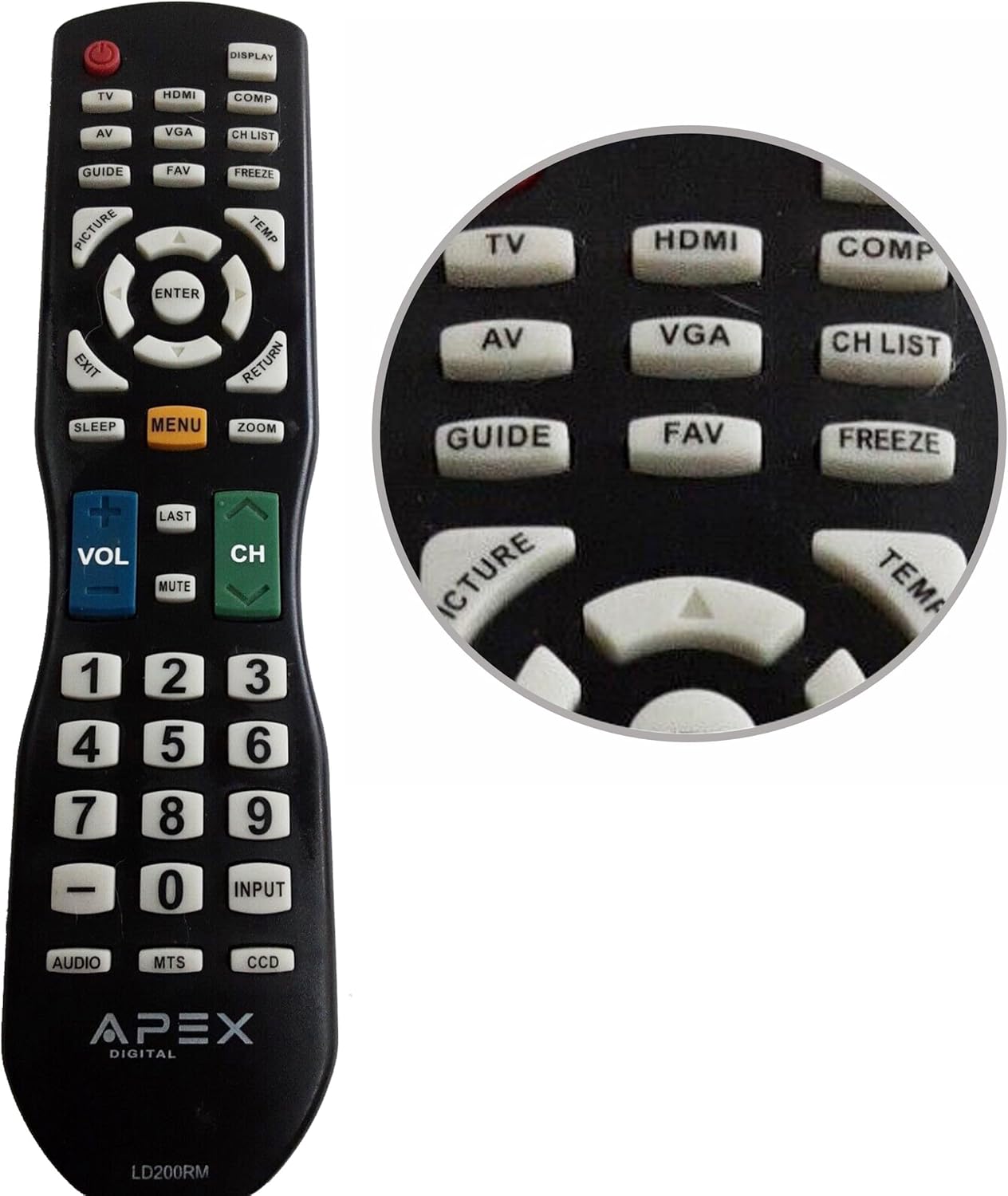
Figure 1: APEX LD200RM Remote Control Layout. This image displays the entire remote control, highlighting the arrangement of its various function buttons, including power, input selection, navigation, volume, channel, and numeric keypad.

Figure 2: Close-up of APEX LD200RM Remote Control Top Buttons. This image provides a detailed view of the upper section of the remote, focusing on buttons such as TV, HDMI, AV, VGA, COMP, CH LIST, DISPLAY, GUIDE, FAV, FREEZE, PICTURE, TEMP, MENU, ENTER, EXIT, RETURN, SLEEP, and ZOOM.
3.1 Power and Input Selection
- НАПАЈАЊЕ (црвено дугме): Укључује или искључује телевизор.
- ТВ: Selects the TV tuner input.
- ДВИ: Selects the HDMI input.
- АВ: Selects the Audio/Video input.
- ВГА: Selects the VGA input.
- ЦОМП: Selects the Component video input.
- ПРИКАЗ: Приказује информације на екрану.
3.2 Channel and Volume Control
- ВОЛ (+/-): Повећава или смањује јачину звука.
- CH (Up/Down): Мења телевизијски канал горе или доле.
- ПОСЛЕДЊЕ: Враћа се на претходно viewед цханнел.
- МУТЕ: Искључује или укључује звук телевизора.
- ЦХ ЛИСТА: Приказује листу канала.
3.3 Мени и навигација
- МЕНИ: Opens the television's main menu.
- ЕНТЕР: Confirms a selection within the menu.
- Дугмад са стрелицама (горе/доле/лево/десно): Navigates through menu options and adjusts settings.
- ЕКСИТ: Излази из тренутног менија или приказа на екрану.
- ПОВРАТАК: Враћа се на претходни мени или екран.
3.4 Numeric Keypad and Special Functions
- 0-9 (Numeric Buttons): Директно уноси бројеве канала.
- УЛАЗНИ: Кружи кроз доступне изворе улаза.
- ВОДИЧ: Приказује електронски програмски водич (ако је доступан).
- ФАВ: Приступ омиљеним каналима.
- ЗАМРЗНУТИ: Freezes the current image on the screen.
- СЛИКА: Подешава подешавања слике.
- ТЕМП: (Function may vary by model, often related to picture temperature or a specific mode).
- СПАВАЊЕ: Подешава тајмер за спавање.
- ЗООМ: Adjusts the screen zoom level.
- АУДИО: Selects audio modes or tracks.
- МТС: Multi-channel Television Sound (stereo/SAP).
- ЦЦД: Closed Captioning Display.
4. Одржавање
4.1 Замена батерије
When the remote control's performance degrades or it stops responding, it is likely time to replace the batteries. Refer to Section 2.1 for detailed battery installation instructions. Always use fresh AA batteries.
4.2 Чишћење
За чишћење даљинског управљача користите меку, суву крпу. За тврдокорну прљавштину, благо дampОбришите крпу водом или благим, неабразивним средством за чишћење. Избегавајте употребу јаких хемикалија или абразивних материјала, јер могу оштетити површину даљинског управљача или унутрашње компоненте.
4.3 Складиштење
Даљински управљач чувајте на хладном и сувом месту, даље од директне сунчеве светлости и екстремних температура. Ако се даљински управљач неће користити дуже време, препоручљиво је да извадите батерије како бисте спречили цурење и потенцијално оштећење.
КСНУМКС. Решавање проблема
- Даљински управљач не реагује:
- Ensure the batteries are correctly installed with the correct polarity (+/-).
- Замените старе батерије новим АА батеријама.
- Check for any obstructions between the remote control and the television's infrared sensor.
- Ensure you are within the effective range of the television's IR receiver.
- Нека дугмад не раде:
- Ово може указивати на низак ниво напуњености батерије. Замените батерије.
- Ensure the remote is clean and there is no debris lodged under the buttons.
- Verify that the button function is applicable to your specific TV model. Some functions may not be supported by all compatible TVs.
- Television is not turning on/off:
- Confirm the television is plugged into a working power outlet.
- Try using the power button directly on the television to rule out a TV issue.
6. Спецификације
| Феатуре | Детаљ |
|---|---|
| Број модела | LD200RM |
| Бранд | Апек |
| Компатибилни уређаји | APEX LCD & LED Televisions |
| Извор напајања | 2 к АА батерије (нису укључене) |
| Димензије производа | 10 к 6 к 2 инча (приближно) |
| Тежина артикла | 3.2 унци (приближно) |
| Боја | Црно |
| Посебна карактеристика | Ергономски дизајн |
7. Информације о гаранцији
This APEX LD200RM remote control typically comes with a 30-day warranty from the date of purchase. This warranty covers manufacturing defects. For specific details regarding warranty claims, returns, or replacements, please refer to your purchase documentation or contact the seller directly.
8. Подршка
If you encounter issues not covered in this manual or require further assistance, please contact the retailer or the manufacturer's customer support. When contacting support, please have your product model number (LD200RM) and your television model number readily available.