
Увод
This manual provides detailed instructions for the installation, operation, and maintenance of your Orbit 94894 Easy-Set Logic Automatic Irrigation System Programmer. This digital programmer is designed for both indoor and outdoor use, featuring a protective cover with a key lock, an LCD display, and large buttons for simplified programming. It supports up to 4 irrigation zones and offers flexible scheduling options to efficiently manage your watering needs.
Безбедносне информације
Please read all safety instructions before installing and operating the irrigation programmer. Failure to follow these instructions may result in property damage or personal injury.
- Уверите се да је напајање искључено пре него што извршите било какво ожичење или одржавање.
- Install the unit in a location protected from direct sunlight and extreme weather conditions if possible, even though it is rated for outdoor use.
- Keep batteries away from children. Battery warning: Chemical Burn Hazard.
- Only use the specified power transformer (240V to 24V integrated transformer).
Подешавање и инсталација
The Orbit 94894 programmer can be installed indoors or outdoors. Choose a location that is easily accessible and provides adequate protection for the unit and wiring.
1. Mounting the Programmer
Mount the programmer vertically on a wall using appropriate screws and anchors. Ensure it is at a height that allows for comfortable viewинг и рад.

Image: Orbit 94894 programmer mounted indoors, open, showing controls and internal components. This illustrates a typical indoor installation.

Image: Orbit 94894 programmer mounted on an outdoor brick wall, open, displaying the control panel. This shows an outdoor installation with the protective cover open.
2. Wiring the Valves
Connect the common wire from your irrigation valves to the terminal labeled "COM". Connect each zone wire to its corresponding terminal (1, 2, 3, 4). The programmer supports up to 4 zones.

Слика: Интерна view of the Orbit 94894 programmer showing wiring terminals for common and zones 1-4. This image highlights the connection points for irrigation valves.
3. Прикључак за напајање
The unit includes an integrated 240V to 24V transformer. Connect the power cord to a suitable electrical outlet. Ensure the connection is secure.
4. Rain Sensor Connection (Optional)
If using a rain sensor, connect it to the designated sensor terminals. Refer to your rain sensor's manual for specific wiring instructions. The rain sensor will interrupt scheduled watering during rainfall.
5. Инсталација батерије
A button battery is integrated to retain programming during power outages. Ensure it is properly seated. This battery does not power the irrigation system, only the program memory.
Упутство за употребу
The Orbit 94894 features an intuitive interface with an LCD display and control buttons. The main dial allows selection of different programming modes.

Слика: Фронт view of the Orbit 94894 programmer showing the LCD display, control dial, and buttons. This is the primary interface for programming.
1. Setting Current Time and Date
Окрените точкић на "SET CLOCK" положај. Користити "+" и "-" buttons to adjust the time and date. Press the "NEXT" button to move between settings (hour, minute, AM/PM, day, month, year).
2. Programming Irrigation Schedules
The programmer supports 3 independent programs (A, B, C) with up to 4 start times each, allowing for a total of 12 irrigation events per day.
- Изаберите програм: Окрените точкић на "PROGRAM A", "PROGRAM B", или "PROGRAM C".
- Постави време почетка: For each program, use the "+" и "-" buttons to set up to 4 start times. Press "NEXT" to cycle through start times.
- Set Run Times (Duration): Окрените точкић на "RUN TIMES". Select the desired zone (1-4) using the "ZONE" дугме, а затим употребите "+" и "-" to set the watering duration from 1 to 99 minutes for that zone. Repeat for all active zones.
- Set Watering Days: Окрените точкић на "WATER DAYS". Select your preferred watering schedule (e.g., specific days of the week, odd/even days, or interval watering). Use "+" и "-" прилагодити.
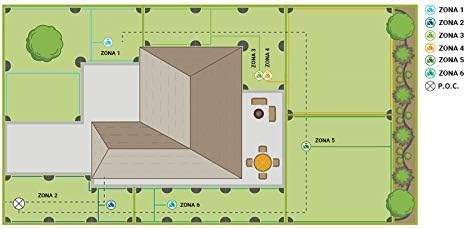
Image: Diagram illustrating different irrigation zones in a garden layout. This visual aid helps in understanding how to assign and manage different watering areas.
3. Функција одлагања кише
To temporarily suspend watering due to rain, rotate the dial to "RAIN DELAY". Користите "+" or "-" buttons to select a delay of 24, 48, or 72 hours. The system will automatically resume watering after the selected delay period.
4. Seasonal Adjustment (Percentage Adjustment)
To adjust all programmed watering durations by a percentage without reprogramming each zone, rotate the dial to "SEASONAL ADJUST". Користите "+" or "-" buttons to increase or decrease the watering duration percentage (e.g., 50% for less water, 120% for more water).
5. Ручно заливање
To manually water a specific zone or all zones, rotate the dial to "РУЧНИК". Follow the on-screen prompts to select zones and set durations for immediate watering.
Одржавање
Regular maintenance ensures optimal performance and longevity of your irrigation programmer.
- Чишћење: Обришите јединицу меком крпом, дamp крпу. Избегавајте абразивна средства за чишћење или раствараче.
- Провера батерије: Periodically check the integrated button battery to ensure program retention during power interruptions. Replace if necessary, following the instructions for battery type and polarity.
- Зимљење: In regions with freezing temperatures, disconnect the programmer and store it indoors during winter months to prevent damage from ice.
- Инспекција ожичења: Annually inspect all wiring connections for corrosion or damage. Ensure all connections are secure.
Решавање проблема
If you encounter issues with your Orbit 94894 programmer, refer to the following common problems and solutions:
| Проблем | Могући узрок | Решење |
|---|---|---|
| Programmer display is blank. | No power, faulty transformer, or internal issue. | Check power outlet. Ensure transformer is connected. If problem persists, contact support. |
| Valves do not turn on. | No power to valves, faulty wiring, rain sensor active, or valve malfunction. | Verify power to programmer. Check common and zone wiring connections. Ensure rain sensor is not activated. Manually test valves. |
| Valves do not turn off. | Faulty valve, wiring short, or programmer malfunction. | Inspect valve for debris or damage. Check wiring for shorts. If a specific zone continuously runs, disconnect its wire to isolate the issue. |
| Programmer loses settings after power outage. | Integrated button battery is dead or improperly seated. | Check and replace the button battery if necessary. |
| Одлагање кише не ради. | Rain sensor not connected or faulty. | Ensure rain sensor is properly wired and functioning. Check rain sensor settings on the programmer. |
Спецификације
- Модел: 94894
- Бренд: Орбита
- Материјал: Пластика
- Боја: Греи
- Тип приказа: ЛЦД
- Тежина артикла: Приближно 3.31 лбс (1.5 кг)
- Улазна снага: 240V AC (integrated 24V transformer)
- Зоне: До 4 зона
- Програми: 3 independent programs (A, B, C)
- Времена почетка: Up to 4 start times per program
- Run Time per Zone: 1 до 99 минута
- Кашњење кише: 24, 48, 72 сати
- Сезонско прилагођавање: Перценtage-based adjustment for all run times
Гаранција и подршка
The Orbit 94894 Automatic Irrigation System Programmer typically comes with a 6-year warranty, as indicated on product packaging. For specific warranty details, claims, or technical support, please refer to the official Orbit webсајт или директно контактирајте њихову корисничку службу. Сачувајте доказ о куповини за потребе гаранције.
За даљу помоћ, посетите ввв.орбитонлине.цом.