
Gembird KB-BT-001-W-DE
Упутство за употребу Гембирд KB-BT-001-W-DE Slimline Bluetooth тастатуре
Model: KB-BT-001-W-DE | Brand: Gembird
1. Увод
This manual provides detailed instructions for the Gembird KB-BT-001-W-DE Slimline Bluetooth Keyboard. Please read this manual thoroughly before using the product to ensure proper operation and to maximize its lifespan. This keyboard is designed for seamless wireless connectivity with various Bluetooth-enabled devices.
2. Садржај пакета
- Gembird KB-BT-001-W-DE Bluetooth Keyboard (German QWERTZ Layout, White)
- УСБ кабл
- Упутство за употребу
3. Кључне карактеристике
- Slimline Bluetooth V 3.0 Wireless Keyboard (German QWERTZ Layout)
- Ultra-flat and ergonomic design
- Supports common Bluetooth-enabled devices: smartphones, tablets, PCs, and laptops
- Soft-touch keys for comfortable typing
- Convenient multimedia keys
- Compact size (28.7 x 2 x 13.7 cm) ideal for travel
- Compatible with Windows (XP, Vista, 7, 8) and Apple (iPad, iPhone, iPod Touch, MAC OS)
- Радни домет: До 10 метара
4. Системски захтеви
- Device with Bluetooth connectivity (e.g., PC, laptop, tablet, smartphone)
- Supported Operating Systems: Windows XP/Vista/7/8, Apple iOS (iPad, iPhone, iPod Touch), Mac OS
5. Подешавање и упаривање
5.1. Укључивање тастатуре
Locate the power switch on the keyboard, usually on the side or back. Slide it to the "ON" position. The keyboard's indicator light (often blue or green) should illuminate briefly, indicating it is powered on and ready for pairing.
5.2. Упаривање са вашим уређајем
- Омогућите Блутут на свом уређају: Go to your device's settings and ensure Bluetooth is turned on.
- Уђите у режим упаривања: On the Gembird keyboard, press the Повежите се or Упаривање button (if available, typically a small button on the back or bottom, or a key combination like Fn + C). The indicator light should start blinking rapidly, signifying it is in pairing mode.
- Тражи Уређаји: On your device, search for available Bluetooth devices. The keyboard should appear as "Gembird KB-BT-001-W-DE" or similar.
- Изаберите и повежите се: Select the keyboard from the list. Your device may prompt you to enter a pairing code displayed on the screen. Type this code using the Gembird keyboard and press Ентер.
- Потврда: Once successfully paired, the indicator light on the keyboard will stop blinking and remain solid or turn off, and your device will show the keyboard as "Connected."
Note: The exact pairing process may vary slightly depending on your device's operating system. Refer to your device's manual for specific Bluetooth pairing instructions.
6. Упутство за употребу
6.1. Основна употреба
Once paired, the keyboard functions like a standard QWERTZ keyboard. Simply begin typing. Ensure the keyboard is within the 10-meter operating range of your device for optimal performance.
6.2. Multimedia and Function Keys
The Gembird KB-BT-001-W-DE keyboard includes dedicated function keys (F1-F12) and multimedia shortcuts. To activate the secondary functions (blue icons) on the F-keys, press and hold the Fn тастер (који се налази близу левог тастера Ctrl), а затим притисните жељени F-тастер.
| Комбинација тастера | Функција | Опис |
|---|---|---|
| Фн + Ф1 | Ф11 | Standard F11 key function. |
| Фн + Ф2 | Ф12 | Standard F12 key function. |
| Фн + Ф3 | Емаил | Отвара подразумевани клијент е-поште. |
| Фн + Ф4 | Browser/Home | Opens default web browser or navigates to home page. |
| Фн + Ф5 | Медиа Плаиер | Launches default media player. |
| Фн + Ф6 | Превиоус Трацк | Skips to the previous track in media playback. |
| Фн + Ф7 | Пусти/Паузирај | Укључује/искључује репродукцију/паузирање за репродукцију медија. |
| Фн + Ф8 | Нект Трацк | Skips to the next track in media playback. |
| Фн + Ф9 | Муте | Искључује/укључује звук. |
| Фн + Ф10 | Утишавање звука | Смањује јачину звука система. |
| Фн + Ф11 | Волуме Уп | Повећава јачину звука система. |
| Фн + Ф12 | Закључавање екрана | Locks the computer screen. |
| Fn + Num Lock | Numeric Keypad Toggle | Activates/deactivates the embedded numeric keypad (U, I, O, J, K, L, M keys). |
6.3. Keyboard Layout (German QWERTZ)
This keyboard features a German QWERTZ layout. Key positions for special characters and symbols may differ from standard QWERTY layouts. Refer to the keycaps for specific character placements.
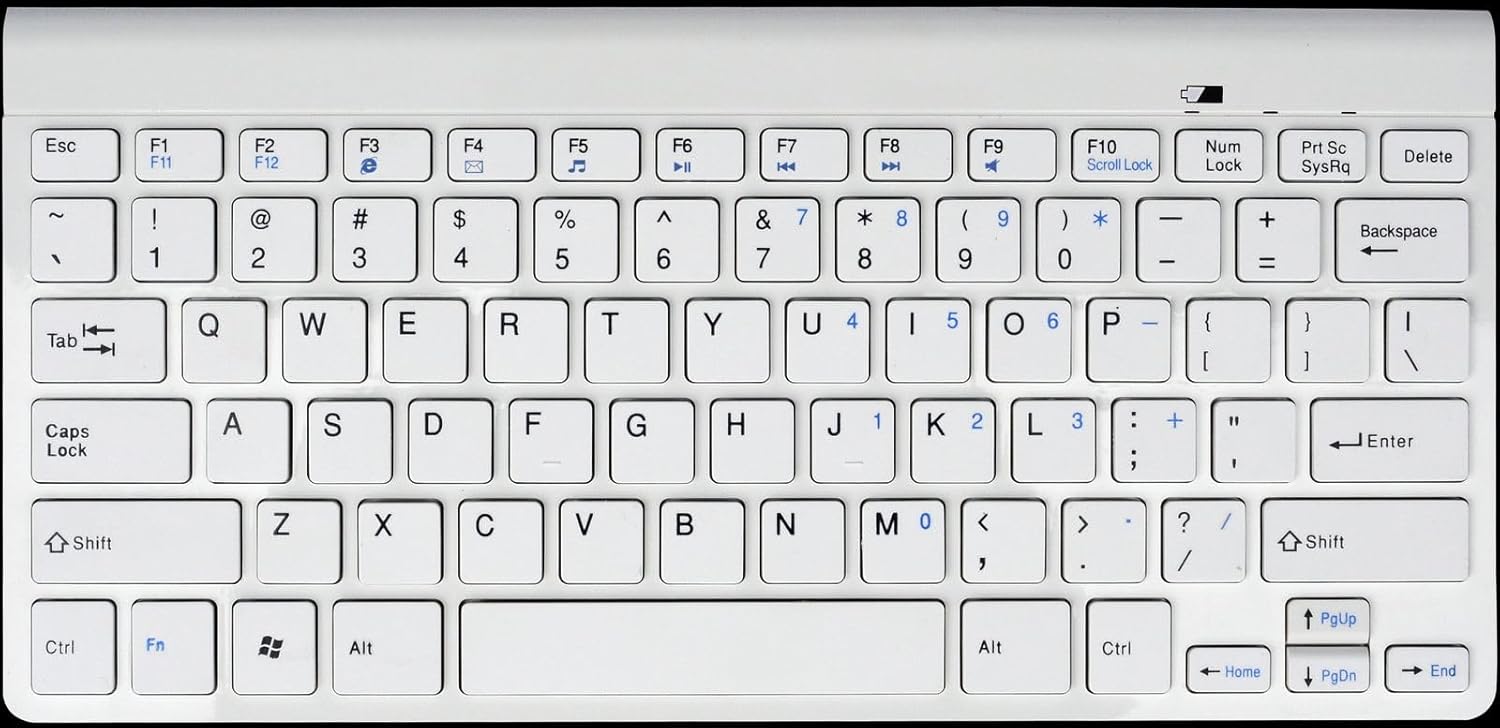
Слика 1: Gembird KB-BT-001-W-DE Slimline Bluetooth Keyboard. This image displays the full keyboard, highlighting its compact design and German QWERTZ key layout, including function keys with multimedia shortcuts and the embedded numeric keypad on the right side.
7. Одржавање
7.1. Чишћење
- Disconnect the keyboard from power and turn it off before cleaning.
- Користите меку крпу која не оставља длачицеampнатопљен водом или благим раствором за чишћење.
- Избегавајте прекомерну влагу и не прскајте средства за чишћење директно на тастатуру.
- За прашину и остатке између тастера користите компримовани ваздух.
7.2. Брига о батерији
- If the keyboard uses rechargeable batteries, charge it regularly using the provided USB cable.
- If it uses disposable batteries, replace them when the low battery indicator (if present) illuminates or performance degrades.
- Turn off the keyboard when not in use for extended periods to conserve battery life.
КСНУМКС. Решавање проблема
| Проблем | Могући узрок | Решење |
|---|---|---|
| Keyboard not connecting/pairing. | Bluetooth is off on device; keyboard not in pairing mode; low battery; too far from device. | Ensure Bluetooth is enabled. Put keyboard in pairing mode. Charge/replace batteries. Move keyboard closer to device (within 10m). Try re-pairing. |
| Keys not responding or delayed input. | Low battery; interference; out of range. | Charge/replace batteries. Move away from other wireless devices. Ensure keyboard is within range. |
| Incorrect characters typed (e.g., Y and Z swapped). | Device's keyboard layout is set to QWERTY instead of QWERTZ. | Change your device's keyboard input language/layout to German (QWERTZ). |
| Мултимедијални тастери не раде. | Fn key not pressed; software incompatibility. | Уверите се да држите Fn key while pressing the F-key. Update device drivers if applicable. |
9. Спецификације
| Феатуре | Детаљ |
|---|---|
| Бранд | Гембирд |
| Број модела | KB-BT-001-W-DE |
| Технологија повезивања | Блуетоотх в3.0 |
| Компатибилни уређаји | Рачунар, паметни телефон, таблет |
| Опис тастатуре | Мултимедија |
| Број кључева | 78 |
| Распоред тастатуре | КВЕРТЗ (немачки) |
| Укључене компоненте | УСБ кабл |
| Оперативни опсег | До 10 метара |
| Димензије (приближно) | КСНУМКС к КСНУМКС к КСНУМКС цм (КСНУМКС к КСНУМКС к КСНУМКС инча) |
10. Гаранција и подршка
For warranty information and technical support, please refer to the documentation included with your purchase or visit the official Gembird website. Contact details for support are typically provided in the product packaging or on the manufacturer's webсајту.
- Произвођач: Гембирд
- Подршка: Telephone support and email support are mentioned in the product features. Please check the included manual or Gembird's official webсајт за актуелне контакт информације.
Ask a question about this manual
Ask about setup, troubleshooting, compatibility, parts, safety, or missing instructions. Manuals+ will review the question and use this page’s manual context to help answer it.