
Phanteks PH-ES813P_BL
Phanteks Enthoo Series Primo Ultimate Full Tower Computer Case User Manual
Model: PH-ES813P_BL
Увод
The Phanteks Enthoo Primo is a full tower computer case designed for enthusiasts seeking exceptional cooling possibilities and functional design. This manual provides detailed instructions for setting up, operating, maintaining, and troubleshooting your Enthoo Primo case, ensuring optimal performance and longevity.

Figure 1: Phanteks Enthoo Primo Ultimate Full Tower Computer Case (Black/Blue)
Подешавање и инсталација
Proper installation is crucial for the performance and stability of your system. Follow these steps carefully.
1. Инсталација јединице за напајање (PSU)
The Enthoo Primo features a unique thermally isolated PSU location at the rear of the case, promoting cooler temperatures and improved cable management.
- Locate the PSU compartment at the bottom rear of the case.
- Slide your PSU into the designated area.
- Причврстите напајање приложеним завртњима са задње стране кућишта.
Video 1: Animated demonstration of internal case features, including PSU placement, HDD trays, and cable management. This video highlights the thermally isolated PSU location and hidden cable routing.

Слика 2: Задња страна view of the Enthoo Primo case, showing the PSU mounting area at the bottom.
2. Drive Installation (HDD/SSD)
The case supports up to 6 HDDs with dual repositionable and removable HDD cages, and features Drop-n-Lock double stack SSD brackets.
- Access the hidden HDD trays by removing the side panel.
- Slide your 3.5" HDDs into the trays and secure them.
- For 2.5" SSDs, utilize the removable Drop-n-Lock brackets. These can be installed in three different locations within the case.
- Ensure all drives are securely fastened to prevent vibration.

Слика 3: Унутрашњост view of the Enthoo Primo, highlighting the hidden HDD trays and SSD mounting points.
3. Motherboard and Component Installation
The Enthoo Primo supports ATX motherboards and offers ample space for various components.
- Install your ATX motherboard onto the standoffs.
- Install your CPU, RAM, and graphics cards as per their respective manuals.
- Utilize the pre-installed cable management tools behind the motherboard tray to route cables neatly.
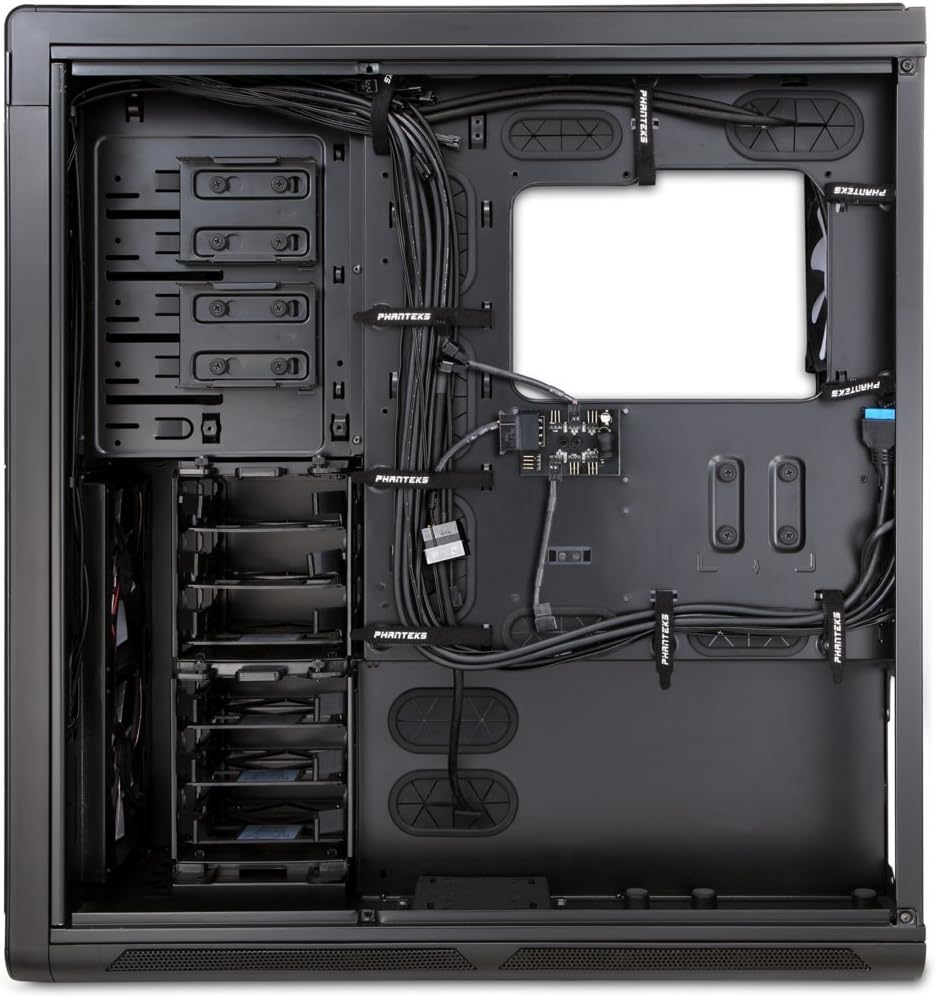
Слика 4: Унутрашњост view of the Enthoo Primo, showcasing the cable management features behind the motherboard tray.
Operativne karakteristike
The Enthoo Primo is designed with user convenience and optimal performance in mind.
У/И предње плоче
The front I/O panel provides easy access to essential ports and controls:
- 2x USB 3.0 порта: За пренос података великом брзином.
- 2x USB 2.0 порта: За стандардне периферне везе.
- Утичница за микрофон: За аудио улаз.
- 3.5 мм аудио прикључак: За аудио излаз.
- ЛЕД прекидач: Controls the integrated LED lighting (LED strip & Fan LED).

Слика 5: Горњи угао view of the Enthoo Primo, illustrating the accessible front I/O panel.
Систем за хлађење
The Enthoo Primo offers extensive cooling support for both air and liquid cooling configurations.
- Унапред инсталирани вентилатори: Includes 1x 140mm fan on top, 2x 140mm LED fans in front, 1x 140mm fan in the rear, and 1x 140mm fan on the bottom. All are Phanteks' PH-F140SP fans.
- Ваздушно хлађење: Supports up to 14x 120mm fans or 11x 140mm fans for comprehensive airflow.
- Хлађење воде: Provides up to 5 different installation areas for slim and thick radiators (120mm and 140mm form factors), including clearance for push-pull fan configurations. Innovative liquid cooling mounting systems include radiator brackets and a versatile reservoir/pump bracket.

Слика 6: Предња страна view of the Enthoo Primo, showcasing the clean design and intake areas.
Одржавање
Regular maintenance ensures optimal performance and extends the lifespan of your computer case.
- Филтери за прашину: The Enthoo Primo features removable dust filters located at the front, top, bottom (2x), and side panel (2x). Regularly remove and clean these filters to maintain optimal airflow and prevent dust buildup inside the case.
- Спољно чишћење: Користите меку, дamp cloth to wipe down the aluminum front and top panels. Avoid abrasive cleaners.
- Унутрашње чишћење: Periodically use compressed air to clear dust from internal components and fan blades. Ensure the system is powered off and unplugged before cleaning.
Решавање проблема
Овај одељак се бави уобичајеним проблемима на које можете наићи.
- Нема напајања:
- Ensure the PSU is properly seated and connected to the motherboard and wall outlet.
- Проверите да ли је кабл прекидача за напајање на предњој плочи правилно повезан са прикључком на матичној плочи.
- Fans Not Spinning / LED Not Lighting:
- Check fan connections to the motherboard or fan hub.
- Ensure the fan hub is powered (SATA connection).
- Verify the LED switch on the front panel is in the 'on' position.
- УСБ портови не раде:
- Confirm that the USB 3.0 and USB 2.0 headers from the front panel are securely connected to the motherboard.
- Прекомерна бука:
- Check if all fans are securely mounted and free from obstructions.
- Ensure drive trays are properly secured to minimize vibration.
- Clean dust filters and fan blades if necessary.
Спецификације
| Феатуре | Детаљ |
|---|---|
| Назив модела | PH-ES813P_BL |
| Тип случаја | Фулл Товер |
| Компатибилност матичне плоче | АТКС |
| Материјал | Aluminum Faceplates, Steel Chassis |
| Боја | Црно/плаво |
| Димензије (ДкШкВ) | 23.62 к 9.84 к 25.59 инча |
| Тежина артикла | 50 фунти |
| УСБ 3.0 портови | 2 |
| УСБ 2.0 портови | 2 |
| Аудио портови | 1x Microphone, 1x 3.5mm Audio Jack |
| Слотови за проширење | 8 |
| Метод хлађења | Ваздух / Вода |
| Унапред инсталирани вентилатори | 5x 140mm (1 top, 2 front LED, 1 rear, 1 bottom) |
| Максимална подршка за вентилаторе | 14 x 120 мм или 11 x 140 мм |
| Подршка радијатора | Up to 5 locations (120mm/140mm form factors) |
Гаранција и подршка
За информације о гаранцији и техничку подршку, обратите се званичном Phanteks-у. webсајт или комплетан кориснички приручник.
Комплетно упутство за употребу у PDF формату можете преузети овде: Phanteks Enthoo Primo User Manual (PDF)
Ask a question about this manual
Ask about setup, troubleshooting, compatibility, parts, safety, or missing instructions. Manuals+ will review the question and use this page’s manual context to help answer it.