
Eurotime 23708-00
Eurotime LCD Digital Alarm Clock Model 23708-00 User Manual
Модел: КСНУМКС-КСНУМКС
Увод
This manual provides instructions for the setup, operation, and maintenance of your Eurotime LCD Digital Alarm Clock, Model 23708-00. Please read this manual thoroughly before using the product to ensure proper function and longevity.
The Eurotime LCD Digital Alarm Clock features an LCD display, 7-color changing LED lighting, multiple natural alarm tones, and displays time, date, day of the week, and indoor temperature. It also includes a snooze function and a countdown feature.
Безбедносне информације
- Држите уређај даље од воде и високе влажности.
- Не излажите уређај директној сунчевој светлости или екстремним температурама.
- Use only the specified battery type (3 x 1.5V AAA batteries).
- Немојте мешати старе и нове батерије или различите типове батерија.
- Истрошене батерије одлажите одговорно у складу са локалним прописима.
- Не покушавајте сами да растављате или поправљате уређај. За сервис контактирајте квалификовано особље.
Садржај пакета
- Eurotime LCD Digital Alarm Clock (Model 23708-00)
- 3 к 1.5 В ААА батерије
- Кориснички приручник (овај документ)
Производ је завршенview
Упознајте се са компонентама и контролама вашег будилника.
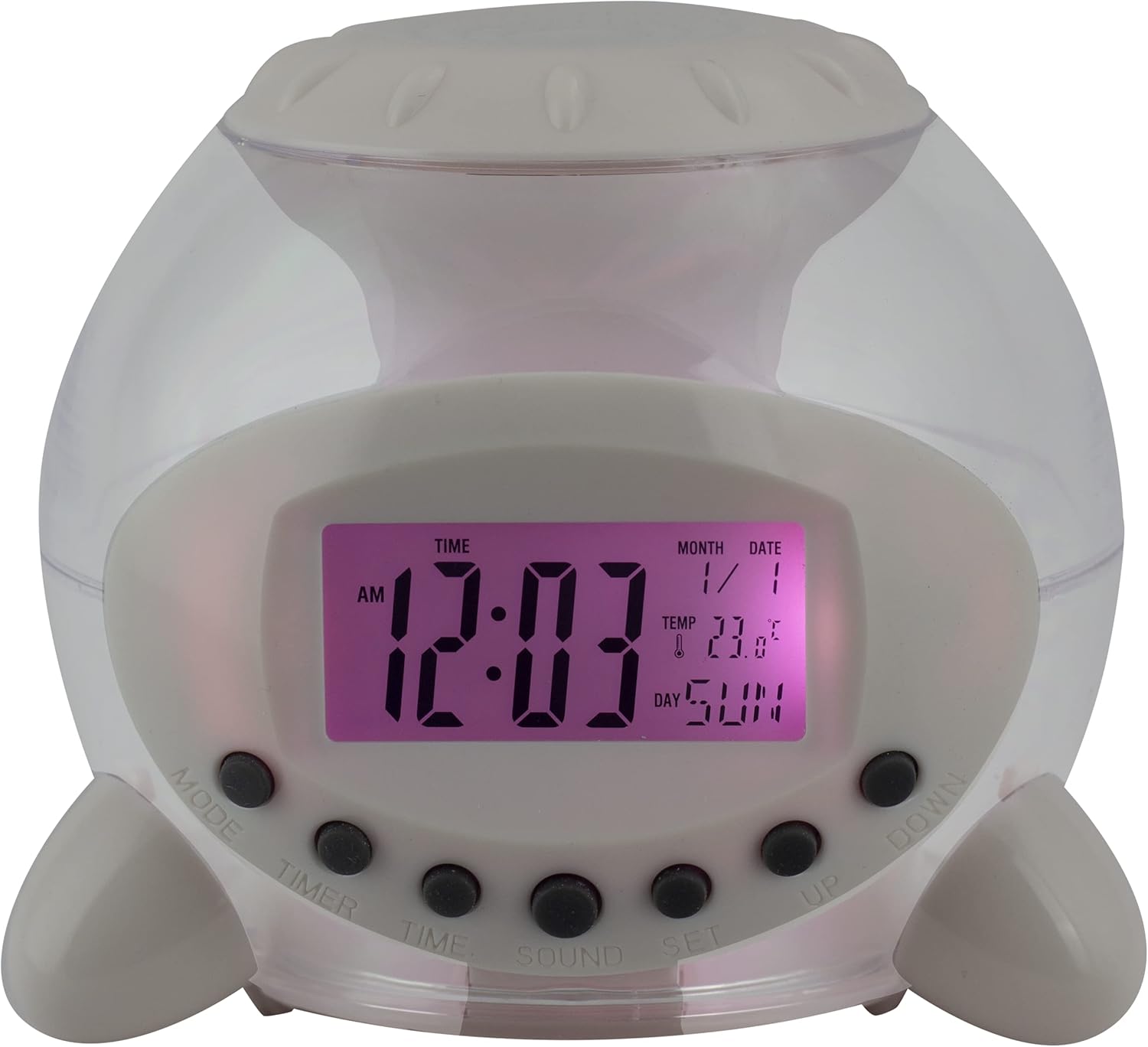
Слика 1: Предња страна View будилника. This image displays the front of the Eurotime LCD Digital Alarm Clock, highlighting its transparent plastic housing and the central LCD screen. The screen shows the time (12:03 AM), month (1), date (1), temperature (23.8°C), and day (SUN). Below the screen are control buttons labeled MODE, TIMER, TIME, SOUND, and SET, along with UP and DOWN buttons.

Слика 2: Страна View with Control Buttons. This image shows a side perspective of the alarm clock, emphasizing the array of control buttons located on the front-bottom edge. The transparent housing allows a glimpse of the internal structure and the LED lighting effect. The buttons are clearly visible for user interaction.

Слика 3: Страна View with Internal Lighting. This image provides another side view, illustrating the transparent housing and the internal LED lighting. The light emanates from the base, creating a soft glow within the clock's structure, demonstrating its color-changing feature.
Контролна дугмад:
- НАЧИН: Switches between time display, alarm setting, and countdown timer.
- ТАЈМЕР: Activates and sets the countdown timer.
- ВРЕМЕ: Користи се за подешавање тренутног времена и датума.
- ЗВУК: Selects alarm tones or natural sounds.
- КОМПЛЕТ: Потврђује подешавања или улази у режим подешавања.
- ГОРЕ ДОЛЕ: Adjusts values during setting modes.
Сетуп
1. Инсталација батерије
- Пронађите одељак за батерије на дну будилника.
- Отворите поклопац одељка за батерије.
- Insert three (3) 1.5V AAA batteries, ensuring correct polarity (+/-).
- Добро затворите поклопац одељка за батерије.
Напомена: The clock will automatically power on after battery installation. The display may flash, indicating it's ready for time setting.
Упутство за употребу
1. Подешавање времена и датума
- У режиму нормалног приказа времена, притисните ВРЕМЕ дугме једном. Цифре за сате ће трептати.
- Користите UP or ДОВН дугмад за подешавање сата.
- Притисните ВРЕМЕ again to move to minute setting. Adjust with UP or ДОВН.
- Наставите да притискате ВРЕМЕ to cycle through year, month, and date settings, adjusting each with UP or ДОВН.
- Након подешавања датума, притисните ВРЕМЕ one last time or wait a few seconds for the settings to be saved and return to normal display.
2. Подешавање аларма
- Притисните тастер МОДЕ button until "ALARM" appears on the display (or an alarm icon).
- Притисните тастер СЕТ дугме. Цифре сата аларма ће трептати.
- Користите UP or ДОВН дугмад за подешавање сата аларма.
- Притисните СЕТ again to move to minute setting. Adjust with UP or ДОВН.
- Притисните СЕТ one last time to confirm the alarm time.
- Да бисте активирали/деактивирали аларм, притисните дугме UP button in alarm display mode. An alarm icon will appear/disappear.
3. Функција одлагања
Када се огласи аларм, притисните било које дугме (осим СЕТ or МОДЕ) to activate the snooze function. The alarm will pause and sound again after a few minutes (duration is adjustable, refer to advanced settings if available).
Да бисте потпуно искључили аларм, притисните дугме СЕТ button when it is sounding.
4. Color Changing LED Lighting
The alarm clock features a 7-color changing LED light. This function typically activates automatically when the alarm sounds or can be manually toggled. Refer to the МОДЕ or СЕТ button for specific controls related to the lighting, if available.
5. Natural Alarm Tones
To select an alarm tone:
- In alarm setting mode (after pressing МОДЕ to display alarm time), press the ЗВУК дугме.
- Користите UP or ДОВН buttons to cycle through the available natural alarm tones.
- Притисните СЕТ да потврдите свој избор.
6. Countdown Feature
Да бисте користили тајмер за одбројавање:
- Притисните тастер МОДЕ button until "TIMER" appears on the display.
- Притисните тастер ТИМЕР дугме. Цифре сата ће трептати.
- Користите UP or ДОВН to set the desired countdown hour.
- Притисните ТИМЕР again to set minutes, then seconds.
- Притисните СЕТ да бисте започели одбројавање.
- To pause or resume, press СЕТ. За ресетовање притисните МОДЕ.
Одржавање
Чишћење
- Обришите сат меком, сувом крпом.
- Do not use abrasive cleaners or solvents, as they may damage the plastic housing or display.
Замена батерије
When the display dims or functions become erratic, it is time to replace the batteries. Follow the "Battery Installation" steps in the Setup section.
Решавање проблема
| Проблем | Могући узрок | Решење |
|---|---|---|
| Екран је празан или замагљен. | Слабе или испражњене батерије. Неправилна инсталација батерија. | Replace batteries with new 1.5V AAA batteries. Ensure correct polarity. |
| Аларм се не оглашава. | Аларм није активиран. Јачина звука аларма је прениска (ако се може подесити). | Ensure the alarm icon is displayed. Check alarm settings. |
| Време/датум је нетачан. | Not set correctly after battery installation or power interruption. | Follow "Setting Time and Date" instructions to reset. |
| Светло које мења боју не ради. | Feature not activated or malfunction. | Check operating instructions for light activation. If problem persists, contact support. |
Спецификације
- Бренд: Eurotime
- Број модела: 23708-00
- Димензије производа: 8.99 к 8.99 к 8 цм
- Тежина: 120 г
- Материјал: Пластика
- Тип приказа: Дигитални ЛЦД
- Посебне карактеристике: Calendar display, Snooze, Alarm, 7-Color Changing LED, Natural Alarm Tones, Countdown Feature, Indoor Temperature Display
- Извор напајања: 3 x 1.5 V AAA батерије (укључене)
Гаранција и подршка
For warranty information or technical support, please refer to the retailer where the product was purchased or visit the official Eurotime webсајт. Сачувајте рачун као доказ о куповини.
Ask a question about this manual
Ask about setup, troubleshooting, compatibility, parts, safety, or missing instructions. Manuals+ will review the question and use this page’s manual context to help answer it.