
1. Увод
The Apevia X-HERMES-BL is a mid-tower PC gaming case designed to accommodate ATX and Micro ATX motherboards. This chassis features a durable metal construction with a sleek black finish and an armored aesthetic. It includes a large blue-tinted side window, multiple cooling fans, and convenient front access ports, providing a functional and versatile foundation for your PC build.

Слика 1.1: Угаони предњи део view of the Apevia X-HERMES-BL case, showcasing its design and blue LED lighting.
2. Карактеристике
- Тип кућишта: Mid Tower with a large blue-tinted side window.
- Front Access Ports: 1 x USB 3.0, 2 x USB 2.0, and 2 x HD Audio ports for convenient connectivity.
- Систем за хлађење: Equipped with 5 pre-installed cooling fans (4 x 120mm fans and 1 x 200mm fan). Supports up to 7 fans total and includes provisions for water cooling.
- Дриве Баис: Features 5 external bays (4x 5.25", 1x 3.5"/2.5" hot-swap) and 5 internal bays (4x 3.5", 1x 2.5").
- Компатибилност матичне плоче: Supports ATX and Micro ATX motherboards up to 11" x 12".
- Graphics Card Clearance: Accommodates graphics cards up to 16 inches in length.
- Power Supply Mounting: Designed for a bottom-mounted power supply.

Слика 2.1: Предња страна view of the Apevia X-HERMES-BL, highlighting the drive bays and front panel ports.
3. Подешавање и инсталација
This section provides general guidelines for installing components into your Apevia X-HERMES-BL PC case. Always refer to your component manuals for specific installation instructions.
3.1 Распакивање и припрема
- Пажљиво извадите кућиште из његовог паковања.
- Поставите кућиште на стабилну, равну површину.
- Locate and remove the screws securing the side panels (typically thumbscrews at the rear). Slide the panels backward and lift them off.
3.2 Инсталација матичне плоче
- Identify the correct standoff locations for your ATX or Micro ATX motherboard. Install any necessary standoffs that are not pre-installed.
- Инсталирајте И/О штит у задњи отвор кућишта.
- Пажљиво поставите матичну плочу на одстојнике, поравнавајући рупе за вијке.
- Причврстите матичну плочу приложеним завртњима. Немојте превише затезати.
3.3 Инсталација напајања
- Position the power supply unit (PSU) in the bottom-mounted bay, ensuring the fan faces the correct direction (typically downwards for cases with a bottom vent).
- Secure the PSU to the rear of the case with screws.
3.4 Инсталација погона
- 5.25" Drives (Optical Drives): Remove the desired front panel bay cover. Slide the drive into the bay from the front and secure it using the screwless mounting mechanism or screws.
- 3.5"/2.5" Drives (HDDs/SSDs): For internal bays, slide the drive into the appropriate tray or cage and secure it. The hot-swap bay allows for tool-less installation of a 3.5" or 2.5" drive.
3.5 Инсталација картице за проширење
- Уклоните потребне поклопце слотова за проширење са задње стране кућишта.
- Insert your graphics card or other expansion cards into the appropriate PCIe slots on the motherboard.
- Причврстите картице завртњима.
3.6 Управљање кабловима
Utilize the space behind the motherboard tray and cable tie points to route and secure cables. This improves airflow and aesthetics.

Слика 3.1: Унутрашњост view of the Apevia X-HERMES-BL case, showing drive bays, fan mounts, and motherboard tray.

Слика 3.2: Позади view of the Apevia X-HERMES-BL case, showing expansion slots, rear fan, and power supply opening.
4. Операција
4.1 Укључивање/искључивање
Press the power button located on the front panel to turn your computer on or off. A short press typically initiates a soft shutdown, while a long press (several seconds) forces a hard shutdown.
4.2 Портови на предњој плочи
Предња плоча пружа лак приступ:
- УСБ 3.0 порт: За брзи пренос података са компатибилним уређајима.
- УСБ 2.0 портови: For connecting various USB peripherals.
- HD Audio Ports: За повезивање слушалица и микрофона.
4.3 Hot-Swap Drive Bay
The dedicated hot-swap bay allows for easy insertion and removal of a 3.5" or 2.5" SATA drive without needing to open the case or power down the system (ensure your motherboard and operating system support hot-swapping for optimal functionality).
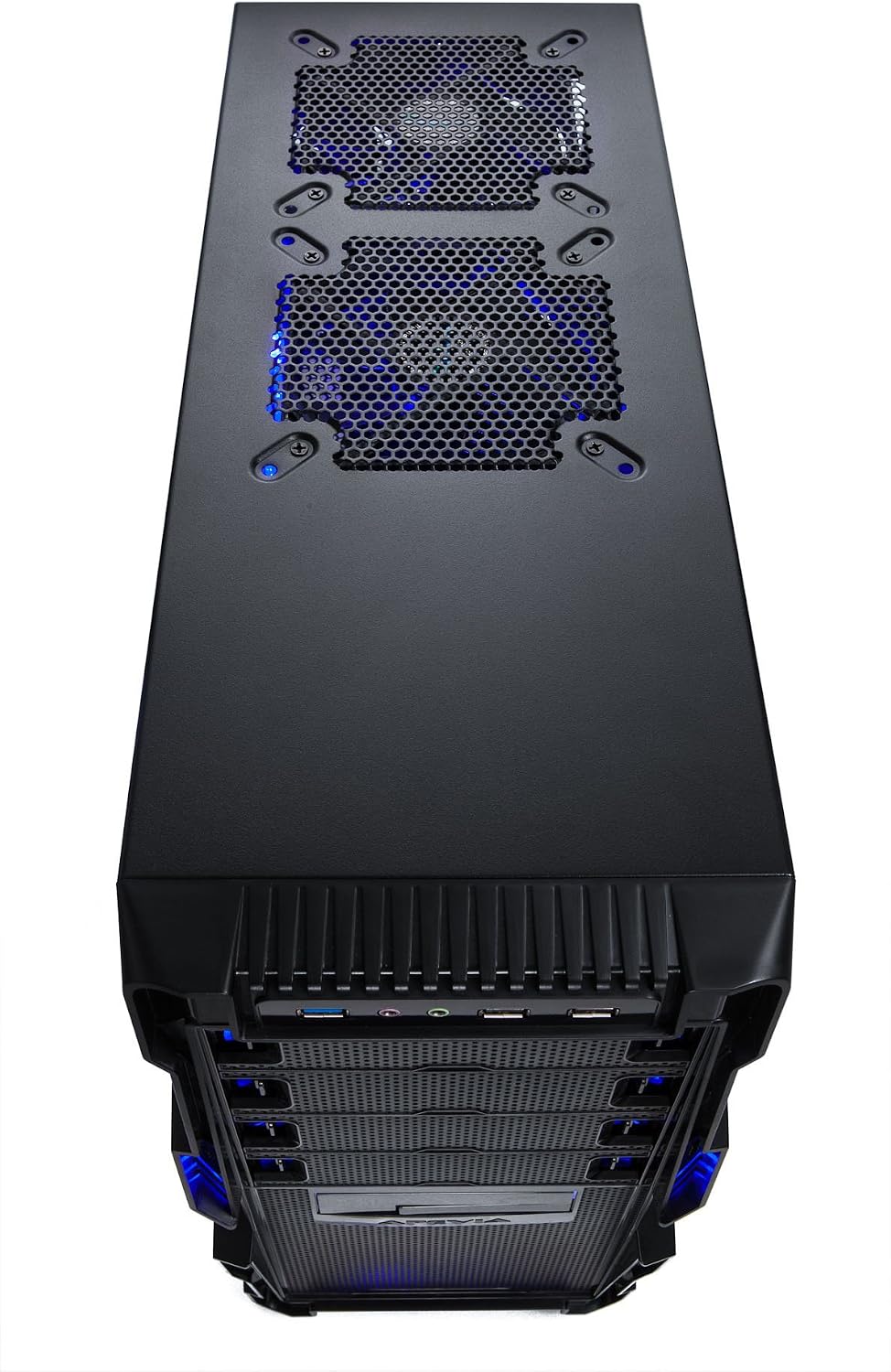
Слика 4.1: Врх view of the Apevia X-HERMES-BL case, showing top fan mounts and front panel connectivity.
5. Одржавање
Редовно одржавање помаже у обезбеђивању оптималних перформанси и дугог века трајања компоненти вашег рачунара.
5.1 Чишћење прашине
- Periodically clean dust filters (if present) and internal components using compressed air.
- Ensure the system is powered off and unplugged before performing any internal cleaning.
5.2 Спољашње чишћење
Обришите спољашње површине меком, дamp крпом. Избегавајте абразивна средства за чишћење или раствараче који могу оштетити завршну обраду.
5.3 Fan Inspection
Check fans regularly for dust buildup or signs of wear. Clean or replace as necessary to maintain adequate airflow.

Слика 5.1: Бочна страна view of the Apevia X-HERMES-BL case, showing the blue tinted window and large side fan.
КСНУМКС. Решавање проблема
If you encounter issues with your PC case, consider the following common troubleshooting steps:
- Нема напајања: Ensure all power cables (PSU to wall, PSU to motherboard, CPU, and components) are securely connected. Verify the power switch on the PSU is in the 'ON' position.
- Вентилатори се не окрећу: Check that all fan power cables are correctly connected to the motherboard or power supply.
- Портови на предњој плочи не раде: Confirm that the front panel USB and audio headers are correctly connected to the corresponding pins on your motherboard.
- прегревање: Ensure all case fans are installed and spinning in the correct orientation for optimal airflow. Clean any dust buildup from fans and filters.
- Лабаве везе: During transport or over time, internal cables can become loose. Power down and unplug your system, then re-seat all power and data cables.
7. Спецификације
| Феатуре | Спецификација |
|---|---|
| Бранд | Apevia |
| Број модела | X-HERMES-BL |
| Тип случаја | Мид Товер |
| Боја | Црна / Плава |
| Материјал | Метал |
| Компатибилност матичне плоче | ATX, Micro ATX (up to 11" x 12") |
| Спољни одељци за дискове | 4 x 5.25", 1 x 3.5"/2.5" (Hot-Swap) |
| Унутрашња лежишта за погон | 4 x 3.5", 1 x 2.5" |
| Слотови за проширење | 7 |
| Front Access Ports | 1 к УСБ 3.0, 2 к УСБ 2.0, 2 к ХД аудио |
| Унапред инсталирани вентилатори | 4 к 120 мм, 1 к 200 мм |
| Максимална подршка за вентилаторе | 7 |
| Метод хлађења | Air, Water Cooling Ready |
| Монтажа напајања | Боттом Моунт |
| Максимална дужина графичке картице | 16 инча |
| Тежина артикла | 15 фунти |
8. Гаранција и подршка
For warranty information, technical support, or further assistance, please refer to the official Apevia webсајт или контактирајте њихову службу за кориснике. Сачувајте доказ о куповини за потребе гаранције.
Apevia Official Webсајт: ввв.апевиа.цом