
ФЛИР МР77
FLIR MR77 Pinless Moisture Meter User Manual
Comprehensive instructions for operation and maintenance of your FLIR MR77 Moisture Meter.
1. Увод
The FLIR MR77 Pinless Moisture Meter is a professional-grade instrument designed for accurate moisture and environmental measurements. This device combines pinless moisture detection with an external pin probe, relative humidity, and temperature sensing capabilities, making it a versatile tool for various applications.
This manual provides detailed instructions for the setup, operation, maintenance, and troubleshooting of your FLIR MR77 meter to ensure optimal performance and longevity.
2. Распакивање и садржај
Carefully unpack all items from the packaging. Verify that all components are present and undamaged. If any items are missing or damaged, contact your supplier immediately.
Садржај пакета:
- FLIR MR77 Moisture Meter
- Temperature/Relative Humidity Sensor (MR01)
- Pin Probe (MR02)
- 9В Батерија
- Кориснички приручник (овај документ)
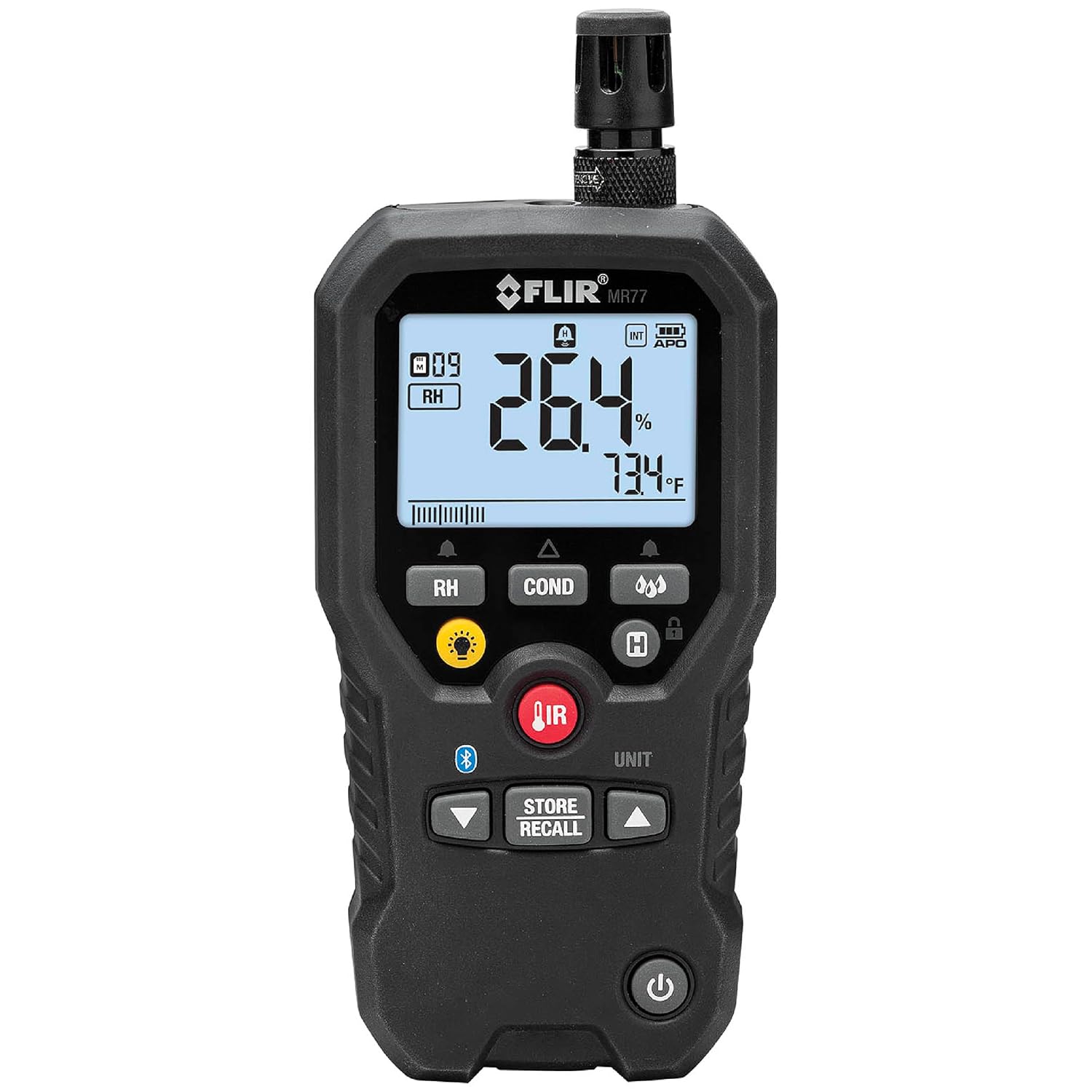
Figure 2.1: The FLIR MR77 Pinless Moisture Meter with its integrated sensor and display.
3. Подешавање и инсталација батерије
3.1 Инсталација батерије
- Пронађите одељак за батерије на задњој страни мерача.
- Отворите поклопац одељка за батерије.
- Insert the included 9V battery, observing correct polarity.
- Добро затворите поклопац одељка за батерије.
3.2 Attaching Sensors
The MR77 comes with an integrated pinless sensor and ports for external sensors.
- Temperature/Relative Humidity Sensor (MR01): This sensor is typically pre-attached to the top of the unit. Ensure it is securely fastened for accurate environmental readings.
- Pin Probe (MR02): For penetrating moisture measurements, connect the pin probe cable to the designated port on the side of the MR77.

Figure 3.1: The external temperature and relative humidity sensor (MR01).

Figure 3.2: The pin probe (MR02) for penetrating moisture measurements.
4. Упутство за употребу
4.1 Укључивање/искључивање
Притисните тастер Повер button (usually located at the bottom of the device) to turn the meter on or off.
4.2 Приказ прекоview

Figure 4.1: Close-up of the MR77 display showing various readings.
The backlit LCD displays moisture readings, relative humidity, air temperature, dew point, and other relevant data. Icons indicate measurement mode, battery status, and other functions.
4.3 режима мерења
The FLIR MR77 offers multiple measurement capabilities:
- Pinless Moisture: For non-invasive moisture detection up to 0.75 inches (19 mm) deep. Place the back of the meter flat against the surface to be measured.
- Pin Moisture: Use the external pin probe for direct contact measurements in materials like wood or drywall. Insert the pins into the material.
- Релативна влажност (РХ): Measures the percentage of moisture in the air using the integrated or external RH sensor.
- Температура ваздуха: Measures ambient air temperature.
- Тачка росе: Calculates the dew point temperature based on RH and air temperature.
- Non-Contact IR Thermometer: Use the IR button and laser pointer to measure surface temperatures.

Figure 4.2: Performing a pinless moisture measurement with the FLIR MR77.

Figure 4.3: Using the integrated IR thermometer with laser targeting.
4.4 Material Group Selection
The MR77 allows selection of different material groups for more accurate moisture readings. Refer to the "Material Group Reference" table in the Specifications section for details on specific materials.

Figure 4.4: The display indicating the selected material group (M09) and Relative Humidity (RH).
4.5 Чување и опозив података
Користите СТОРЕ/ОПОЗИВ button to save and retrieve measurement data. Consult the full user manual for detailed instructions on data logging and management.
4.6 Meter Link Smartphone App
The FLIR MR77 can connect to a smartphone app via Bluetooth for enhanced data monitoring, comparison, and reporting. Download the Meter Link app from your device's app store.

Figure 4.5: The Meter Link smartphone app interface for data monitoring and comparison.
5. Одржавање
5.1 Чишћење
Обришите спољашњост бројила рекламомamp cloth. Do not use abrasive cleaners or solvents. Keep the sensor areas clean and free of debris.
5.2 Замена сензора
The temperature/relative humidity sensor (MR01) is field-replaceable. If readings become inaccurate or the sensor is damaged, replace it with an authorized FLIR replacement part. Refer to the full user manual for detailed replacement instructions.
5.3 Складиштење
Store the FLIR MR77 in a cool, dry place when not in use. Remove the battery if storing for extended periods to prevent leakage.
КСНУМКС. Решавање проблема
| Проблем | Могући узрок | Решење |
|---|---|---|
| Мерач се не укључује. | Мртва или неправилно инсталирана батерија. | Check battery polarity, replace battery. |
| Нетачна очитавања влаге. | Incorrect material group selected; sensor dirty or damaged; external interference. | Verify material group; clean or replace sensor; move away from strong electromagnetic fields. |
| Inaccurate RH/Temperature readings. | Sensor dirty or damaged. | Clean or replace the MR01 sensor. |
| Проблеми са Блуетоотх везом. | Meter not in pairing mode; app issues; distance from device. | Ensure meter Bluetooth is active; restart app/meter; reduce distance. |
For further assistance, refer to the official FLIR MR77 User Manual (PDF) or contact FLIR customer support.
7. Спецификације
Опште спецификације:
- Модел: МР77
- Димензије: 6.3 к 3 к 8 инча (16 к 7.6 к 20.3 цм)
- Тежина: 1.54 фунти (0.7 килограма)
- батерија: 1 Lithium Ion battery (included), 9V Alkaline recommended for replacement.
- Трајање батерије: Approximately 100 hours (without worklight)
- Произвођач: ФЛИР Системс
- Тип монтаже: Таблетоп
- Отпорност на пад: Withstands a drop of 2 meters.
Спецификације мерења:
- Pinless Moisture Depth (Max): 0.75 инча (19 мм)
- Pin Moisture Range: 7–30% (100% reference only)
- Pin Moisture Accuracy: ±1.5% MC (Moisture Content)
- Pinless Moisture Range: 0–99.9 (relative measurement)
- Опсег релативне влажности: 10–90%
- Прецизност релативне влажности: ±2.5% РХ
- Vapor Pressure Range: 0.0–20.0 кПа
- Vapor Pressure Accuracy: Greater of ±2.0 or 0.2 kPa
- Температурни опсег тачке росе: -22°Ф до 122°Ф (-30°Ц до 50°Ц)

Figure 7.1: Detailed specifications for the FLIR MR77.
Material Group Reference:

Figure 7.2: Reference table for selecting appropriate material groups for moisture measurements.
This table provides common names of timbers and other materials, along with their corresponding material group numbers (e.g., Group 1-8 for timbers, Group 9 for plywood, drywall, and oriented strand board, Group 10 for brick, cement screed, and concrete, Group 11 for cement mortar, anhydrite screed, lime mortar, and plaster). Groups 10 and 11 are not specified for accuracy and should be used for reference only.
8. Информације о гаранцији
The FLIR MR77 Pinless Moisture Meter is covered by a Ограничена доживотна гаранција. For specific terms and conditions, including details on coverage and how to make a warranty claim, please refer to the official warranty documentation provided with your product or visit the FLIR webсајту.
9. Подршка и додатни ресурси
For further information, technical support, or to access the complete user manual, please use the resources below:
- Преузмите комплетно упутство за употребу (PDF)
- Visit the Official FLIR Store on Amazon
- Contact FLIR Customer Support (refer to FLIR's official webсајт за контакт податке).
Ask a question about this manual
Ask about setup, troubleshooting, compatibility, parts, safety, or missing instructions. Manuals+ will review the question and use this page’s manual context to help answer it.