
1. Производ је готовview
The Western Digital RE WD4001FYYG is a high-performance 3.5-inch Enterprise SAS Hard Drive with a 4TB (4000GB) capacity. Designed for demanding enterprise environments, it features a 32MB cache, 7200 RPM rotational speed, and a SAS 6 Gb/s interface, ensuring reliable 24x7 operation with a 1.4 million hours MTBF (Mean Time Between Failures).
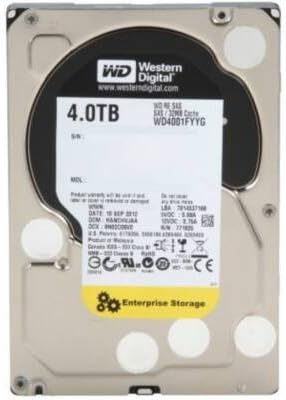
Figure 1: Western Digital RE WD4001FYYG 4TB Enterprise SAS Hard Drive (Top View)
Product Summary Video
Видео 1: Кратак прегледview of the product's features and design.
2. Спецификације
| Феатуре | Детаљ |
|---|---|
| Произвођач | Вестерн Дигитал |
| Број модела | ВД4001ФИИГ |
| Капацитет дигиталног складиштења | 4000 ГБ (4 ТБ) |
| Технологија повезивања | SAS (Serial Attached SCSI) |
| Фактор облика тврдог диска | 3.5 инча |
| Опис чврстог диска | Механички чврсти диск |
| Брзина ротације чврстог диска | 7200 РПМ |
| Цацхе | 32 МБ |
| Брзина интерфејса | 6.0 Гб/с |
| МТБФ (средње време између кварова) | 1.4 милиона сати |
| Компатибилни уређаји | Server, Workstation |
| Врста инсталације | Интерни чврсти диск |
| Посебна карактеристика | Portable (referring to its physical size for integration) |
3. Подешавање и инсталација
This section outlines the general steps for installing the Western Digital RE WD4001FYYG hard drive into a compatible system. Ensure your system is powered off and disconnected from the power source before beginning installation.
3.1 Физичка инсталација
- Припремите кућиште рачунара: Open your computer case to access the internal drive bays. Most PC cases include dedicated bays for 3.5-inch hard drives.
- Монтирајте чврсти диск: Secure the WD4001FYYG hard drive into an available 3.5-inch drive bay using the appropriate screws or tool-less mounting mechanisms provided with your PC case. Ensure the drive is firmly seated to prevent vibration.
- Connect Data Cable: Connect one end of a SAS data cable (not typically included with the drive, often supplied with the motherboard or power supply) to the SAS port on the hard drive. Connect the other end of the SAS data cable to an available SAS port on your motherboard or SAS controller card.
- Повежите кабл за напајање: Connect a power cable from your power supply unit (PSU) to the power connector on the hard drive. Ensure a secure connection for stable power delivery.
- Затвори кућиште рачунара: Once all connections are secure and the drive is mounted, close your PC case.
3.2 Иницијализација и форматирање диска
After physical installation, the hard drive needs to be initialized and formatted by your operating system before it can be used for storage.
- Систем за укључивање: Reconnect your computer to the power source and power it on.
- Приступ управљању дисковима:
- Виндовс: Right-click on the Start button, select "Disk Management".
- Линук: Use disk utility tools like GParted or
fdisk/mkfsкоманде. - мацОС: Open "Disk Utility" from Applications/Utilities.
- Иницијализација диска: The new hard drive should appear as "Unallocated Space". You may be prompted to initialize the disk (e.g., MBR or GPT partition style). Choose the appropriate option for your system.
- Create New Volume: Create a new simple volume (partition) on the initialized disk. Follow the on-screen prompts to assign a drive letter and format the volume with a suitable file system (e.g., NTFS for Windows, ext4 for Linux, APFS/HFS+ for macOS).
- Спреман за употребу: Once formatted, the drive will appear in your file explorer and is ready for data storage.
4. Руковање чврстим диском
The Western Digital RE WD4001FYYG is optimized for reliable storage of large files and data in enterprise environments. Its SAS 6 Gb/s interface provides efficient data transfer speeds for its class.
- Примарна употреба: This hard drive is ideal for storing large volumes of data such as video files, photo archives, documents, and other non-time-critical applications.
- Перформансе: While offering substantial capacity and good transfer speeds for a mechanical drive, it is generally not recommended as a primary drive for operating systems or applications requiring extremely fast load times, such as modern video games. For such uses, Solid State Drives (SSDs) are typically preferred due to their superior speed.
- Поузданост: Designed for 24x7 operation, this drive maintains consistent read and write speeds, making it suitable for continuous data access and storage.
5. Одржавање
Proper maintenance ensures the longevity and optimal performance of your hard drive.
- Редовне резервне копије: Always maintain regular backups of critical data stored on the drive. While highly reliable, no storage device is immune to failure.
- Праћење здравља диска: Utilize disk monitoring software (e.g., S.M.A.R.T. tools) to periodically check the health status of your hard drive. This can help identify potential issues before they lead to data loss.
- Осигурајте одговарајућу вентилацију: Ensure your PC case has adequate airflow to prevent the drive from overheating, which can degrade performance and lifespan.
- Избегавајте физичке шокове: Mechanical hard drives are sensitive to physical shocks. Handle your system with care and avoid moving it while the drive is operating.
КСНУМКС. Решавање проблема
If you encounter issues with your Western Digital RE WD4001FYYG hard drive, consider the following troubleshooting steps:
- Диск није откривен:
- Verify that both the SAS data cable and power cable are securely connected to the drive and the motherboard/PSU.
- Check your system's BIOS/UEFI settings to ensure the SAS controller is enabled and detecting the drive.
- Ensure the drive has been initialized and formatted via Disk Management (Windows) or equivalent utilities (Linux/macOS).
- Споре перформансе:
- Check for excessive fragmentation (if using an older file system that benefits from defragmentation).
- Ensure your SAS controller drivers are up to date.
- Monitor drive health for any signs of impending failure using S.M.A.R.T. tools.
- Необични звуци:
- Clicking, grinding, or repetitive noises can indicate a mechanical failure. Immediately back up any accessible data and consider replacing the drive.
7. Гаранција и подршка
For detailed warranty information and technical support, please refer to the official Western Digital website or contact their customer service. Keep your proof of purchase and the drive's serial number handy when seeking support.
Посетите Western Digital Store за више производа и информација.