
1. Увод
This manual provides comprehensive instructions for the setup, operation, and maintenance of your A4tech Natural A Ergonomic Keyboard, model KRS-85. Designed with patented A-Shape keys and round-edged keycaps, this keyboard aims to promote a natural typing position, thereby helping to prevent Repetitive Strain Injury (RSI).
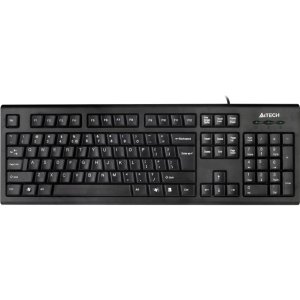
Figure 1: A4tech Natural A Ergonomic Keyboard (KRS-85). This image displays the full layout of the black wired keyboard, highlighting its ergonomic design with A-Shape keys and round keycaps.
2. Подешавање
2.1 Системски захтеви
- IBM or Compatible Systems
- Windows 2000 / XP (X64) / 2003 (X64) / Vista
2.2 Повезивање тастатуре
- Пронађите слободан УСБ порт на рачунару.
- Insert the USB connector of the A4tech KRS-85 keyboard firmly into the USB port.
- Ваш оперативни систем би требало аутоматски да детектује и инсталира потребне драјвере. Овај процес може потрајати неколико тренутака.
- Када је инсталација завршена, тастатура је спремна за употребу.
3. Упутство за употребу
The A4tech Natural A Keyboard is designed for comfortable and efficient typing. Its unique features are intended to enhance your typing experience and reduce strain.
3.1 Кључне карактеристике
- Patented A-Shape Keys: The layout of the keys is designed to align with the natural position of your hands and wrists, promoting a more relaxed posture.
- Round Edged Keycaps: These keycaps provide a smooth and comfortable typing surface.
- Стандардни распоред: The keyboard features a full-size layout including a numeric keypad, function keys (F1-F12), and navigation keys.
3.2 Основна употреба
Use the keyboard as you would any standard computer keyboard for typing, navigating, and executing commands. The ergonomic design is intended to provide comfort during extended use.
4. Одржавање
Правилно одржавање осигурава дуготрајност и оптималне перформансе ваше тастатуре.
4.1 Чишћење
- Искључите тастатуру из рачунара пре чишћења.
- Користите меку крпу која не оставља длачицеampводом или благим раствором за чишћење да бисте обрисали површину тастатуре.
- Избегавајте употребу јаких хемикалија, абразивних средстава за чишћење или прекомерну влагу.
- За чишћење између тастера, користите компримовани ваздух да бисте уклонили прашину и остатке.
КСНУМКС. Решавање проблема
If you encounter issues with your A4tech Natural A Keyboard, please refer to the following common solutions.
5.1 Тастатура не реагује
- Ensure the USB cable is securely connected to a working USB port on your computer. Try a different USB port.
- Поново покрените рачунар.
- Check your computer's Device Manager (Windows) to see if the keyboard is recognized and if there are any driver issues.
5.2 Specific Key Combinations Not Working (e.g., Ctrl-Alt-Del)
- Some users have reported that certain key combinations, such as Ctrl-Alt-Del, may not function as expected on this keyboard with Windows operating systems. This is a known compatibility limitation for some configurations.
- If this issue persists, consider using alternative methods for these functions within your operating system, or consult A4tech support for potential workarounds or driver updates if available.
6. Спецификације
| Феатуре | Детаљ |
|---|---|
| Назив производа | Natural_A Rounded Edge Keyboard |
| Број модела | КРС-85 |
| Технологија повезивања | Кабл (USB) |
| Опис тастатуре | Ергономски |
| Број кључева | 85 |
| Димензије производа | 19.69 к 7.87 к 1.97 инча |
| Тежина артикла | 2.2 фунти |
| Произвођач | ERGOGUYS (A4tech Co., Ltd) |
| Датум првог доступног | 31. октобра 2013. године |
7. Информације о гаранцији
The A4tech Natural A Ergonomic Keyboard (KRS-85) comes with a 1-годишња ограничена гаранција од произвођача. Ова гаранција покрива недостатке у материјалу и изради при нормалној употреби.
Please retain your proof of purchase for warranty claims. For detailed terms and conditions, refer to the warranty documentation provided with your product or contact the manufacturer directly.
8. Подршка
For further assistance, technical support, or warranty inquiries, please contact the manufacturer or your point of purchase. Ensure you have your product model number (KRS-85) and proof of purchase ready when contacting support.