
1. Производ је готовview
The Irradio Mini Blast is a compact, amplified Bluetooth speaker designed for portable audio playback. It offers high-efficiency sound output and versatile connectivity options.
Кључне карактеристике:
- Bluetooth 3.0 EDR for wireless audio streaming.
- Integrated USB 2.0 connection.
- Auxiliary (AUX) input for connecting external audio devices.
- Integrated lithium battery for portable use.
- 3 Watts maximum speaker output power.
- ДЦ 5В напајање.
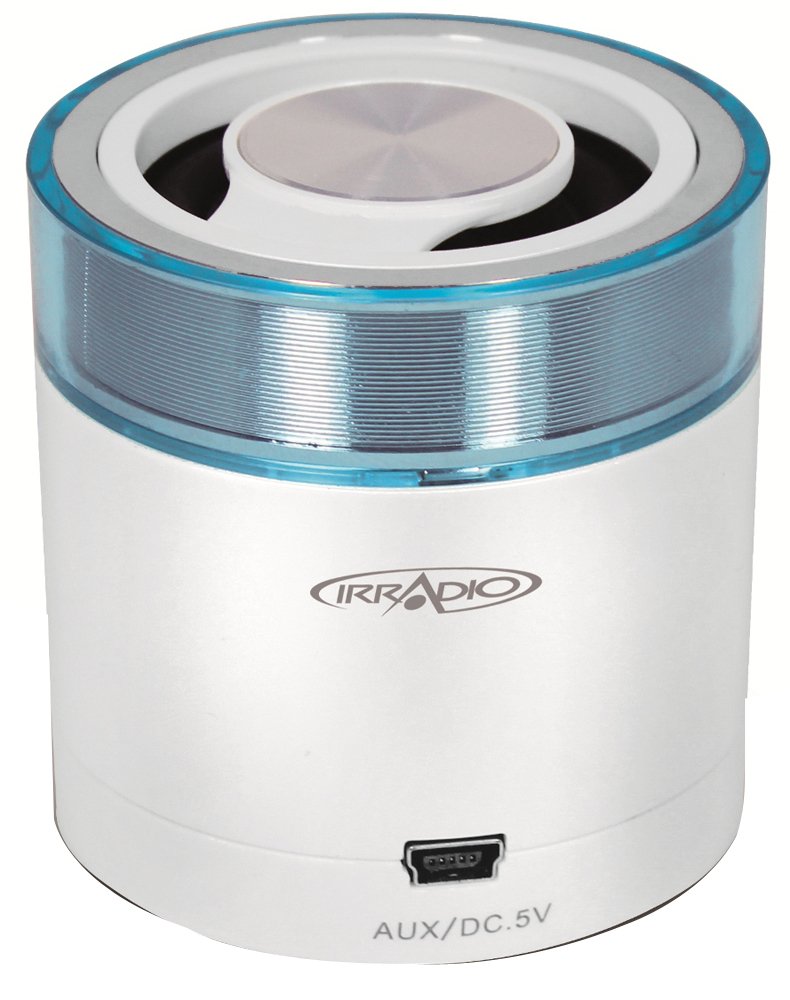
Слика 1.1: Предња страна view of the Irradio Mini Blast Amplified Bluetooth Speaker in white and blue. This image displays the compact design and primary color scheme of the device.
2. Садржај пакета
Молимо вас да означите поље за следеће ставке:
- Irradio Mini Blast Speaker Unit
- УСБ кабл
- Водич за брзи почетак
- Упутство за употребу
3. Безбедносне информације
Read all safety instructions before using this product. Failure to follow these instructions may result in electric shock, fire, or other hazards.
- Не излажите уређај екстремним температурама, директној сунчевој светлости или високој влажности.
- Do not disassemble, repair, or modify the device. This may void the warranty and pose a safety risk.
- Држите уређај даље од воде и других течности.
- Use only the provided or approved charging cable.
- Одложите уређај и његову батерију одговорно у складу са локалним прописима.
4. Подешавање
4.1 Почетно пуњење
- Connect the provided USB cable to the speaker's USB port.
- Connect the other end of the USB cable to a compatible USB power adapter (DC 5V, not included) or a computer's USB port.
- The charging indicator light will illuminate (color may vary) to show that the device is charging.
- Allow the speaker to charge fully before first use. The indicator light will change or turn off when charging is complete.
4.2 Укључивање/искључивање
- За укључивање: Press and hold the Power button (usually marked with Ⓘ) for approximately 3 seconds. An audible tone or indicator light will confirm the device is on.
- За искључивање: Press and hold the Power button for approximately 3 seconds. An audible tone or indicator light will confirm the device is off.
5. Упутство за употребу
5.1 Блуетоотх упаривање
- Ensure the speaker is powered on and within close proximity (within 10 meters) of your Bluetooth-enabled device.
- The speaker will automatically enter Bluetooth pairing mode, indicated by a flashing LED light (e.g., blue).
- На аудио уређају (паметном телефону, таблету итд.) омогућите Bluetooth и потражите доступне уређаје.
- Select "Irradio Mini Blast" from the list of found devices.
- Once paired, the LED indicator will typically stop flashing and remain solid, and an audible confirmation may be heard.
- Сада можете да репродукујете звук са свог уређаја преко звучника.
5.2 АУКС веза
For devices without Bluetooth, use the AUX input:
- Connect one end of a 3.5mm audio cable (not included) to the AUX port on the Irradio Mini Blast speaker.
- Повежите други крај 3.5 мм аудио кабла са прикључком за слушалице или аудио излазом вашег екстерног аудио уређаја.
- The speaker should automatically switch to AUX mode, or you may need to press a mode button if available.
- Adjust the volume on both your external device and the speaker.
5.3 Репродукција са УСБ-а
The integrated USB 2.0 connection can be used for charging the speaker or potentially for playing audio from a USB storage device, depending on the model's specific features. Refer to the quick start guide for detailed USB playback instructions if applicable.
6. Одржавање
6.1 Чишћење
- Увек искључите уређај пре чишћења.
- Use a soft, dry, lint-free cloth to wipe the exterior of the speaker.
- Do not use abrasive cleaners, solvents, or strong chemicals, as these can damage the surface.
- Избегавајте улазак влаге у било какве отворе.
6.2 Складиштење
- Чувајте звучник на хладном и сувом месту, даље од директне сунчеве светлости и екстремних температура.
- If storing for an extended period, charge the battery periodically (e.g., every 3-6 months) to maintain battery health.
КСНУМКС. Решавање проблема
| Проблем | Могући узрок | Решење |
|---|---|---|
| Звучник се не укључује. | Батерија је празна. | Напуните звучник помоћу приложеног УСБ кабла. |
| Не могу се повезати преко Bluetooth-а. | Bluetooth is not enabled on the device; speaker is out of range; speaker is already paired to another device. | Ensure Bluetooth is on; move device closer to speaker; disconnect from other devices and try pairing again. |
| Нема звука или је јачина звука ниска. | Volume is too low on speaker or connected device; incorrect input mode selected. | Increase volume on both speaker and connected device; ensure correct input mode (Bluetooth/AUX) is selected. |
| Изобличење звука. | Volume is too high; audio source quality is poor. | Reduce volume on speaker and connected device; try a different audio source. |
8. Спецификације
| Феатуре | Детаљ |
|---|---|
| Назив модела | Мини |
| Број модела | 166000109 |
| Бранд | ИРРАДИО |
| Технологија повезивања | Bluetooth (3.0 EDR), Auxiliary, USB |
| Максимална излазна снага звучника | 3 Ваттс |
| Извор напајања | Battery Powered (Integrated Lithium Battery) |
| Повер Суппли | ДЦ 5В |
| Тип монтаже | Табле Моунт |
| Димензије производа | 18.2 к 11 к 7.2 цм |
| Тежина артикла | 100 грама |
| Боја | White/Light Blue |
9. Гаранција и подршка
9.1 Информације о гаранцији
This product is covered by a limited warranty. Please refer to the warranty card included in your package or contact your retailer for specific terms and conditions. The warranty typically covers manufacturing defects under normal use.
9.2 Корисничка подршка
For technical assistance, troubleshooting, or warranty claims, please contact your point of purchase or visit the official Irradio website for support contact details. Have your model number (166000109) and purchase information ready when contacting support.