
Увод
This manual provides essential information for the safe and efficient operation of your InFocus IN124a XGA Wireless-Ready Projector. Please read this manual thoroughly before using the projector and retain it for future reference. This projector is designed for displaying content with XGA (1024 x 768) native resolution, offering 3500 lumens of brightness and a 15000:1 contrast ratio.
Безбедносне информације
- електрична безбедност: Always connect the projector to a grounded power outlet. Do not use damaged power cords. Disconnect power before cleaning or servicing.
- Грејање и вентилација: Ensure adequate ventilation around the projector. Do not block ventilation openings. Avoid placing the projector near heat sources.
- Lamp безбедност: Пројектор лamp operates at high temperatures and pressures. Allow the projector to cool down before moving or replacing the lamp. Do not look directly into the lens when the lamp је укључен.
- Руковање: Пажљиво рукујте пројектором. Избегавајте испуштање или излагање јаким ударцима.
- Влага: Не излажите пројектор киши, влази или прекомерној влажности.
Садржај пакета
Проверите да ли су све ставке присутне у пакету:
- InFocus IN124a Projector
- ХДМИ кабл
- ВГА кабел
- Повер Цорд
- Remote Control (not explicitly listed but standard)
- Optional USB adapter for wireless connectivity (if purchased separately)
Производ је завршенview
Familiarize yourself with the physical components and connections of your InFocus IN124a projector.

This image displays the rear panel of the InFocus IN124a projector, highlighting various connectivity options including HDMI, VGA (Computer 1 and 2), Monitor Out, S-Video, Video, Audio In (1 and 2), Audio Out, RS-232, USB-B, USB Mini-B, and USB-A ports. The power input is located on the lower left.

The top panel of the InFocus IN124a projector is shown, featuring the control buttons for power, menu navigation (up, down, left, right, enter), source selection, blank screen function, and indicators for temperature and lamp status. The focus and zoom adjustment rings are also visible.

А фронт view of the InFocus IN124a projector, showing the main projection lens and the power indicator light. The focus and zoom rings are visible near the lens.

Ова слика приказује једну страну view of the InFocus IN124a projector, emphasizing the ventilation grilles designed for heat dissipation, crucial for maintaining optimal operating temperature.
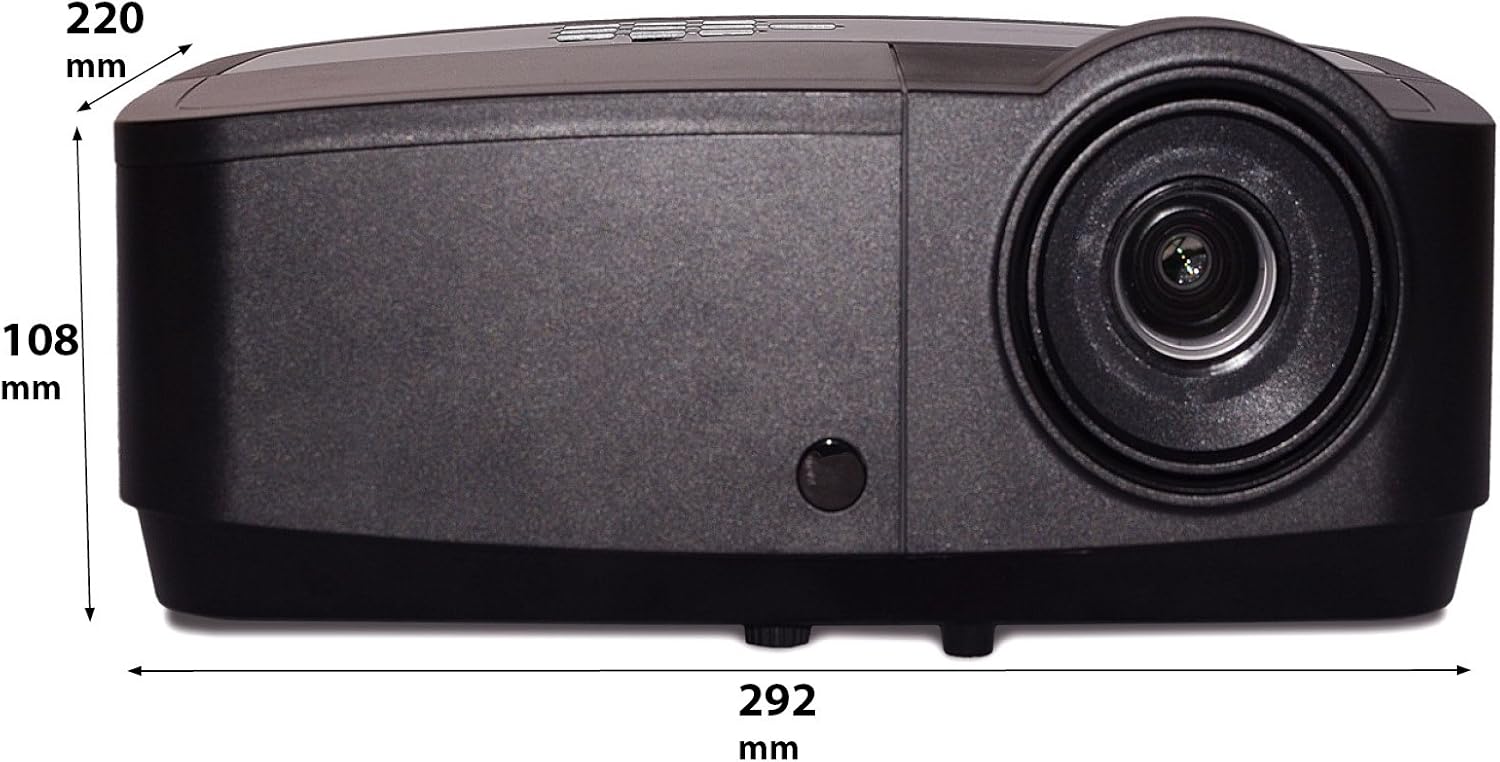
Ова слика приказује бочног професионалцаfile of the InFocus IN124a projector, illustrating its physical dimensions: approximately 292 mm in length, 108 mm in height, and 220 mm in width.
Сетуп
КСНУМКС. Постављање
Position the projector on a stable, flat surface or mount it securely. Ensure the projector is at an appropriate distance from the screen to achieve the desired image size. Avoid direct sunlight or strong ambient light on the screen for optimal viewинг.
2. Повезивање напајања
- Прикључите кабл за напајање на утичницу за напајање пројектора.
- Укључите други крај кабла за напајање у уземљену електричну утичницу.
3. Повезивање видео извора
The IN124a offers multiple connectivity options:
- ДВИ: Повежите HDMI кабл са изворног уређаја (нпр. лаптопа, Blu-ray плејера) са HDMI портом на пројектору.
- VGA (рачунар 1/2): Use a VGA cable to connect your computer to either the 'COMPUTER 1' or 'COMPUTER 2' port.
- С-Видео/Видео: For older devices, connect S-Video or composite video cables to the respective ports.
- УСБ: The USB-A port can be used for displaying content directly from a USB drive. The USB-B port supports USB display functionality.
- аудио: Connect external audio sources to 'AUDIO 1' or 'AUDIO 2' inputs, and use 'AUDIO OUT' for external speakers if needed.
4. Wireless Setup (Optional)
For wireless connectivity, an optional USB adapter is required. Insert the wireless USB adapter into the designated USB port on the projector. Refer to the adapter's specific instructions for software installation and connection procedures on your source device.
Оперативни
1. Укључивање/искључивање
- Укључено: Press the 'Power' button on the projector's control panel or remote control. The power indicator light will turn steady blue.
- Искључивање: Press the 'Power' button again. A confirmation message may appear. Press 'Power' a second time to confirm shutdown. The fan will continue to run briefly to cool the lamp before shutting down completely.
2. Подешавање слике
- Фокус: Rotate the focus ring around the lens until the image appears sharp and clear.
- Зумирање: Rotate the zoom ring around the lens to adjust the image size without moving the projector.
- Кеистоне Цоррецтион: Ако слика изгледа трапезоидно, користите функцију корекције трапезоидног искривљења у менију пројектора да бисте је поравнали.
3. Избор извора
Press the 'Source' button on the control panel or remote control repeatedly to cycle through available input sources (HDMI, Computer 1, Computer 2, S-Video, Video, USB). The projector will automatically detect an active signal.
4. Мену Навигатион
Press the 'Menu' button to access the On-Screen Display (OSD) menu. Use the arrow buttons to navigate through options and 'Enter' to select. Press 'Menu' or 'Exit' to close the OSD.
5. 3Д режим
The InFocus IN124a is 3D-Ready. To utilize 3D functionality, you will need compatible 3D content, a 3D-capable source device, and active 3D glasses. Refer to your 3D source device's manual for specific setup instructions. The projector will automatically detect a 3D signal when available.
Одржавање
1. Лamp Замена
Пројектор лamp has a lifespan of up to 7,000 hours. When the lamp life is nearing its end, a warning message may appear, or the lamp indicator light will illuminate. Only replace the lamp with an authorized InFocus replacement lamp. Always allow the projector to cool completely before attempting lamp замена.
2. Чишћење
- Пројектор Цasing: Користите меку крпу која не оставља длачице дampОчистите благим, неабразивним средством за чишћење. Не користите јаке хемикалије.
- Објектив: Gently wipe the lens with a lens cleaning cloth or lens tissue. Avoid touching the lens surface with your fingers.
- Вентилациони отвори: Periodically check and clean the air vents to prevent dust buildup, which can lead to overheating. Use a soft brush or compressed air to clear obstructions.
Решавање проблема
Ако наиђете на проблеме са пројектором, погледајте следеће уобичајене проблеме и решења:
| Проблем | Могући узрок | Решење |
|---|---|---|
| Нема приказане слике | Напајање није повезано; Неисправан улазни извор; Изворни уређај није активан. | Check power connection; Select correct input source; Ensure source device is on and outputting signal. |
| Слика је мутна или ван фокуса | Lens focus not adjusted; Projector too close/far from screen. | Adjust the focus ring on the lens; Adjust projector distance or use zoom ring. |
| Даљински управљач не ради | Батерије су празне; Препрека између даљинског управљача и пројектора; Сензор даљинског управљача је блокиран. | Replace batteries; Remove obstructions; Ensure remote sensor on projector is clear. |
| Пројектор се прегрева и гаси | Блокирана вентилација; Прашњав ваздушни филтер. | Ensure vents are clear; Clean air filter (if applicable) and vents. |
Спецификације
| Феатуре | Спецификација |
|---|---|
| Нативе Ресолутион | КСГА (1024 к 768) |
| Осветљеност | 3500 лумена |
| Однос контраста | 15000:1 |
| Lamp Живот | До 7,000 сати (еко режим) |
| Технологија повезивања | Wireless (with optional adapter), HDMI, USB video |
| Посебна карактеристика | 3Д-Реади |
| Димензије производа | 14.25 к 12 к 7.75 инча (36.2 к 30.5 к 19.7 цм) |
| Тежина артикла | 5.4 фунте (2.45 кг) |
| Препоручена употреба | Индоор/Оутдоор |
Гаранција и подршка
For warranty information and technical support, please refer to the warranty card included with your product or visit the official InFocus webсајт. Сачувајте рачун као доказ о куповини за потребе гаранције.