
1. Увод
This manual provides essential information for the safe and efficient operation of your InFocus IN2126a WXGA Network Projector. Please read this manual thoroughly before using the projector and retain it for future reference. The InFocus IN2126a is designed for versatile use in various environments, offering high brightness and network capabilities.
2. Безбедносне информације
Придржавајте се следећих мера предострожности како бисте спречили оштећење пројектора и осигурали безбедност корисника:
- Не блокирајте вентилационе отворе. Обезбедите адекватан проток ваздуха око пројектора.
- Не гледајте директно у сочиво пројектора када је укљученоamp је укључено. Јако светло може изазвати оштећење ока.
- Avoid placing the projector in direct sunlight, near heat sources, or in environments with high humidity or excessive dust.
- Користите само кабл за напајање који се испоручује са пројектором.
- Сва сервисирања препустите квалификованом сервисном особљу. Не покушавајте сами да отворите или поправите пројектор.
3. Производ је готовview
Familiarize yourself with the components and features of your InFocus IN2126a projector.
3.1 Компоненте пројектора
Слика 1: Предња страна view of the InFocus IN2126a projector, showing the lens and ventilation.

Слика 2: Страна view of the InFocus IN2126a projector, highlighting the ventilation grilles.
3.2 Прикључци задње плоче
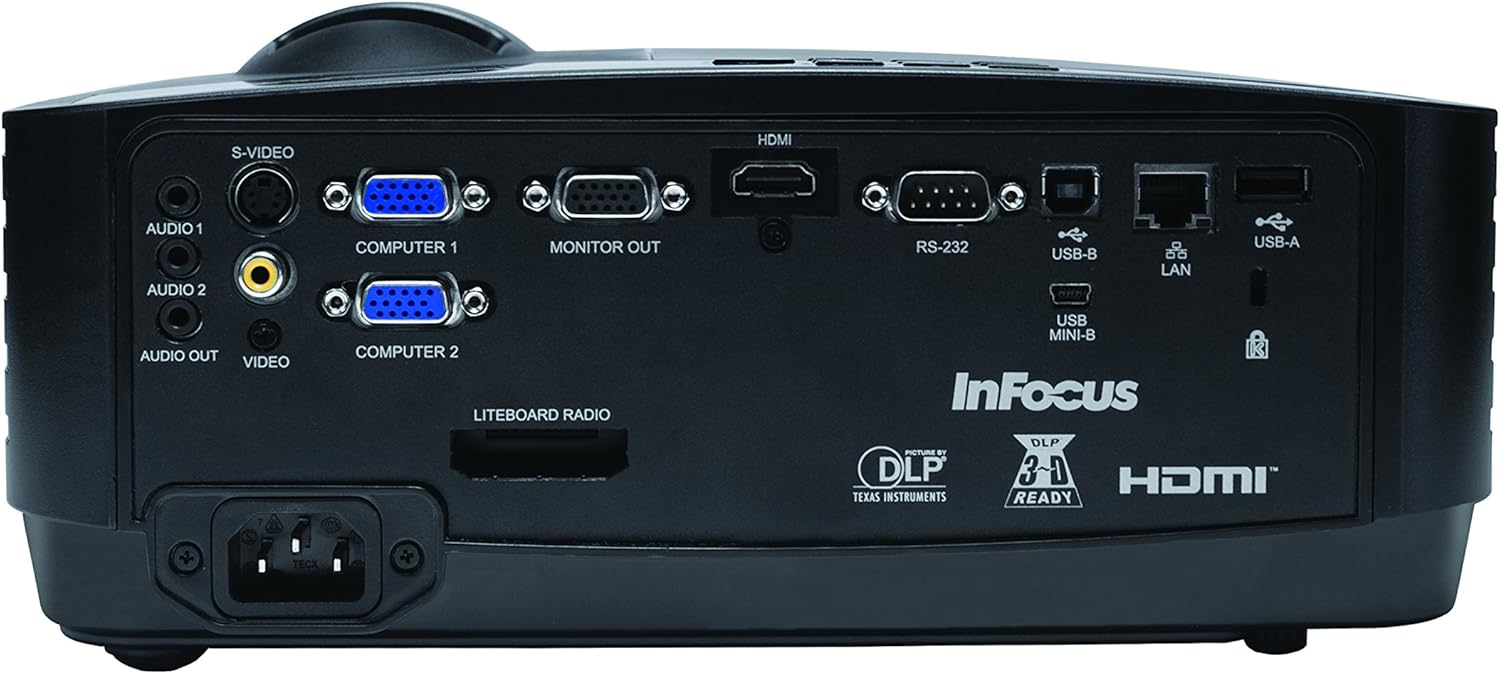
The rear panel provides various input and output ports for connecting external devices.
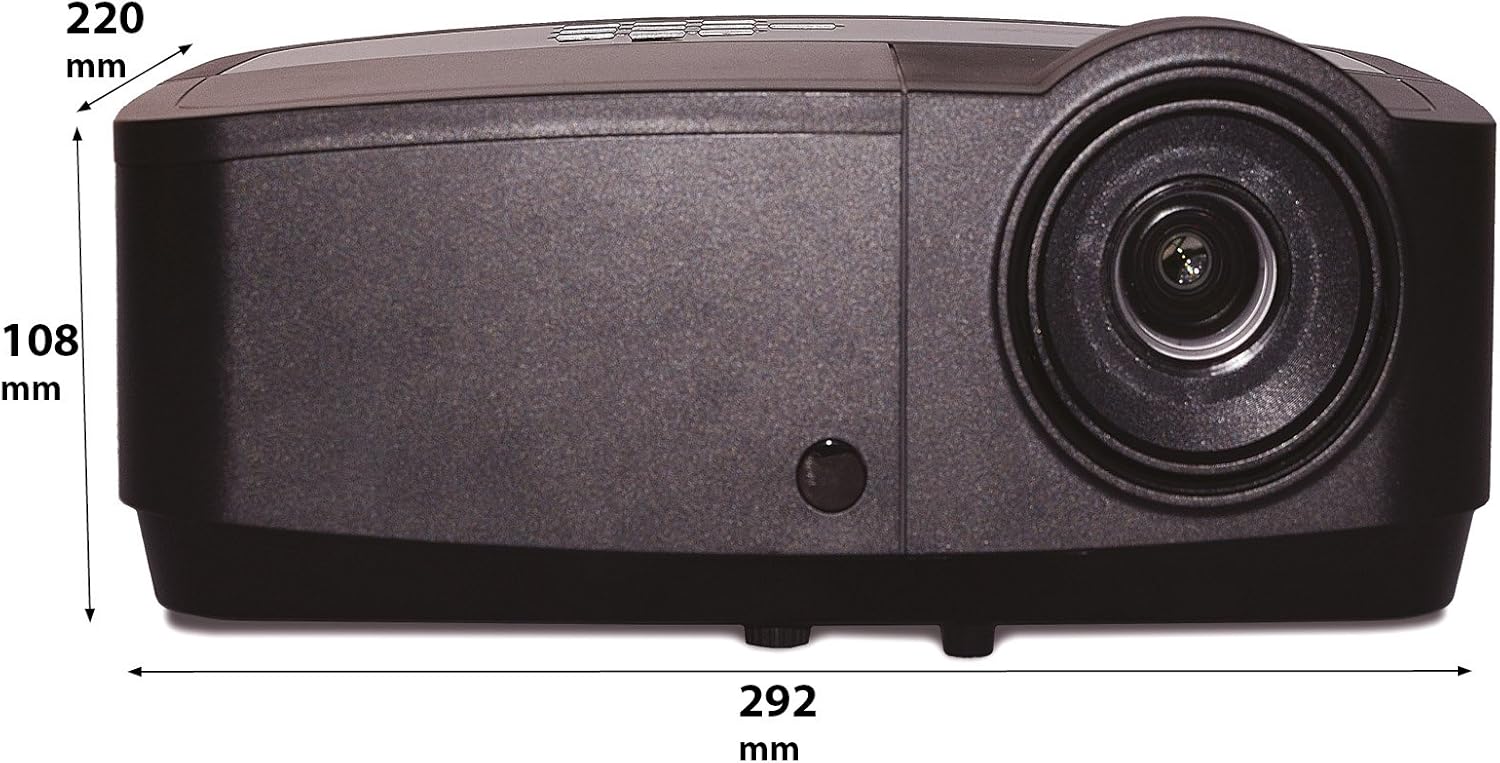
Figure 3: Rear panel of the InFocus IN2126a projector, displaying various connectivity ports including HDMI, VGA, USB, and LAN.
- ДВИ: For digital video and audio input.
- COMPUTER 1 / COMPUTER 2 (VGA): For analog video input from computers.
- MONITOR OUT (VGA): For connecting an external monitor.
- USB-B / USB Mini-B: For service or specific USB functions.
- УСБ-А: For connecting USB devices, such as a wireless adapter.
- ЛАН (РЈ45): За мрежну повезаност.
- РС-232: За серијску контролу.
- AUDIO 1 / AUDIO 2 (RCA): За аудио улаз.
- АУДИО ИЗЛАЗ: За повезивање екстерних аудио система.
- VIDEO (RCA): For composite video input.
- С-ВИДЕО: For S-Video input.
- Улаз за напајање: За повезивање кабла за напајање.
3.3 Контроле на горњој плочи
The top panel features controls for basic projector functions and image adjustments.

Figure 4: Top panel of the InFocus IN2126a projector, showing the control buttons and focus/zoom rings.
- Дугме за напајање: Укључује или искључује пројектор.
- Дугме Мени/Излаз: Приступа или излази из менија на екрану (OSD).
- Навигациона дугмад (горе, доле, лево, десно): Креће се кроз опције менија.
- Дугме Ентер: Потврђује изборе у менију.
- Дугме извора: Бира улазне изворе.
- Blank Button: Temporarily blanks the screen.
- Auto dugme: Аутоматски прилагођава поставке слике.
- Прстен за фокусирање: Подешава оштрину слике.
- Прстен за зумирање: Подешава величину слике.
3.4 Димензије
Understanding the physical dimensions is important for installation and placement.

Figure 5: Diagram illustrating the dimensions of the InFocus IN2126a projector (292mm length, 220mm width, 108mm height).
4. Подешавање
4.1 Постављање пројектора
Place the projector on a stable, flat surface or mount it securely. Ensure the projector is positioned at an appropriate distance from the screen to achieve the desired image size. Maintain sufficient space around the projector for proper ventilation.
4.2 Повезивање уређаја
- Прикључак за напајање: Прикључите кабл за напајање на утичницу за напајање пројектора, а затим на уземљену електричну утичницу.
- Видео извор:
- For digital sources (e.g., Blu-ray player, laptop), use an HDMI cable to connect to the HDMI port.
- For analog computer sources, use a VGA cable to connect to the COMPUTER 1 or COMPUTER 2 port.
- For other video sources, use the appropriate S-VIDEO or VIDEO (RCA) connections.
- Извор звука: If your video source does not transmit audio via HDMI, connect audio cables to the AUDIO 1 or AUDIO 2 ports.
- Мрежна конекција: За жичани мрежни приступ, повежите Етернет кабл са ЛАН портом.
- Бежична повезаност: If using a compatible wireless adapter (sold separately), insert it into the USB-A port.
4.3 Укључивање/искључивање
- За укључивање: Press the Power button on the projector's top panel or the remote control. The power indicator light will illuminate.
- За искључивање: Press the Power button again. The projector will enter a cooling cycle before shutting down completely. Do not unplug the projector during the cooling cycle.
5. Руковање пројектором
5.1 Избор извора
After powering on, the projector may automatically detect an active input source. If not, or to switch sources:
- Притисните тастер Извор дугме на пројектору или даљинском управљачу.
- Use the navigation buttons to highlight the desired input source (e.g., HDMI, Computer 1, Video).
- Притисните Ентер да изаберете извор.
5.2 Подешавање слике
- Фокус: Ротирајте Фоцус ring on the projector lens until the image appears sharp and clear.
- Зумирање: Ротирајте Зоом ring on the projector lens to adjust the image size to fit your screen.
- Кеистоне Цоррецтион: If the image appears trapezoidal, use the keystone correction feature in the OSD menu to square the image.
5.3 Приказ на екрану (ОСД) мени
The OSD menu allows you to configure various projector settings.
- Притисните тастер Мени дугме да бисте отворили OSD мени.
- Користите Горе/Доле navigation buttons to select a menu category.
- Користите Лево/Десно navigation buttons to adjust settings or enter sub-menus.
- Притисните Ентер да потврдите промене.
- Притисните Изађи to close the OSD menu.
5.4 Бежично повезивање
The IN2126a is wireless-ready. To enable wireless display, a compatible InFocus wireless adapter (sold separately) must be connected to the USB-A port. Refer to the wireless adapter's specific instructions for setup and connection procedures.
5.5 3Д функционалност
The projector supports 3D content. To view 3D content, you will need a compatible 3D source, 3D glasses, and appropriate 3D content. Refer to the projector's OSD menu for 3D settings and ensure your source device is configured for 3D output.
6. Одржавање
Редовно одржавање обезбеђује оптималне перформансе и продужава век трајања вашег пројектора.
6.1 Лamp Замена
Пројектор лamp has a limited lifespan (approximately 4000 hours). When the lamp indicator illuminates or the image brightness significantly decreases, the lamp needs replacement. Always use an authorized InFocus replacement lampПогледајте комплетан сервисни приручник за детаљније информацијеamp replacement instructions or contact customer support.
6.2 Чишћење филтера
Dust accumulation on the air filter can impede airflow and cause overheating. Regularly clean the air filter to maintain proper ventilation. Turn off and unplug the projector before cleaning. Use a soft brush or vacuum cleaner to remove dust from the filter cover.
6.3 Генерално чишћење
- Пројектор Цasing: Користите меку крпу која не оставља длачице дampОчистите благим, неабразивним средством за чишћење. Не користите јаке хемикалије.
- Објектив: Use a lens cleaning cloth and specialized lens cleaning solution. Avoid touching the lens surface with your fingers.
КСНУМКС. Решавање проблема
Ако наиђете на проблеме са пројектором, погледајте следеће уобичајене проблеме и решења:
| Проблем | Могући узрок | Решење |
|---|---|---|
| Нема слике на екрану | Изабран погрешан улазни извор; Лабава кабловска веза; Пројектор у режиму приправности. | Verify input source; Check all cable connections; Press power button to wake from standby. |
| Слика је мутна | Фокус није подешен; Пројектор је преблизу/предалеко од платна. | Adjust the focus ring; Reposition the projector and adjust zoom. |
| Слика је трапезоидног облика | Пројектор није нормалан у односу на платно. | Користите корекцију трапезоидног искривљења у OSD менију. |
| Нема звука | Audio cables not connected; Volume too low; Muted. | Check audio cable connections; Adjust volume; Unmute projector. |
| Пројектор се прегрева и гаси | Блокирана вентилација; Прљав ваздушни филтер. | Ensure clear airflow around projector; Clean the air filter. |
For more detailed troubleshooting, consult the complete user manual or contact InFocus customer support.
8. Спецификације
Key technical specifications for the InFocus IN2126a WXGA Network Projector:
- Назив модела: ИН2126а
- Тип приказа: ДЛП
- Изворна резолуција: 1280 к 800 (ВКСГА)
- Осветљеност: 3500 лумена
- Однос контраста: 15000:1
- Репродукција боја: 1.07 милијарди боја (30-битних)
- Радни век извора светлости: 4000 сата
- Технологија повезивања: Wireless-ready, HDMI 1.4, VGA (x2), USB (Type-A, Mini-B, Type-B), LAN (RJ45), RS-232, Audio In (x2), Audio Out, Video (RCA), S-Video
- Посебне карактеристике: 3D-Ready, Network Projector
- Фактор форме: Портабле
- Тип монтаже: Таблетоп Моунт
- Тежина артикла: 7.1 фунти
9. Гаранција и подршка
For information regarding your product's warranty, please refer to the warranty card included with your purchase or visit the official InFocus website. For technical support, service, or to purchase accessories, please contact InFocus customer service through their official channels.


