
Увод
The Movo VXR300 is a full-featured X/Y stereo condenser microphone designed to capture high-quality audio directly to your DSLR camera or camcorder. Its compact and lightweight design, combined with professional audio features, allows for clear dialogue capture without compromising your setup. The microphone features a rugged ABS construction, a wide frequency response, and a selectable high-pass filter to reduce unwanted low-frequency noise.
Садржај пакета
Before beginning, please ensure all items are present in your package:
- Movo VXR300 Stereo Condenser Microphone
- 3.5 мм TRS излазни кабл
- Furry Windscreen (Deadcat)
- Пена ветробран
- Путна торба
- Гарантни лист

Image: The Movo VXR300 microphone and its included accessories: a 3.5mm TRS output cable, a furry windscreen, and a travel bag.
Сетуп
1. Инсталирајте батерије
The VXR300 requires two AAA batteries for operation. Locate the battery compartment, insert the batteries according to the polarity indicators, and close the compartment securely. Note that the battery fitting can be intricate.
2. Mount the Microphone
The microphone can be mounted onto any standard accessory shoe on your DSLR camera or camcorder. It also features a 1/4” thread for mounting on tripods or other compatible accessories. Ensure the microphone is securely attached to prevent movement during recording.
3. Повежите се са својим уређајем
Connect the included 3.5mm TRS output cable from the microphone to the 3.5mm microphone input jack on your DSLR camera or camcorder. Verify that your device has a compatible 3.5mm microphone input.

Image: The Movo VXR300 microphone shown mounted on a DSLR camera, with icons indicating compatibility with camcorders, DSLR/HDSLR cameras, and audio recorders.
Упутство за употребу
1. Укључите напајање
Locate the power switch on the microphone and slide it to the 'ON' position before recording. Remember to switch the microphone off when not in use to conserve battery life.
2. Подесите подешавања
The VXR300 features several settings to optimize audio capture:
- -10dB Attenuation Switch: Use this switch to reduce the input gain by 10 decibels. This is useful when recording in loud environments to prevent audio distortion.
- Low-Cut Filter (80Hz High-Pass Filter): Engage this filter to reduce low-frequency noise such as air conditioners, traffic, or handling noise. This helps to clarify dialogue and other mid-to-high frequency sounds.

Image: A close-up of the Movo VXR300 microphone, pointing out the High Pass Filter switch, the Integrated Shock Mount, and the Supercardioid Polar Pattern.
3. Utilize Windscreens
The microphone includes both a standard foam windscreen and a furry windscreen (deadcat). Use the appropriate windscreen to reduce wind noise, especially when recording outdoors, to ensure clear audio.

Image: The Movo VXR300 microphone mounted on a camcorder, with text emphasizing 'Clean Audio' and the use of the high-pass filter and -10dB pad switch.
4. Monitor Audio Levels
Always monitor your audio levels through your camera's headphone jack (if available) or on-screen meters. Adjust your camera's audio input gain settings to achieve optimal levels without clipping or excessive background noise. Setting manual audio levels on your camera is often recommended over auto-level settings.
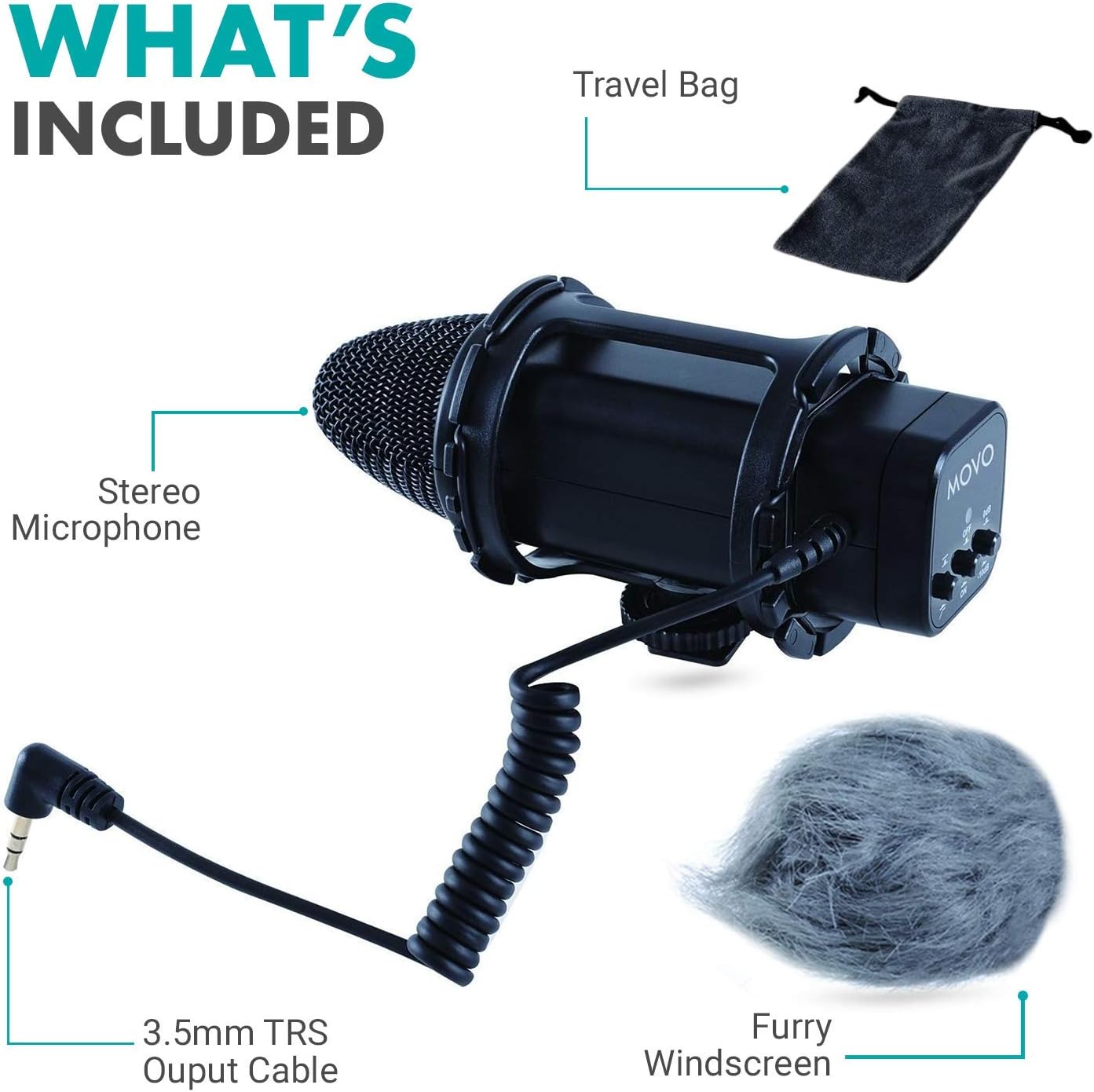
Image: A close-up of the Movo VXR300 microphone, highlighting its design for 'Flawless Audio Quality'.
5. Audio Test Demonstration
The following video demonstrates the audio quality of the Movo VXR300 at various distances, providing a practical example of its performance.
Video: An audio test of the Movo VXR300 microphone, demonstrating its sound capture at different distances from the speaker.
Овај видео пружа општи прегледview and demonstration of the Movo VXR300's capabilities when paired with a DSLR camera.
Video: A demonstration highlighting the Movo VXR300 as a beneficial addition to a DSLR camera setup.
Одржавање
To ensure the longevity and optimal performance of your Movo VXR300 microphone, follow these maintenance guidelines:
- Чишћење: Use a soft, dry cloth to clean the exterior of the microphone. Avoid using harsh chemicals or abrasive materials.
- Складиштење: When not in use, store the microphone in its travel bag to protect it from dust, moisture, and physical damage.
- Одржавање батерије: Remove batteries if the microphone will not be used for an extended period to prevent leakage.
- Ветробранска стакла: Clean windscreens gently. The foam material can be delicate.
Решавање проблема
If you encounter issues with your Movo VXR300, refer to the following common problems and solutions:
| Проблем | Могући узрок | Решење |
|---|---|---|
| Low audio level or no sound | Microphone not powered on; low batteries; incorrect camera audio settings; microphone too far from sound source. | Ensure microphone is ON. Replace AAA batteries. Adjust camera's audio input gain. Move closer to the sound source. |
| Hissing or background noise | High camera gain; environmental low-frequency noise; microphone picking up camera handling noise. | Reduce camera's audio input gain. Engage the 80Hz Low-Cut Filter on the microphone. Ensure the microphone is properly seated in its shockmount. |
| Изобличен звук | Audio input level too high; recording in very loud environments. | Reduce camera's audio input gain. Engage the -10dB Attenuation switch on the microphone. |
| Испрекидан звук | Loose cable connection; faulty cable. | Ensure the 3.5mm cable is securely connected at both ends. Try a different 3.5mm TRS cable if available. |
Спецификације
| Феатуре | Детаљ |
|---|---|
| Тип | Стерео Цонденсер |
| Канали | Dual-channel X/Y configuration |
| Полар Паттерн | Супер-цардиоид |
| Фреквенцијски одзив | 40Хз-20кХз |
| Осетљивост | -33дБ +/- 3дБ / 0дБ=1В/Па, 1кХз |
| Однос сигнала и шума | 76 дБ или више |
| Излазна импеданса | 200 Охмс |
| Повер | 2 "ААА" батерије |
| Цоннецтор | mini-pin plug (3.5mm) |
| Димензије | 151 к 65 к 73 мм |
| Тежина | 135г |
| Компатибилни уређаји | Camcorder, Camera (with 3.5mm jack) |
Гаранција и подршка
The Movo VXR300 comes with a 1-годишња гаранција. Movo is committed to providing reliable products and offers US-based support to assist with any technical inquiries or issues you may encounter. Please refer to the warranty card included in your package for detailed terms and conditions.
For support, please visit the official Movo webсајт или директно контактирајте њихову корисничку службу.