
1. Увод
This manual provides comprehensive instructions for the installation, operation, and maintenance of your Swann SWDVK-163208S-US 3200S 16-Channel 960H DVR Security System. Please read this manual thoroughly before using the product to ensure proper setup and functionality. Keep this manual for future reference.
The system includes a 16-channel 960H Digital Video Recorder (DVR) with a pre-installed 1TB hard drive and eight 700TVL security cameras designed for both indoor and outdoor use. It supports continuous recording, motion detection, and remote viewинг способности.
2. Безбедносне информације
- Уверите се да су сви прикључци за напајање безбедни и правилно димензионисани за уређај.
- Do not expose the DVR or cameras to water or excessive moisture.
- Избегавајте постављање DVR-а на директну сунчеву светлост или близу извора топлоте.
- Use only the power adapters supplied with the system.
- Do not attempt to open or service the DVR or cameras yourself. Refer all servicing to qualified personnel.
- Keep cables organized to prevent tripping hazards and ensure proper ventilation.
3. Садржај пакета
Verify that all items listed below are present in your package. If any items are missing or damaged, contact Swann customer support.
- Swann SWDVK-163208S-US 16-Channel 960H DVR with 1TB HDD
- 8 x 700TVL Security Cameras
- 8 x BNC Cables (60ft/18m)
- Адаптери за напајање за DVR и камере
- Етхернет Цабле
- ХДМИ кабл
- УСБ миш
- Монтажни вијци и типлови
- Водич за брзи почетак
- Налепнице за спречавање крађе
4. Систем је завршенview
4.1 DVR Front Panel
The front panel of the DVR provides access to essential controls and indicators.
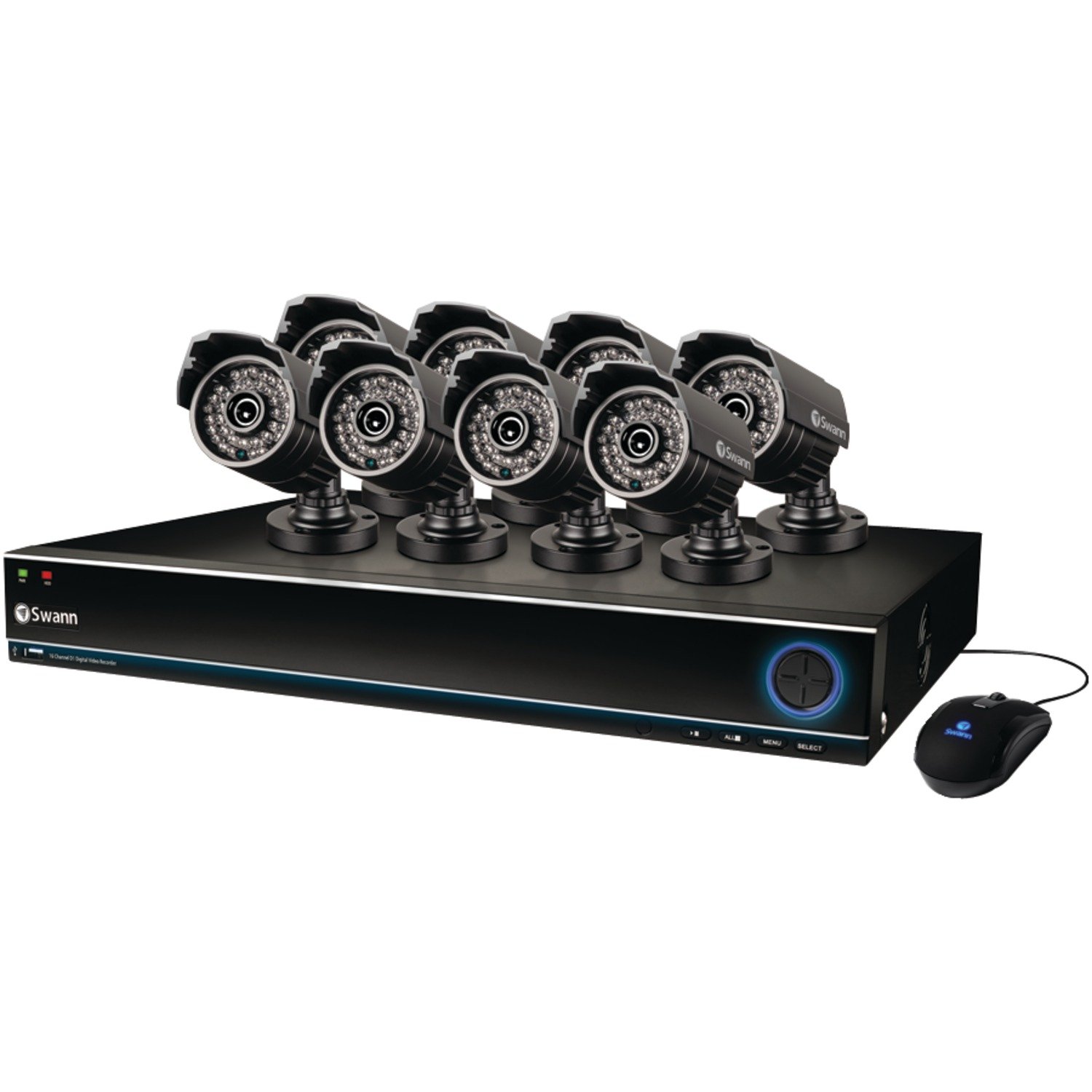
Image: The Swann SWDVK-163208S-US security system, showing the DVR unit and several cameras. The DVR features a blue-lit front panel with control buttons and status indicators.
- Индикатор напајања: Illuminates when the DVR is powered on.
- ХДД индикатор: Трепери када је чврсти диск активан.
- Мрежни индикатор: Означава мрежну повезаност.
- УСБ порт: За повезивање УСБ миша или за прављење резервне копије података.
- Контролна дугмад: Navigate menus and control playback.
4.2 DVR Rear Panel
The rear panel contains all the necessary ports for connecting cameras, monitors, and network cables.
- Видео улаз (BNC): 16 ports for connecting security cameras.
- Video Output (HDMI/VGA): For connecting a monitor or TV.
- Аудио улаз/излаз (RCA): For connecting microphones and speakers (if supported).
- Етхернет порт (РЈ45): За мрежну везу.
- УСБ портови: Додатни УСБ портови за периферне уређаје.
- eSATA Port: For connecting an external hard drive for expanded storage.
- Улазна снага: For connecting the DVR power adapter.
4.3 Карактеристике камере
The included 700TVL cameras offer clear video surveillance with night vision capabilities.
- Резолуција: 700TVL (Television Lines) for detailed images.
- Ноћни вид: Infrared LEDs provide visibility up to 82ft (25m) in low light or complete darkness.
- Отпоран на временске услове: Designed for both indoor and outdoor installation.
- Монтажа: Adjustable brackets for flexible positioning.
5. Подешавање
5.1 Повезивање DVR-а
- Connect the included USB mouse to one of the USB ports on the DVR.
- Connect the HDMI cable from the DVR's HDMI output to an HDMI input on your TV or monitor. Alternatively, use a VGA cable for VGA connections.
- За даљински viewing, connect an Ethernet cable from the DVR's Ethernet port to your router or network switch.
5.2 Connecting Cameras
- Mount each camera in your desired location using the provided screws and plugs. Ensure the camera has a clear field of view and is protected from direct impact.
- Connect one end of the BNC cable to the camera's video output.
- Connect the other end of the BNC cable to a video input port on the DVR (e.g., Video In 1, Video In 2, etc.).
- Connect the camera's power input to the power splitter cable, then connect the power adapter to the splitter and a power outlet.
5.3 Укључивање
- Connect the DVR power adapter to the DVR's power input and then to a power outlet.
- The DVR will power on automatically. The power indicator light on the front panel will illuminate.
- Wait for the system to boot up. The Swann logo will appear on your connected monitor, followed by the live view дисплеј.
5.4 Почетна конфигурација
Upon first boot-up, the DVR will guide you through an initial setup wizard.
- Избор језика: Одаберите жељени језик.
- Датум и време: Set the correct date, time, and time zone. This is crucial for accurate recording timestamps.
- Подешавања мреже: Configure network settings (DHCP is usually sufficient for automatic setup).
- Подешавање лозинке: Create a strong password for the administrator account to secure your system.
- Формат чврстог диска: The system may prompt to format the hard drive. Confirm to proceed.
6. Руковање системом
6.1 Уживо View
Након почетног подешавања, DVR ће приказивати уживо view са свих повезаних камера. Можете пребацивати између режима једне камере view, multi-camera grids (e.g., 4-channel, 8-channel, 16-channel), and sequence modes using the on-screen menu or front panel controls.
6.2 Режими снимања
DVR подржава различите режиме снимања:
- Континуирано снимање: Записи 24/7, преписивање најстаријег записаtagе када је чврсти диск пун.
- Снимање детекције покрета: Снима само када се детектује кретање у камери view. This conserves hard drive space. Sensitivity and detection areas can be configured for each camera.
- Планирано снимање: Снима током одређеног доба дана или недеље.
- Ручно снимање: Start and stop recording manually from the DVR interface.
Access recording settings via the DVR's main menu: Menu > Record > Record Schedule.
6.3 Репродукција
То реview снимљено фооtage:
- Од уживо view, right-click with the mouse to open the main menu.
- Изаберите Репродукција.
- Choose the desired date and camera channel(s).
- Use the timeline to navigate through recorded events. Different colors on the timeline indicate different recording types (e.g., continuous, motion).
- Use the playback controls (play, pause, fast forward, rewind) to review фооtage.
НИКАДА не резервни
You can back up important video footage to a USB flash drive or external hard drive.
- Insert a USB storage device into a USB port on the DVR.
- Иди на Menu > Backup.
- Select the camera channel, date, and time range for the footage you wish to back up.
- Choose the backup device and file format (e.g., AVI).
- Кликните Почни to begin the backup process.
6.5 Ремоте Viewing (SwannLink & SwannView)
The SwannLink and SwannView applications allow you to view your cameras remotely from a smartphone or tablet.
- Ensure your DVR is connected to the internet via the Ethernet port.
- Download the SwannView апликацију из продавнице апликација на вашем уређају.
- Open the app and follow the on-screen instructions to add your DVR. This typically involves scanning a QR code displayed on the DVR's monitor (Menu > Network > SwannLink) или ручним уносом ИД-а уређаја.
- Enter the DVR's username and password when prompted.
- Сада би могао view ливе фооtage and access playback remotely.
7. Одржавање
7.1 Управљање чврстим диском
Хард диск од 1 ТБ ће аутоматски преписати најстарије датотекеtage when full. To ensure optimal performance, it is recommended to periodically check the hard drive status via Menu > HDD > Disk Manage. You can also connect an external hard drive to the eSATA port for additional storage capacity.
7.2 Cleaning Cameras
Периодично чистите сочива камере меком крпомamp крпом да бисте уклонили прашину, прљавштину или мрље од воде које могу да заклоне view. Do not use harsh chemicals or abrasive materials.
7.3 Ажурирања фирмвера
Swann may release firmware updates to improve system performance or add new features. Check the Swann support website for the latest firmware for your model. Follow the instructions provided with the firmware update carefully to avoid damaging the DVR.
КСНУМКС. Решавање проблема
| Проблем | Могући узрок | Решење |
|---|---|---|
| Нема слике на монитору | Лабав видео кабл, изабран погрешан улаз на монитору, DVR није укључен. | Проверите HDMI/VGA кабловске везе. Уверите се да је монитор на исправном улазу. Проверите напајање DVR-а. |
| Нема слике камере | Loose BNC cable, camera power issue, faulty camera. | Check BNC and power connections for the specific camera. Test camera with a known working cable/power supply. |
| DVR not recording | Recording schedule not set, hard drive full or faulty, motion detection not configured. | Check recording schedule. Verify hard drive status. Ensure motion detection is enabled and configured correctly. |
| Не могу view на даљину | No network connection, incorrect network settings, app configuration error. | Verify DVR has internet access. Check network settings (DHCP). Reconfigure the DVR in the SwannView апп. |
| Purple image on camera | IR filter stuck, camera malfunction. | Power cycle the camera. If the issue persists, the camera may be faulty and require replacement. |
9. Спецификације
- Број модела: SWDVK-163208S-US
- Видео улази: 16 канала BNC
- Видео излаз: ХДМИ, ВГА
- Резолуција екрана: Up to 1080p (HDMI)
- Резолуција снимања: 960H (960x576/960x480)
- чврсти диск: 1TB SATA HDD (expandable via eSATA)
- Формат компресије: Х.264
- Мрежни интерфејс: РЈ45 Етхернет порт
- УСБ интерфејс: 3 к УСБ 2.0 порта
- Резолуција камере: КСНУМКСТВЛ
- Camera Night Vision: До 82 стопа (25 м)
- Camera Weatherproof Rating: ИП66 (за спољашњу употребу)
- Dimensions (DVR): 22.5 к 15.3 к 8.1 инча (приближно)
- Weight (DVR): 14 фунте (приближно)
- Извор напајања: ДЦ 12В
10. Информације о гаранцији
Swann products are covered by a limited warranty. The specific terms and duration of your warranty may vary by region and product. Please refer to the warranty card included with your product or visit the official Swann webсајт за детаљне информације о гаранцији и поступке регистрације. Сачувајте доказ о куповини за потребе потраживања у оквиру гаранције.
11. Подршка
For technical assistance, product support, or to download the latest software and manuals, please visit the official Swann support website. You can typically find FAQs, troubleshooting guides, and contact information for customer service there. Have your product model number (SWDVK-163208S-US) ready when contacting support.
Сванн подршка Webсајт: https://www.swann.com/us/support