
APEX AL-A300ATX
APEX AL-A300ATX 300W ATX12V Power Supply User Manual
Model: AL-A300ATX
1. Увод
This manual provides essential information for the safe and efficient installation, operation, and maintenance of your APEX AL-A300ATX 300W ATX12V Power Supply. Please read this manual thoroughly before installation and retain it for future reference.
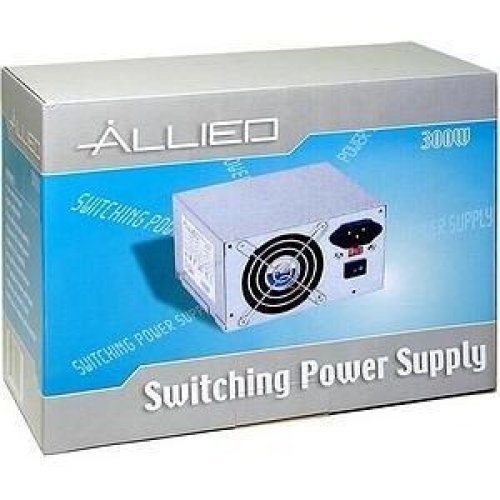
Image: The AL-A300ATX 300W ATX12V Power Supply shown in its retail packaging, indicating it is a "Switching Power Supply" from "ALLIED".
2. Безбедносне информације
Always observe the following safety precautions to prevent injury or damage to the power supply or other components:
- Ensure the power supply is disconnected from the AC outlet before installation or removal.
- Не отварајте напајање цasinг. Висока запреминаtagУнутра су присутни делови, чак и када су искључени. Нема делова које корисник може сам да поправи.
- Инсталирајте напајање у добро проветреном простору. Не блокирајте вентилационе отворе.
- Избегавајте излагање напајања влази или екстремним температурама.
- Use only the cables provided or approved for use with this power supply.
- If the power supply is damaged or malfunctioning, discontinue use immediately and contact support.
3. Садржај пакета
Проверите да ли су све ставке присутне у пакету:
- APEX AL-A300ATX 300W ATX12V Power Supply Unit
- Кабл за напајање наизменичном струјом (може да варира у зависности од региона)
- Монтажни завртњи
- Кориснички приручник (овај документ)
4. Подешавање и инсталација
Follow these steps to install the power supply into your computer system:
- Припрема:
- Искључите рачунар и искључите кабл за напајање из зидне утичнице.
- Open your computer case. Refer to your computer case manual for specific instructions.
- Ако замењујете постојећи извор напајања, искључите све каблове из старог напајања и извадите га из кућишта.
- Монтажа напајања:
- Carefully slide the AL-A300ATX power supply into the designated PSU bay in your computer case.
- Поравнајте отворе за завртње на напајању са онима на кућишту.
- Осигурајте напајање помоћу приложених монтажних вијака.
- Прикључни каблови:
- 24-Pin ATX Main Power Connector: Connect this large connector to the corresponding port on your motherboard. Ensure it clicks into place.
- CPU Power Connector (4-pin or 8-pin): Connect the appropriate CPU power cable to the CPU power port on your motherboard.
- САТА конектори за напајање: Connect these flat connectors to your SATA hard drives, SSDs, and optical drives.
- Molex (Peripheral) Connectors: Connect these 4-pin connectors to older drives or case fans if needed.
- PCI-E Power Connectors (if applicable): If your graphics card requires additional power, connect the appropriate PCI-E power cable from the PSU to the graphics card. This model is listed with a "24 Pin" PCI-Express Connector Configuration, implying the main ATX connector.
- Управљање кабловима: Уредно усмерите каблове како бисте побољшали проток ваздуха и естетику унутар кућишта.
- Коначна провера: Још једном проверите све везе да бисте били сигурни да су безбедни.
- Затвори случај: Close your computer case and secure it.
5. Упутство за употребу
Након успешне инсталације, пратите ове кораке да бисте укључили систем:
- Повежите наизменичну струју: Plug the AC power cord into the power supply's inlet and then into a grounded wall outlet or surge protector.
- Прекидач: Locate the power switch on the back of the power supply (usually a rocker switch labeled "I" for ON and "O" for OFF). Ensure it is in the "ON" (I) position.
- Укључивање рачунара: Press the power button on your computer case. The system should now power on.
To turn off your computer, always use the operating system's shutdown procedure. Do not use the power supply's switch for regular shutdowns, as this can lead to data loss or system instability.
6. Одржавање
Proper maintenance helps ensure the longevity and optimal performance of your power supply:
- Чишћење прашине: Periodically (every 3-6 months, depending on environment) clean dust from the power supply's fan and ventilation grilles using compressed air. Ensure the computer is powered off and unplugged before cleaning.
- Проток ваздуха: Ensure that the computer case has adequate airflow and that the power supply's fan is not obstructed.
- Управљање кабловима: Maintain tidy cable routing to prevent obstruction of airflow.
КСНУМКС. Решавање проблема
Ако наиђете на проблеме са напајањем, погледајте следеће уобичајене проблеме и решења:
| Проблем | Могући узрок | Решење |
|---|---|---|
| Рачунар се не укључује. |
|
|
| Систем се укључује, али се одмах искључује. |
|
|
| Fan is noisy or not spinning. |
|
|
If the problem persists after attempting these solutions, contact APEX customer support or a qualified technician.
8. Спецификације
| Феатуре | Детаљ |
|---|---|
| Назив модела | AL-A300ATX |
| Бранд | АПЕКС |
| Оутпут Ватtage | 300 Ваттс |
| Форм Фацтор | АТКС12В |
| Компатибилни уређаји | Персонал Цомпутер |
| Тип конектора | ATX (24 Pin PCI-Express Connector Configuration) |
| Метод хлађења | Ваздух |
| Минимални улазни обимtage | 110 волти (АЦ) |
| Тежина артикла | 3.64 фунти |
| Димензије пакета | 9.6 к 7.2 к 4.1 инча |
| Датум првог доступног | 22. априла 2014. године |
9. Гаранција и подршка
For information regarding warranty coverage, technical support, or service, please refer to the official APEX webсајт или директно контактирајте њихову корисничку службу. Сачувајте рачун као доказ о куповини.
APEX Contact Information: Please visit the official APEX webсајт за најновије контакт информације и ресурсе за подршку.
Ask a question about this manual
Ask about setup, troubleshooting, compatibility, parts, safety, or missing instructions. Manuals+ will review the question and use this page’s manual context to help answer it.