
Увод
This manual provides comprehensive instructions for the setup, operation, and maintenance of your Lowell JM Oval Alarm Clock, model JA7020. Please read this manual carefully before using the product to ensure proper function and longevity.
Производ је завршенview
The Lowell JM Oval Alarm Clock is a compact and functional device designed to display time and provide an alarm function. Its simple design makes it suitable for various settings.
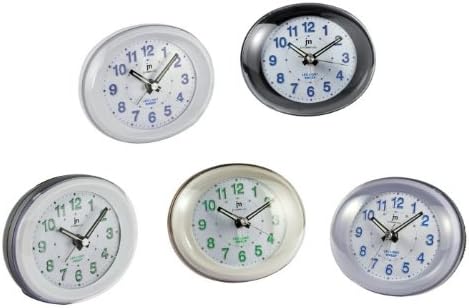
Слика 1: Фронт view of the Lowell JM Oval Alarm Clock, showcasing its oval shape and analog display. The image displays multiple color variations of the clock, including white, black, silver, and cream, each with a clear face, hour, minute, and second hands, and numerical hour markers.
Садржај пакета
- Lowell JM Oval Alarm Clock (Model JA7020)
- Упутство за употребу (овај документ)
Напомена: Батерије нису укључене и морају се купити засебно.
Сетуп
- Распакивање: Carefully remove the alarm clock from its packaging. Retain packaging for future storage or transport if needed.
- Инсталација батерије:
Locate the battery compartment on the back of the clock. Open the compartment cover. Insert the required batteries (typically 1x AA battery, not included) according to the polarity indicators (+/-). Close the battery compartment cover securely.
- Пласман: Place the alarm clock on a stable, flat surface away from direct sunlight, extreme temperatures, and high humidity.
Упутство за употребу
Подешавање времена
- Пронађите дугме за подешавање времена на полеђини сата.
- Rotate the knob clockwise or counter-clockwise until the hour and minute hands display the correct current time.
Постављање аларма
- Пронађите дугме за подешавање аларма на полеђини сата.
- Окрените дугме за подешавање аларма да бисте померили казаљку аларма на жељено време аларма.
- Locate the alarm ON/OFF switch (usually a small slider or button) on the back or side of the clock. Slide or press it to the "ON" position to activate the alarm.
Заустављање аларма
- When the alarm sounds, slide or press the alarm ON/OFF switch to the "OFF" position to silence it.
- To reactivate the alarm for the next day, ensure the alarm ON/OFF switch is set to the "ON" position after silencing it.
Одржавање
- Чишћење: Wipe the clock with a soft, dry cloth. Do not use abrasive cleaners, solvents, or chemical sprays, as these can damage the finish and internal components.
- Замена батерије: Replace batteries when the clock starts losing time or the alarm function weakens. Always use fresh batteries of the specified type. Remove old batteries promptly to prevent leakage.
- Складиштење: Ако складиштите сат дуже време, извадите батерије како бисте спречили цурење и потенцијално оштећење.
Решавање проблема
| Проблем | Могући узрок | Решење |
|---|---|---|
| Сат не ради / Казаљке се не померају | Мртве или неправилно инсталиране батерије. | Проверите поларитет батерија. Замените их новим батеријама. |
| Аларм се не оглашава | Alarm switch is OFF; alarm time not set correctly; weak batteries. | Ensure alarm switch is ON. Verify alarm hand is set to desired time. Replace batteries. |
| Сат губи време | Слабе батерије. | Замените новим батеријама. |
Спецификације
- Бренд: LoWell
- Модел: ЈАКСНУМКС
- Тип: Аналогни будилник
- Димензије (Д к Ш к В): Приближно 22 к 3.81 к 21 цм (8.66 к 1.5 к 8.27 инча)
- Тежина: Приближно 160 г (0.35 фунте)
- Извор напајања: Батерија (није укључена)
- Карактеристике: Time display, Alarm function
Гаранција и подршка
For warranty information or technical support, please refer to the retailer where the product was purchased or visit the official LoWell website. Please have your model number (JA7020) and purchase details ready when contacting support.