
1. Безбедносне информације
Please read these safety instructions carefully before operating the TROTEC TTK 122 E dehumidifier. Failure to comply with these instructions may result in electric shock, fire, or injury.
- Уверите се да напајање одговара запреминиtagнаведено на етикети са карактеристикама јединице.
- Немојте користити јединицу са оштећеним каблом за напајање или утикачем.
- Keep the unit upright during transport and operation. If the unit has been tilted, allow it to stand upright for at least 12 hours before plugging it in to prevent compressor damage.
- Не блокирајте улаз или излаз ваздуха. Одржавајте довољан простор око уређаја за правилан проток ваздуха.
- Не убацујте предмете у отворе уређаја.
- Не користите уређај у просторијама где се складиште запаљиви гасови или течности.
- Увек искључите уређај из струје пре чишћења, одржавања или када га не користите.
- Држите децу и кућне љубимце даље од уређаја током рада.
- Редовно празните резервоар за воду како бисте спречили преливање.
2. Производ је готовview
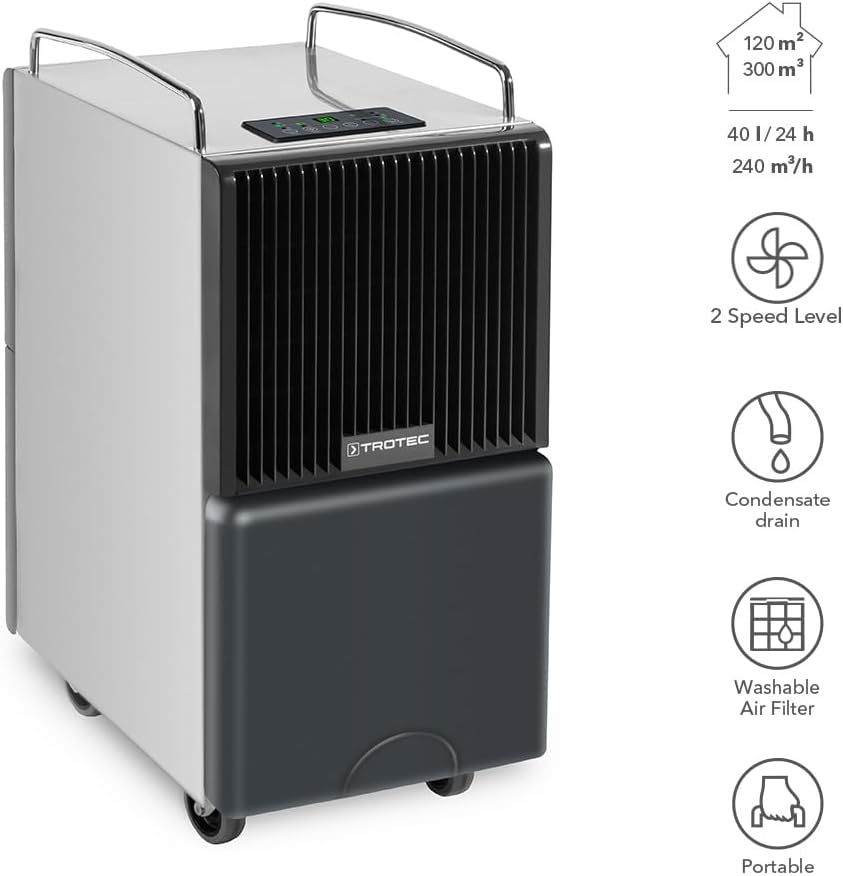
The TROTEC TTK 122 E is a high-performance dehumidifier designed for effective humidity control in various environments. It features a robust construction, a maximum dehumidification capacity of 40 liters per day, and is suitable for rooms up to 120 m² or 300 m³.
Key features include two fan speed levels, a continuous condensate drain option, a washable air filter, and a portable design with wheels and handles for easy movement.

3. Подешавање
3.1 Распакивање
Пажљиво извадите одвлаживач ваздуха из амбалаже. Прегледајте уређај да ли има знакова оштећења. Сачувајте амбалажу за будуће складиштење или транспорт.
3.2 Initial Placement and Waiting Period
Place the dehumidifier on a stable, level surface. Ensure there is at least 20 cm of space around the unit for proper air circulation. Важно: If the unit has been transported horizontally or tilted, allow it to stand upright for a minimum of 12 hours before plugging it into a power outlet. This allows the refrigerant to settle, preventing potential damage to the compressor.
3.3 Прикључак за напајање
Укључите кабл за напајање у уземљену електричну утичницу. Уверите се да утичница испуњава захтеве за напајање уређаја.
3.4 Water Tank Installation / Continuous Drainage
The water tank should be correctly inserted into the unit. For continuous operation without needing to empty the tank, connect a suitable hose (not included) to the continuous drainage outlet. Ensure the hose is routed downwards to allow gravity drainage into a floor drain or larger container.

4. Упутство за употребу
The control panel allows you to manage the dehumidifier's functions. Familiarize yourself with the buttons and indicators.

4.1 Укључивање/искључивање
- Притисните тастер Он/Офф дугме за укључивање или искључивање јединице.
- The unit features an automatic restart function, resuming its last settings after a power interruption.
4.2 Избор режима
- Притисните тастер Режим button to cycle through available operating modes (e.g., automatic dehumidification, continuous dehumidification, laundry drying).
4.3 Подешавање брзине вентилатора
- Користите Брзина button to select between low and high fan speeds. Higher speeds result in faster dehumidification but may produce more noise.
4.4 Setting Target Humidity
- Користите + и - buttons to set your desired relative humidity level. The unit will operate until this level is reached, then cycle on and off to maintain it.
4.5 Функција тајмера
- Притисните тастер Тајмер button to set an operating duration (e.g., 1-24 hours) after which the unit will automatically turn off.
5. Одржавање
Редовно одржавање обезбеђује оптималне перформансе и продужава век трајања вашег одвлаживача ваздуха. Увек искључите уређај из струје пре него што извршите било какво одржавање.
5.1 Пражњење резервоара за воду
When the water tank is full, the unit will automatically stop operating and an indicator light will illuminate. Carefully remove the water tank, empty it, and reinsert it securely. The unit will resume operation.
5.2 Чишћење ваздушног филтера
The washable air filter should be cleaned regularly (e.g., every two weeks or as needed) to prevent dust buildup and maintain efficiency.
- Искључите и искључите овлаживач.
- Locate and remove the air filter from the unit (refer to Figure 5.1).
- Оперите филтер млаком водом и благим детерџентом. Добро исперите.
- Оставите филтер да се потпуно осуши на ваздуху пре него што га поново уметнете у уређај. Не користите фен за косу или директну топлоту.

5.3 Чишћење спољашњости уређаја
Обришите спољашњост јединице меком крпом, дamp cloth. Do not use harsh chemicals, abrasive cleaners, or solvents, as these can damage the surface.
5.4 Складиштење
If storing the unit for an extended period, ensure the water tank is empty and clean, and the air filter is clean and dry. Store the unit in an upright position in a dry, dust-free environment.
КСНУМКС. Решавање проблема
Ако наиђете на проблеме са одвлаживачем ваздуха, погледајте следеће уобичајене проблеме и решења:
| Проблем | Могући узрок | Решење |
|---|---|---|
| Јединица се не укључује | Нема напајања; Кабл за напајање није прикључен; Нестало струјеtage | Check power connection; Ensure outlet is functional; Restore power |
| Није сакупљена вода | Humidity level too low; Room temperature too low; Air filter clogged; Unit in fan-only mode | Adjust target humidity; Ensure room temperature is above 5°C; Clean air filter; Select dehumidification mode |
| Unit stops operating, Full Tank indicator on | Water tank is full or incorrectly inserted | Empty water tank and reinsert it correctly |
| Reduced dehumidification efficiency | Air filter clogged; Air inlet/outlet blocked; Room too large | Clean air filter; Clear obstructions; Ensure unit is suitable for room size |
| Необична бука | Unit not on a level surface; Loose parts; Internal issue | Place on a level surface; Contact customer support if noise persists |
If the problem persists after attempting these solutions, please contact TROTEC customer support.
7. Спецификације
Detailed technical specifications for the TROTEC TTK 122 E Dehumidifier:

| Спецификација | Валуе |
|---|---|
| Назив модела | ТТК 122 Е |
| Број модела | 1120000123 |
| Капацитет уклањања влаге | 40 литара дневно |
| Брзина протока ваздуха | 240 кубних метара на сат |
| Recommended Room Size (Area) | До 120 м² |
| Recommended Room Size (Volume) | До 300 м³ |
| Запремина резервоара за воду | 40 Liters (Note: User reviews indicate effective capacity around 9-10 Liters before auto-stop) |
| Димензије производа (Д к Ш к В) | 31P x 45.3l x 63.5H centimeters (30.99 x 43.51 x 65 cm) |
| Тежина артикла | 27.5 килограма |
| Материјал | легирани челик |
| Боја | Црно |
| Посебна карактеристика | Портабле |
| Оперативни режим | Удобност |
| Upper Temperature Range | 35 степени Целзијуса |
| Земља порекла | Спаин |
8. Гаранција и подршка
For warranty information, technical support, or service inquiries regarding your TROTEC TTK 122 E dehumidifier, please refer to the warranty card included with your purchase or visit the official TROTEC website. You can also contact TROTEC customer service directly for assistance.