
Увод
This manual provides instructions for the setup, operation, and maintenance of your DIRECTV Universal Remote Control, model RC65. This remote is designed to operate your DIRECTV receiver and can be programmed to control other audio/video devices such as televisions and sound systems.
Please read this manual thoroughly before using your remote control to ensure proper functionality and to maximize your viewинг искуство.
Производ је завршенview
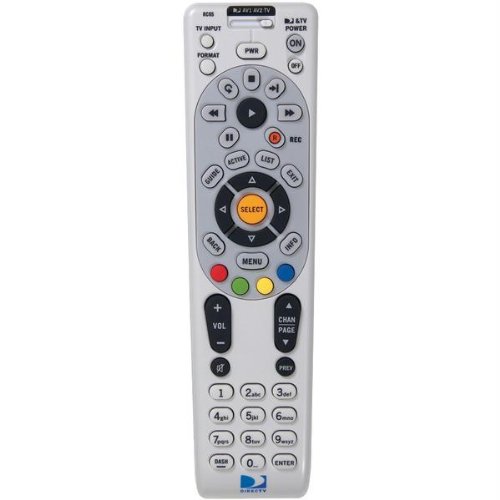
Слика: Фронт view of the DIRECTV Universal Remote Control RC65. This image displays the remote's ergonomic design and the layout of its primary control buttons, including the directional pad, channel and volume controls, and various function keys. The remote is black with white button labels.
The DIRECTV RC65 remote control is a universal remote capable of controlling multiple devices. Its design focuses on ease of use and compatibility with a wide range of audio/video equipment.
Сетуп
1. Инсталација батерије
- Пронађите одељак за батерије на полеђини даљинског управљача.
- Притисните језичак надоле и скините поклопац батерије.
- Insert two (2) AA batteries, ensuring the positive (+) and negative (-) terminals align with the markings inside the compartment.
- Гурните поклопац батерије назад на место док не кликне безбедно.
Напомена: Батерије нису укључене уз даљински управљач.
2. Програмирање за DIRECTV пријемник
The remote is typically pre-programmed to operate your DIRECTV receiver. If it does not work, or if you are setting up a new remote, follow these steps:
- Усмерите даљински управљач ка вашем DIRECTV пријемнику.
- Притисните и држите МУТЕ и СЕЛЕЦТ дугмад истовремено док зелено светло на врху даљинског управљача не трепне два пута.
- Унесите код 961Зелено светло ће трепнути два пута.
- Притисните тастер ЦХАННЕЛ УП дугме. Зелено светло ће трепнути два пута.
- Притисните тастер СЕЛЕЦТ дугме. Зелено светло ће трепнути два пута.
- Test the remote by changing channels or adjusting volume.
3. Programming for Other Devices (TV, Audio)
To program the remote to control your television or other audio/video devices, you will need the device's brand code. Refer to the code list provided with your DIRECTV system or search online for "DIRECTV remote codes [your device brand]".
- Укључите уређај који желите да програмирате (нпр. телевизор).
- Притисните и држите МУТЕ и СЕЛЕЦТ дугмад истовремено док зелено светло на врху даљинског управљача не трепне два пута.
- Press the mode button for the device you are programming (e.g., TV for television, АВ1 or АВ2 for audio/video devices). The green light will flash once.
- Enter the 5-digit code for your device's brand. The green light will flash twice if the code is accepted.
- Point the remote at the device and press the ПОВЕР button. If the device turns off, the programming was successful.
- If the device does not turn off, repeat steps 1-5 with another code for your device's brand.
Tip: If you cannot find a code, try the "Code Search" method: After step 3, instead of entering a code, press ЦХАННЕЛ УП repeatedly until the device turns off, then press СЕЛЕЦТ.
Упутство за употребу
The DIRECTV RC65 remote control features a standard layout for easy navigation and control of your entertainment system.
- MODE Buttons (DIRECTV, TV, AV1, AV2): Select the device you want to control. Press the corresponding button before issuing commands for that device.
- СНАГА: Укључује или искључује изабрани уређај.
- ПОВЕЋАЊЕ/СТИШАВАЊЕ ЈАЧИНЕ: Adjusts the volume of the selected audio device (usually TV or AV receiver).
- CHANNEL UP/DOWN: Changes channels on the DIRECTV receiver.
- МУТЕ: Искључује или укључује звук.
- ВОДИЧ: Displays the DIRECTV program guide.
- МЕНИ: Accesses the DIRECTV system menu.
- SELECT/OK: Потврђује изборе или улази у меније.
- ARROW Buttons (UP, DOWN, LEFT, RIGHT): Крећите се кроз меније и водиче.
- ЗАПИС: Records the current program on your DIRECTV DVR.
- PLAY, PAUSE, STOP, REW, FF, SKIP: Control playback of recorded content or live TV (with DVR).
- ИНФО: Приказује информације о тренутном програму.
- ЕКСИТ: Излази из менија или водича.
Note: Specific button functions may vary slightly depending on your DIRECTV receiver model and programmed devices.
Одржавање
Чишћење даљинског управљача
- Користите меку, суву крпу да обришете површину даљинског управљача.
- За тврдокорну прљавштину, благо дampОчистите крпу водом или благим, неабразивним средством за чишћење. Не прскајте средство за чишћење директно на даљински управљач.
- Avoid using harsh chemicals, solvents, or abrasive cleaning pads, as these can damage the remote's finish or internal components.
Замена батерије
Replace batteries when the remote's response becomes sluggish or if the green light at the top does not flash when a button is pressed. Refer to the "Battery Installation" section under Setup for detailed instructions.
- Увек замените обе батерије истовремено.
- Use new AA alkaline batteries for optimal performance.
- Одложите старе батерије у складу са локалним прописима.
Решавање проблема
Даљински не реагује
- Проверите батерије: Уверите се да су батерије правилно уметнуте и да нису празне. Замените их ако је потребно.
- Линија вида: Make sure there are no obstructions between the remote and the device you are trying to control. The remote uses infrared (IR) signals, which require a clear line of sight.
- Исправан режим: Verify that the correct mode button (DIRECTV, TV, AV1, AV2) is pressed for the device you intend to control.
- Ресетуј даљински: Remove batteries, press all buttons a few times to discharge any residual power, then reinsert batteries.
Device Not Responding After Programming
- Verify Code: Double-check that you entered the correct 5-digit code for your device's brand. Try other codes listed for your brand.
- Претрага кода: Attempt the "Code Search" method described in the "Programming for Other Devices" section.
- Компатибилност уређаја: While the remote has an extensive code library, some older or very new devices may not be fully compatible.
Volume/Channel Control Issues
- Закључавање јачине звука: Ensure the volume is not locked to the DIRECTV receiver if you want to control the TV volume. To unlock, press and hold МУТЕ и СЕЛЕЦТ until the green light flashes twice, then enter 993. Притисните СЕЛЕЦТ.
- Контрола канала: Ensure the remote is in DIRECTV mode to change channels on the receiver.
Спецификације
| Феатуре | Детаљ |
|---|---|
| Бранд | ДИРЕЦТВ |
| Назив / број модела | РЦ65 |
| Посебна карактеристика | Универсал |
| Боја | Црно |
| Компатибилни уређаји | Television, DIRECTV Receiver, Audio/Video Devices |
| Технологија повезивања | Инфрацрвени (ИР) |
| Тип контролера | Контрола дугмета |
| Тип батерије | 2 к АА батерије (нису укључене) |
| Тежина артикла | Приближно 0.52 фунти |
Информације о гаранцији
This DIRECTV Universal Remote Control (Model RC65) comes with a limited warranty against defects in materials and workmanship under normal use. The warranty period typically covers 90 days from the date of purchase. Please retain your proof of purchase for warranty claims.
This warranty does not cover damage caused by misuse, accident, unauthorized modification, or use with non-DIRECTV approved accessories. For specific warranty terms and conditions, please refer to the documentation included with your DIRECTV system or visit the official DIRECTV support webсајту.
Корисничка подршка
If you require further assistance with your DIRECTV Universal Remote Control, please contact DIRECTV customer support:
- Подршка на мрежи: Посетите званичну подршку за DIRECTV website for FAQs, troubleshooting guides, and programming code lists.
- Телефонска подршка: Refer to your DIRECTV service agreement or bill for the most current customer service phone number.
When contacting support, please have your DIRECTV account information and the remote control model number (RC65) ready.