
Увод
This manual provides essential information for the proper installation, operation, and maintenance of the Caterpillar 2016616 Sensor Group. This OEM original part is designed for specific Caterpillar machinery to ensure optimal performance and reliability. Please read this manual thoroughly before installation and operation.
Безбедносне информације
Always prioritize safety when working with machinery and electrical components. Failure to follow safety precautions can result in serious injury or damage to equipment.
- Ensure the machine is powered off and locked out before beginning any installation or maintenance.
- Носите одговарајућу личну заштитну опрему (ЛЗО), укључујући заштитне наочаре и рукавице.
- Refer to the machine's service manual for specific safety procedures related to sensor replacement.
- Do not modify the sensor group or its wiring.
- Keep the sensor and its connections clean and free from debris.
Подешавање и инсталација
This section outlines the steps for installing the 2016616 Sensor Group.
Потребни алати:
- Appropriate wrenches or sockets for mounting bolts.
- Wire cutters/strippers (if wiring harness modification is required, though typically not for OEM parts).
- Multimeter (for testing connections, if necessary).
Кораци инсталације:
- Припрема: Ensure the machine is safely shut down and all power sources are disconnected. Locate the existing sensor that needs replacement.
- Уклањање старог сензора: Carefully disconnect the electrical connector from the old sensor. Use the appropriate tools to unbolt and remove the old sensor from its mounting location.
- Проверите подручје монтаже: Clean the mounting surface to ensure proper seating of the new sensor. Check for any damage or debris that could interfere with installation.
- Инсталирајте нови сензор: Position the new Caterpillar 2016616 Sensor Group in the designated mounting location. Secure it with the appropriate bolts, ensuring they are tightened to the manufacturer's specified torque (refer to machine service manual).
- Connect Electrical Harness: Connect the electrical harness to the new sensor's connector. Ensure a secure and proper connection.
- Проверите инсталацију: Double-check all connections and mounting bolts. Ensure the sensor is firmly in place and the wiring is routed correctly and not pinched.
- Тест функционалност: After reassembling the machine and restoring power, perform functional tests as outlined in the machine's service manual to confirm the new sensor is operating correctly.
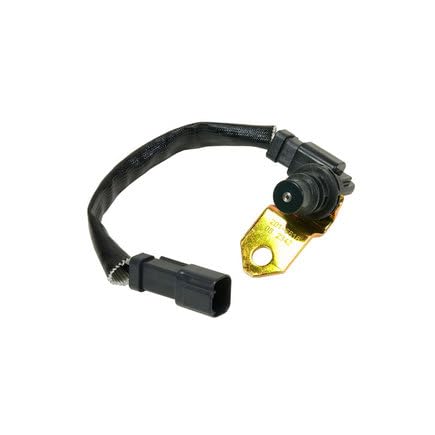
Figure 1: An image showing the Caterpillar 2016616 Sensor Group, featuring the sensor unit with its attached wiring harness and a gold-colored mounting bracket. This is the component you will be installing.
Принципи рада
The Caterpillar 2016616 Sensor Group is an OEM original part designed to monitor specific parameters within Caterpillar machinery. While the exact function depends on its application (e.g., pressure, temperature, speed, position), its primary role is to convert a physical quantity into an electrical signal. This signal is then transmitted to the machine's Electronic Control Unit (ECU) or other control systems, which use the data to regulate machine operations, provide feedback, or trigger warnings.
As an OEM part, it is calibrated to precise specifications to ensure accurate readings and seamless integration with Caterpillar's proprietary systems.
Одржавање
The 2016616 Sensor Group is designed for durability and minimal maintenance. However, periodic inspection can help ensure its longevity and proper function.
- Визуелни преглед: Regularly inspect the sensor and its wiring for any signs of physical damage, corrosion, fraying, or loose connections.
- Чишћење: If the sensor is exposed to dirt or debris, gently clean it with a soft, dry cloth. Avoid using harsh chemicals or abrasive materials that could damage the sensor housing or electrical contacts.
- Интегритет везе: Ensure the electrical connector remains securely attached and free of moisture or contaminants.
- Заштита животне средине: While robust, avoid exposing the sensor to extreme temperatures, excessive vibration, or corrosive substances beyond its operational design limits.
Решавање проблема
If you experience issues that you suspect are related to the sensor, consider the following common troubleshooting steps. Always refer to your machine's specific service manual for detailed diagnostic procedures.
- No Reading or Incorrect Reading:
- Check electrical connections for looseness or corrosion.
- Inspect wiring harness for damage (cuts, pinches).
- Verify power supply to the sensor (if applicable).
- Ensure the sensor is correctly mounted and not obstructed.
- Рад са прекидима:
- Check for intermittent electrical connections.
- Inspect for vibration-induced issues if the sensor is in a high-vibration area.
- Кодови грешака:
- Consult your machine's diagnostic manual for specific error codes related to sensor failures.
- Follow the recommended diagnostic tree for the identified error code.
If troubleshooting steps do not resolve the issue, it is recommended to consult a certified Caterpillar technician or authorized service center.
Спецификације
| Атрибут | Валуе |
|---|---|
| Произвођач | ЦАТЕРПИЛЛАР |
| Part Number (ASIN) | B00LZ6DPL4 |
| Број модела | 2016616 |
| Тип | Sensor Group |
| Стање | OEM Original Part |
| Датум првог доступног | 10. августа 2023. године |
Гаранција и подршка
As an OEM Original Part, the Caterpillar 2016616 Sensor Group is typically covered by Caterpillar's standard warranty for genuine parts. Warranty terms and conditions may vary based on region and purchase location. Please retain your proof of purchase.
For technical support, warranty claims, or further assistance, please contact your authorized Caterpillar dealer or the point of purchase. Always provide the part number (2016616) and your machine's serial number when seeking support.
За више информација можете посетити званичну страницу CAT продавница на Амазону.