
1. Увод
The Timex T231W2 is an AM/FM dual alarm clock radio designed for convenience and reliability. It features a large 1.2-inch green LED display for clear visibility, dual alarms that can be set independently, and a programmable sleep timer. An auxiliary input allows connection of external audio devices. A battery backup system maintains time and alarm settings during power interruptions.
2. Кључне карактеристике
- Wake to AM/FM radio or buzzer
- 20 Station preset memory (10 AM, 10 FM)
- Large, easy-to-read 1.2-inch green LED display
- Line-in jack to connect auxiliary audio sources
- 2-inch dynamic speaker for clear sound
- Programmable 90-minute Sleep Timer
- Battery backup for time and alarm settings
3. Садржај пакета
- Timex T231W2 AM/FM Dual Alarm Clock Radio (White)
4. Контроле и индикатори
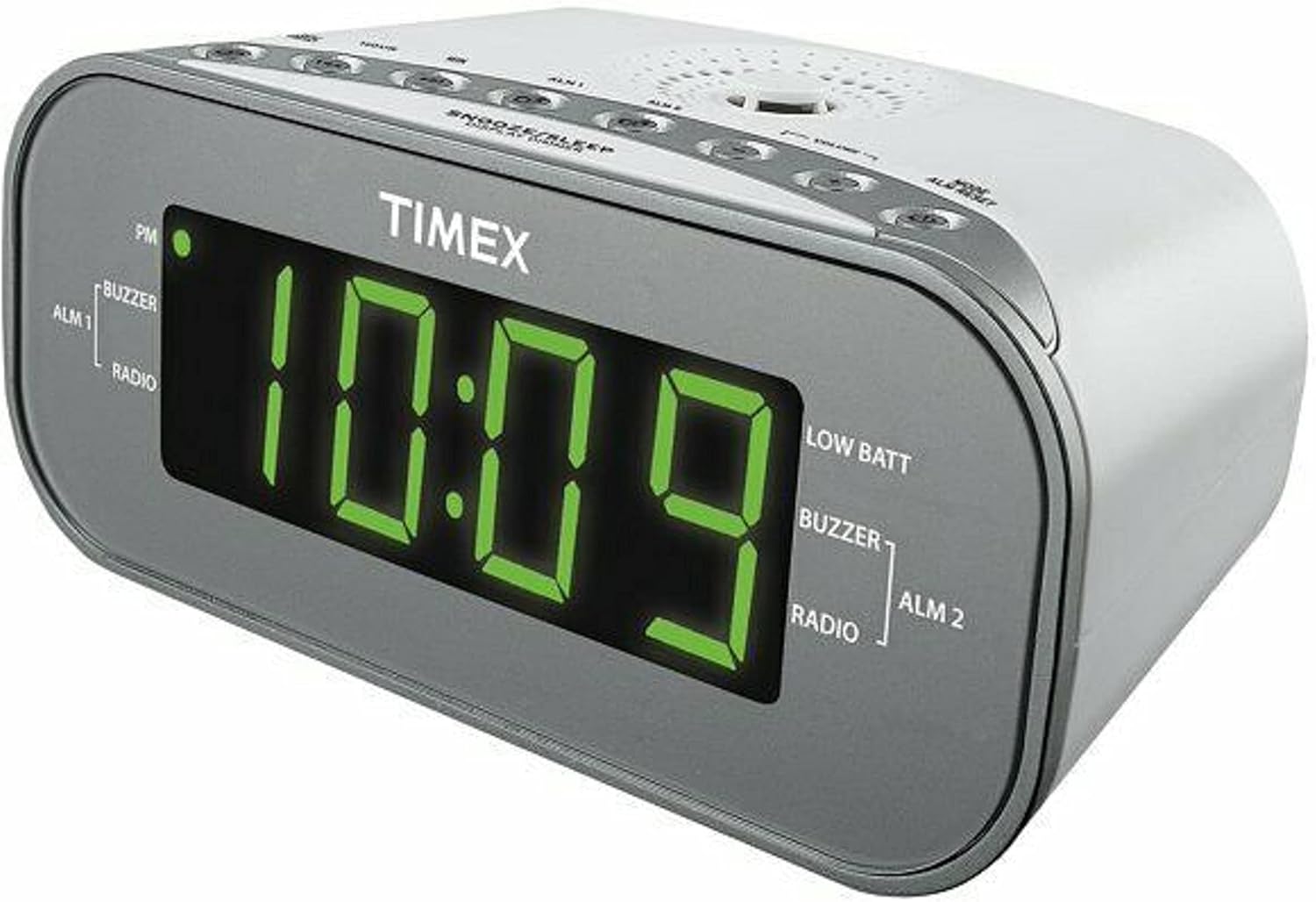
Слика 1: Предња страна View of the Timex T231W2. This image displays the clock radio from a slight angle, highlighting the large green LED display showing the time '10:09'. Indicators for PM, ALM1 (Buzzer/Radio), ALM2 (Buzzer/Radio), and LOW BATT are visible on the display. The top panel shows several control buttons.

Слика 2: Врх View of the Timex T231W2 Controls. Ова слика пружа јасан view of the control buttons located on the top panel of the clock radio. Buttons include HOUR, MIN, ALM1, ALM2, VOLUME, MODE, ALM RESET, SNOOZE/SLEEP/DISPLAY DIMMER, PRESET, and TUNING controls.
4.1. Приказ индикатора
- Приказ времена: Large green LED digits show current time.
- Индикатор поподнева: Светли када је време у поподневним сатима.
- ALM 1 / ALM 2: Indicates which alarm is active.
- BUZZER / RADIO: Indicates if the active alarm is set to buzzer or radio.
- ЛОВ БАТТ: Lights up when backup batteries are low and need replacement.
4.2. Control Buttons (Top Panel)
- САТ / МИН: Used to set time and alarm hours/minutes.
- ALM 1 / ALM 2: Used to set and activate Alarm 1 and Alarm 2.
- ВОЛУМЕ +/-: Adjusts the radio volume.
- MODE / ALM RESET: Switches between functions (e.g., radio, AUX) and resets active alarms.
- SNOOZE / SLEEP / DISPLAY DIMMER: Активира одлагање, подешава тајмер за спавање или подешава осветљеност екрана.
- PRESET / TUNING: Used for saving and recalling radio presets, and manually tuning radio frequencies.
5. Подешавање
5.1. Прикључак за напајање
- Укључите кабл за напајање наизменичном струјом у стандардну зидну утичницу.
- The display will flash, indicating the unit is powered on but the time is not yet set.
5.2. Инсталација резервне батерије
The unit requires 2 AAA batteries (not included) for backup power. These batteries maintain time and alarm settings during a power outage.
- Отворите поклопац одељка за батерије који се налази на дну јединице.
- Insert 2 new AAA batteries, observing the correct polarity (+ and -) as indicated inside the compartment.
- Добро затворите поклопац одељка за батерије.
- If the 'LOW BATT' indicator lights up, replace the batteries.
5.3. Подешавање тренутног времена
- Притисните и држите МОДЕ дугме док приказ времена не почне да трепери.
- Притисните тастер ХОУР button repeatedly to set the hour. Observe the PM indicator for correct AM/PM setting.
- Притисните тастер МИН button repeatedly to set the minutes.
- Притисните тастер МОДЕ поново притисните дугме да бисте потврдили и изашли из режима подешавања времена.
6. Упутство за употребу
6.1. Рад радија (AM/FM)
- Притисните тастер МОДЕ button repeatedly until 'FM' or 'AM' appears on the display.
- Притисните тастер ТУНИНГ buttons (up/down arrows) to manually tune to a desired station. Press and hold to auto-scan for the next available station.
- Подесите јачину звука помоћу ВОЛУМЕ +/- дугмад.
6.1.1. Setting and Recalling Radio Presets
The unit can store up to 20 radio stations (10 AM, 10 FM).
- Подесите жељену радио станицу.
- Притисните и држите ПРЕСЕТ дугме док број претходно подешене поставке не почне да трепери на екрану.
- Користите ТУНИНГ buttons to select the desired preset number (P01-P10 for AM/FM).
- Притисните тастер ПРЕСЕТ button again to save the station.
- To recall a preset, press the ПРЕСЕТ више пута притискајте дугме да бисте се кретали кроз сачуване станице.
6.2. Setting and Using Alarms (Alarm 1 & Alarm 2)
Радио-сат има два независна аларма.
- Притисните и држите АЛМ 1 or АЛМ 2 дугме док време аларма не почне да трепери.
- Притисните тастер ХОУР и МИН дугмад да бисте подесили жељено време аларма.
- Притисните тастер АЛМ 1 or АЛМ 2 button again to select the wake source: БУЗЗЕР or РАДИО. The corresponding indicator will light up.
- Притисните тастер АЛМ 1 or АЛМ 2 button a third time to confirm and activate the alarm. The alarm indicator (ALM 1 or ALM 2) will remain lit.
- Да бисте искључили звучни аларм, притисните дугме ALM RESET дугме. Аларм ће се ресетовати за следећи дан.
- To deactivate an alarm completely, press the corresponding АЛМ 1 or АЛМ 2 button until its indicator light turns off.
6.3. Функција одлагања
Када се огласи аларм, притисните дугме SNOOZE/SLEEP/DISPLAY DIMMER дугме да бисте привремено утишали аларм на приближно 9 минута. Аларм ће се поново огласити након периода одлагања.
6.4. Мерач спавања
The sleep timer allows you to fall asleep to the radio, which will automatically turn off after a set period (up to 90 minutes).
- Док радио свира, притисните дугме SNOOZE/SLEEP/DISPLAY DIMMER више пута притискајте дугме да бисте се пребацивали кроз опције тајмера за спавање (нпр. 90, 60, 30, 15 минута, ИСКЉУЧЕНО).
- Радио ће се репродуковати изабрано време, а затим ће се аутоматски искључити.
6.5. Затамњивач дисплеја
To adjust the brightness of the display, press and hold the SNOOZE/SLEEP/DISPLAY DIMMER button. The display brightness will cycle through different levels. Release the button when the desired brightness is reached.
6.6. Using the Line-in Jack (AUX)
Connect an external audio device (e.g., smartphone, MP3 player) to the unit using a 3.5mm audio cable (not included).
- Plug one end of the 3.5mm audio cable into the Line-in jack on the back of the clock radio.
- Plug the other end into the headphone jack or audio output of your external device.
- Притисните тастер МОДЕ button repeatedly until 'AUX' appears on the display.
- Започните репродукцију на свом спољном уређају.
- Подесите јачину звука помоћу ВОЛУМЕ +/- buttons on the clock radio and/or your external device.
7. Одржавање
7.1. Чишћење
- Искључите јединицу из утичнице пре чишћења.
- Користите меку, суву крпу за брисање спољашњих површина.
- Do not use liquid cleaners, abrasive cleaners, or sprays, as these may damage the finish.
7.2. Општа нега
- Избегавајте постављање уређаја на директно сунчево светло, близу извора топлоте или у подручјима са високом влажношћу или прашином.
- Не блокирајте отворе за вентилацију.
- If the unit will not be used for an extended period, remove the backup batteries to prevent leakage.
КСНУМКС. Решавање проблема
| Проблем | Могући узрок | Решење |
|---|---|---|
| Јединица се не укључује. | Кабл за напајање није безбедно прикључен. | Ensure the AC power cord is firmly connected to both the unit and a working wall outlet. |
| Екран је затамњен или искључен. | Display dimmer setting is too low. | Притисните и држите SNOOZE/SLEEP/DISPLAY DIMMER button to adjust brightness. |
| Аларм се не оглашава. | Аларм није активиран или је погрешно подешен. | Ensure the ALM 1/ALM 2 indicator is lit and the alarm time/source is correctly set. |
| Лош радио пријем. | Antenna not extended or unit's position. | Extend the FM wire antenna fully. For AM, rotate the unit for best reception. Avoid placing near electronic devices that may cause interference. |
| Нема звука са AUX улаза. | Incorrect mode or volume settings. | Ensure the unit is in AUX mode. Check volume levels on both the clock radio and the external device. Verify cable connection. |
| 'LOW BATT' indicator is on. | Backup batteries are low. | Replace the 2 AAA backup batteries. |
9. Спецификације
| Феатуре | Спецификација |
|---|---|
| Бранд | Тимек |
| Број модела | T231WY2 |
| Боја | Бела |
| Дисплаи Типе | ЛЕД (зелена) |
| Посебне карактеристике | Alarm, Auto Dimmable, Programmable Sleep Timer, Radio |
| Димензије производа | 6.9" Ш x 2.96" В |
| Извор напајања | AC Power, Battery Powered (Backup) |
| Резервне батерије | Потребне су 2 ААА батерије (нису укључене) |
| Тежина артикла | 1.4 фунти |
| Повезивање | Line-in Jack (AUX) |
| Радио Бандс | АМ/ФМ |
| Пресетс | 20 (10 AM, 10 FM) |
10. Гаранција и подршка
For warranty information or technical support, please refer to the documentation included with your purchase or contact the manufacturer directly. Keep your proof of purchase for warranty claims.
11. Безбедносне информације
УПОЗОРЕЊЕ: Овај производ вас може изложити хемикалијама, укључујући олово, за које је у држави Калифорнија познато да изазивају рак и урођене дефекте или другу репродуктивну штету. За више информација идите на ввв.П65Варнингс.ца.гов.
Увек се придржавајте основних мера безбедности приликом коришћења електричних уређаја како бисте смањили ризик од пожара, струјног удара и повреда.