
1. Увод
The JJC HR-DV Pistol Grip Handle Stabilizer is designed to enhance the stability and control of your camcorder or camera during video recording. It provides an ergonomic grip and remote control functionality for compatible devices, including Sony DV camcorders with A/V R or LANC ports and the Blackmagic Design Pocket Cinema Camera (BMPCC).
This manual provides instructions for the proper setup, operation, and care of your HR-DV Pistol Grip Handle Stabilizer.
2. Карактеристике производа
- Ergonomic pistol grip design for comfortable and stable handling.
- Integrated Start/Stop button for remote video recording control.
- Unique LOCK button to prevent accidental recording activation or deactivation.
- 1/4"-20 stud for secure attachment to the bottom of a camcorder or camera.
- 1/4"-20 thread at the base for mounting on a tripod or other support.
- Includes two cables for compatibility with Sony camcorders (A/V R or LANC port) and Blackmagic Pocket Cinema Camera.
- No external battery required; powered by the connected camera.
3. Садржај пакета
- 1 x JJC HR-DV Pistol Grip Handle Stabilizer
- 2 x Connection Cables (for Sony A/V R/LANC and Blackmagic Pocket Cinema Camera)
4. Компатибилност
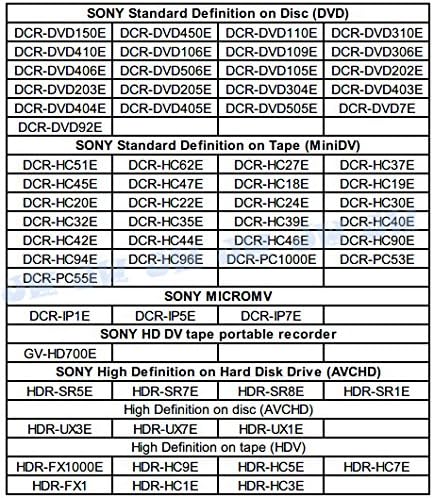
The HR-DV Pistol Grip Handle Stabilizer is compatible with a wide range of Sony camcorders and the Blackmagic Pocket Cinema Camera. Please refer to the following lists and images for detailed compatibility information.
Блацкмагиц Десигн
- Blackmagic Pocket Cinema Camera (BMPCC)
Sony Camcorders (A/V R or LANC Port)
The following lists provide examples of compatible Sony camcorder models. This list is not exhaustive; please check your camcorder's manual for A/V R or LANC port compatibility.
Sony High Definition on Hard Disk Drive (AVCHD)
- HDR-CX190, HDR-CX200, HDR-CX210, HDR-PJ200, HDR-CX250, HDR-CX260V, HDR-CX580V, HDR-PJ260, HDR-PJ260V, HDR-PJ580, HDR-PJ580V, HDR-PJ600, HDR-PJ600V, HDR-XR260V, DCR-SR47, DCR-SR68, DCR-SR200
- HDR-XR160E, HDR-XR155E, HDR-SR10E, HDR-SR11E, HDR-SR12E, HDR-SR5E, HDR-SR7E, HDR-SR8E, HDR-SR1E
- HDR-TD10E, HDR-CX115, HDR-CX130E, HDR-CX360VE, HDR-PJ10E, HDR-PJ30VE, HDR-CX700VE, HDR-CX520VE, HDR-CX350VE, HDR-CX305E, HDR-CX155E, HDR-CX105E, HDR-CX11E, HDR-TG3E, HDR-CX6EK
Sony High Definition on Disc (AVCHD)
- HDR-UX19E, HDR-UX3E, HDR-UX7E, HDR-UX1E
Sony High Definition on Tape (HDV)
- HDR-FX1000E, HDR-HC9E, HDR-HC5E, HDR-HC7E, HDR-HC3E, HDR-FX1, HDR-HC1E
Sony Standard Definition on Hard Disk Drive
- DCR-SR37E, DCR-SR57E, DCR-SR77E, DCR-SR35E, DCR-SR55E, DCR-SR75E, DCR-SR210E, DCR-SR32E, DCR-SR52E, DCR-SR72E, DCR-SR190E, DCR-SR290E, DCR-SR30E, DCR-SR50E, DCR-SR70E, DCR-SR90E, DCR-SR33E
Sony Standard Definition on Flash Memory
- DCR-SX45E, DCR-SX30E, DCR-SX50E
Sony Standard Definition on Disc (DVD)
- DCR-DVD150E, DCR-DVD450E, DCR-DVD110E, DCR-DVD310E, DCR-DVD410E, DCR-DVD106E, DCR-DVD109E, DCR-DVD306E, DCR-DVD406E, DCR-DVD506E, DCR-DVD105E, DCR-DVD202E, DCR-DVD203E, DCR-DVD205E, DCR-DVD304E, DCR-DVD403E, DCR-DVD404E, DCR-DVD405E, DCR-DVD505E, DCR-DVD7E, DCR-DVD92E, DCR-DVD100E, DCR-DVD101E, DCR-DVD200E, DCR-DVD201E
Sony Standard Definition on Tape (MiniDV)
- DCR-HC51E, DCR-HC62E, DCR-HC27E, DCR-HC37E, DCR-HC45E, DCR-HC47E, DCR-HC18E, DCR-HC19E, DCR-HC20E, DCR-HC22E, DCR-HC24E, DCR-HC30E, DCR-HC32E, DCR-HC35E, DCR-HC39E, DCR-HC40E, DCR-HC42E, DCR-HC44E, DCR-HC46E, DCR-HC90E, DCR-HC94E, DCR-HC96E, DCR-PC1000E, DCR-PC53E, DCR-PC55E, DCR-HC14E, DCR-HC85E, DCR-90E, DCR-HC1000E, DCR-PC101E, DCR-PC103E, DCR-PC105E, DCR-PC106E, DCR-PC107E, DCR-PC109E, DCR-PC120E, DCR-PC330E, DCR-PC350E, DCR-TRV22E, DCR-TRV50E, DCR-VX2000E, DCR-VX2100E
Sony Digital 8
- DCR-TRV25E, DCR-TRV33E, DCR-TRV340E, DCR-TRV355E, DCR-TRV60E, DCR-TRV740E
Sony Hi 8
- DCR-TRV14E, DCR-TRV19E
Sony MICROMV
- DCR-IP1E, DCR-IP5E, DCR-IP7E, DCR-IP220E, DCR-IP55E
Sony HD DV Tape Portable Recorder
- GV-HD700E
Sony Other Series
- DSC-R1, DSC-F828, DSC-F717, DSC-F707, DSC-V1, DSC-V3
For visual reference, please see the following images detailing compatible models:


5. Упутства за подешавање
- Attach the Pistol Grip to your Camera: Locate the 1/4"-20 tripod mount thread on the bottom of your camcorder or camera. Align the 1/4"-20 stud on the top surface of the HR-DV Pistol Grip with this thread. Rotate the thumbwheel on the grip clockwise to securely fasten the grip to your camera. Ensure it is tightened firmly but do not overtighten.

Image: The HR-DV Pistol Grip Handle Stabilizer attached to a red Sony Handycam camcorder, showing the connection point and coiled cable. 
Image: The HR-DV Pistol Grip Handle Stabilizer attached to an Olympus camera, demonstrating its versatility with different camera types. - Connect the Control Cable: Identify the appropriate control cable for your camera (either for Sony A/V R/LANC or Blackmagic Pocket Cinema Camera). Plug one end of the cable into the ACC socket on the left side of the HR-DV grip and the other end into the corresponding port on your camera.
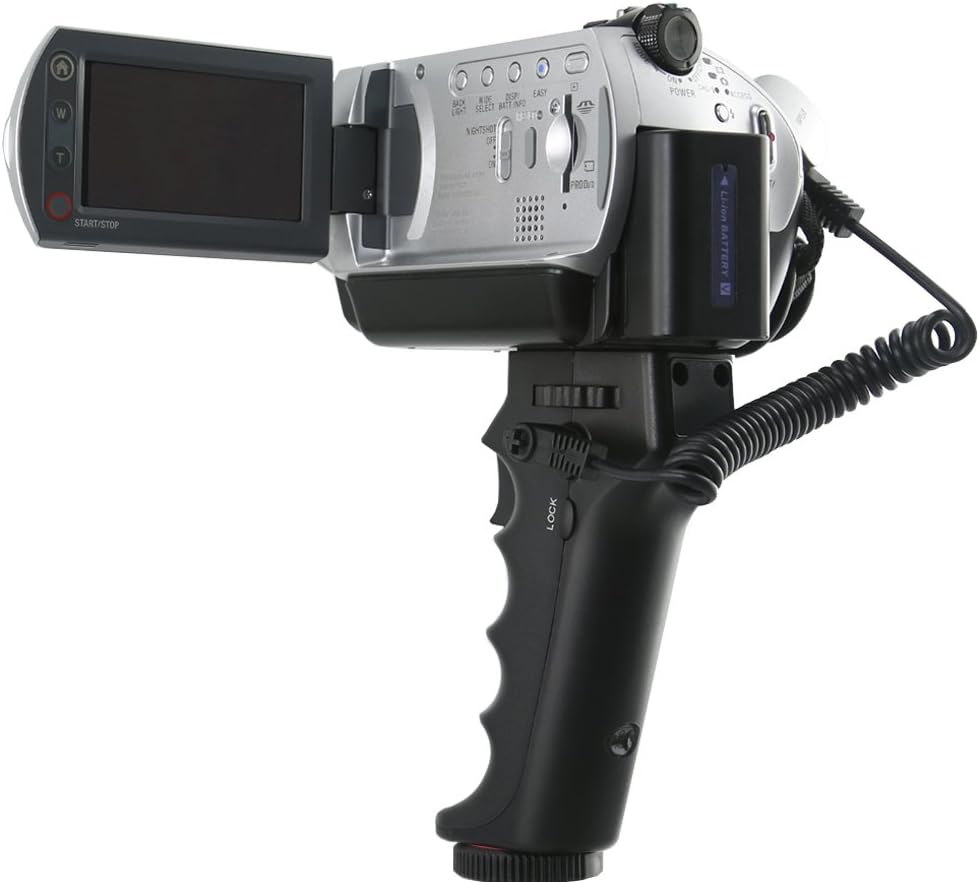
Слика: Крупни план view of the HR-DV Pistol Grip with its coiled control cable connected to a camcorder, highlighting the cable management. - Optional Tripod Mounting: If desired, you can attach the entire assembly (camera + grip) to a tripod or other support using the 1/4"-20 thread located at the bottom of the HR-DV grip.
6. Упутство за употребу
- Укључено: Ensure your camera is powered on and ready for recording. The HR-DV grip does not require separate power.
- Започни/Заустави снимање: Press the Start/Stop button on the HR-DV grip to begin or end video recording on your connected camera. This allows for remote control without touching the camera body, reducing camera shake.
- Функција закључавања: To prevent accidental pressing of the Start/Stop button, slide the LOCK switch to the "LOCK" position. This will disable the Start/Stop button. To re-enable, slide the switch back to the "UNLOCKED" position.

7. Одржавање
- Keep the pistol grip clean by wiping it with a soft, dry cloth.
- Избегавајте излагање уређаја екстремним температурама, влази или директној сунчевој светлости.
- Store the grip and cables in a dry, safe place when not in use.
- Do not attempt to disassemble the unit, as this may void any potential warranty and cause damage.
КСНУМКС. Решавање проблема
- Recording button not responding:
- Ensure the control cable is securely connected to both the HR-DV grip and your camera's control port.
- Verify that the LOCK switch on the HR-DV grip is in the "UNLOCKED" position.
- Confirm your camera is powered on and in a recording-ready mode.
- Check if your specific camera model is listed as compatible. Some users have reported issues with certain cables; ensure you are using the correct cable provided for your camera type.
- Test with another compatible camera or cable if available to isolate the issue.
- Loose connection to camera:
- Ensure the thumbwheel is tightened securely to the camera's tripod mount.
- Avoid overtightening, which can damage the camera's tripod thread.
9. Спецификације
| Димензије производа | 0.51 к 2.4 к 1.18 инча |
| Тежина артикла | 1.44 унци |
| Број модела | HR-DV |
| Произвођач | Jinjiacheng Photography Equipment Co.,Ltd. |
| Датум првог доступног | 16. августа 2014. године |
| Језик | енглески |
10. Гаранција и подршка
For warranty information or technical support, please contact the manufacturer, JJC, or your retailer. Keep your purchase receipt as proof of purchase.
Manufacturer: Jinjiacheng Photography Equipment Co.,Ltd.